
Page History
...
- Install Node.js from https://nodejs.org/en/download/ if it is not installed yet. To check, run
npm -vin a command prompt. Install mcp-remote:
Code Block language bash npm install -g mcp-remote
To check, run
mcp-remote test. The command ends with an error likecode: 'ERR_INVALID_URL', input: 'test', which is expected: it shows that mcp-remote is installed.Open the configuration: on Windows, the menu (three horizontal bars at the top left) → [File] → [Settings] → [Developer] → [Edit Config]; on macOS, [Claude] → [Settings] → [Developer] → [Edit Config]. This opens the file
claude_desktop_config.json(or the folder that contains it); open the file in a text editor.Note title Screenshot needed Claude desktop app, Settings → Developer, with the [Edit Config] button marked. No MCP server entries with real host names or tokens visible.
- Exit Claude completely before you edit the file: closing the window is not enough. On Windows, right-click the Claude icon in the notification area of the taskbar and select [Exit]; on macOS, quit Claude.
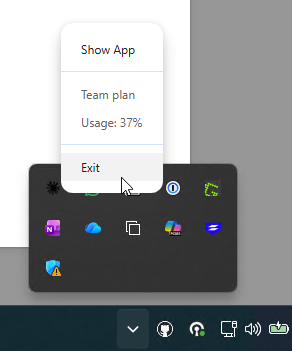
Add the iDNA Applications entry under
"mcpServers". If the file already contains other settings, keep them and add only the "iDNA Applications" block; if there is no"mcpServers"section yet, add it. Make sure the file remains valid JSON (commas, braces).Code Block language javascript { "mcpServers": { "iDNA Applications": { "command": "mcp-remote", "args": [ "https://<your iDNA host>/mcp", "--header", "Authorization: Bearer <your token>" ] } } }Save the file and start Claude again. In [Settings] → [Developer], the "iDNA Applications" server is now listed as running.
Note title Screenshot needed Claude desktop app, Settings → Developer: the "iDNA Applications" server with the status "running", the command mcp-remote and its arguments, with the host replaced by an example host and the token blurred.
...
Ask a question in Cowork, for example "What are my most used Notes applications?". In the Context panel on the right, the answer lists "iDNA Applications" under Connectors and "idna-wikilookup" under Skills.
| Note | ||
|---|---|---|
| ||
A Cowork answer to "What are my most used Notes applications?" against the de-identified sandbox, with the Context panel showing "iDNA Applications" under Connectors and "idna-wikilookup" under Skills (arrows as in the internal howto). |
...
The MCPs tab lists "iDNA Applications" under Servers, switched on. Start a new chat and ask an iDNA or Notes question, for example "What are my most used Notes applications?". In a connected session, the "Idna Wikilookup" skill loads and a "Get Idna Session" tool call succeeds.
Skip this screen shot
| Note | ||
|---|---|---|
| ||
OpenAI ChatGPT/Codex, Settings → Plugins → MCPs: "iDNA Applications" listed under Servers and switched on. |
...