
Page History
| Table of Contents | ||
|---|---|---|
|
Overview
The iDNA Applications Companion is an AI-assistant plugin for HCL Notes/Domino estate analysis: usage, modernization, source-code remediation and application lifecycle. It adds a curated knowledge wiki and analysis guidance to your AI client and, once connected to the MCP server of your iDNA Applications appliance, answers from your live iDNA data.
...
- The plugin: the knowledge wiki, the "idna-wikilookup" skill and the Companion's operating instructions. The plugin also works on its own: without a connection to iDNA, it answers from the wiki only (restricted wiki mode) and says so.
It is installed from panagenda's plugin marketplace on GitHub: - The MCP connection: connects the AI client to your iDNA appliance for live data. It requires that your iDNA administrator has enabled the MCP server (see Setting up the MCP Server in iDNA Applications).
Supported Clients
| Client | Plugin installation | MCP connection |
|---|---|---|
| Claude Cowork (desktop app) | Customize → Plugins | configuration file, through the helper tool mcp-remote (requires Node.js) |
| Claude Code CLI | command line | command line |
| GitHub Copilot App | Customize → Manage marketplaces, Add plugin | Customize → Add → MCP Server |
| GitHub Copilot CLI | command line | configuration file |
| OpenAI ChatGPT/Codex | Customize → Plugins | Settings → Plugins → MCPs, token in an environment variable |
| OpenAI Codex CLI | command line | configuration file, token in an environment variable |
Not supported: claude.ai Chat, and the Chat mode of the Claude desktop app. The Companion needs its plugin files next to its skill, and they are not available there. In the Claude desktop app, use Cowork or Code.
...
- Install Node.js from https://nodejs.org/en/download/ if it is not installed yet. To check, run
npm -vin a command prompt. Install mcp-remote:
Code Block language bash npm install -g mcp-remote
To check, run
mcp-remote test. The command ends with an error likecode: 'ERR_INVALID_URL', input: 'test', which is expected: it shows that mcp-remote is installed.- Open the configuration: on Windows, the menu (three horizontal bars at the top left) → [File] → [Settings] → [Developer] → [Edit config]; on macOS, [Claude] → [Settings] → [Developer] → [Edit config]. This opens the file
claude_desktop_config.json(or the folder that contains it); open the file in a text editor. - Exit Claude completely before you edit the file: closing the window is not enough. On Windows, right-click the Claude icon in the notification area of the taskbar and select [Exit]; on macOS, quit Claude.
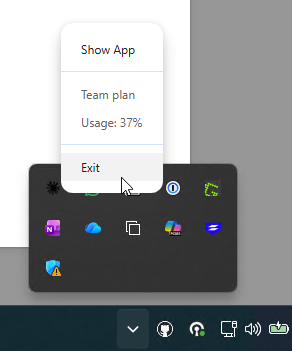
Add the iDNA Applications entry under
"mcpServers". If the file already contains other settings, keep them and add only the "iDNA Applications" block; if there is no"mcpServers"section yet, add it. Make sure the file remains valid JSON (commas, braces).Code Block language javascript { "mcpServers": { "iDNA Applications": { "command": "mcp-remote", "args": [ "https://<your iDNA host>/mcp", "--header", "Authorization: Bearer <your token>" ] } } }- Save the file and start Claude again. In [Settings] → [Developer], the "iDNA Applications" server is now listed as running.
...
- The Companion says that live iDNA tools are unavailable and answers in restricted wiki mode. The session has no working MCP connection. Possible causes: the MCP entry is missing on this machine, the token has expired or was revoked, there is no network path to the appliance (VPN), or the client did not load the tools for this session (start a new session).
- The server is listed but fails to connect. Check that the address ends in
/mcpand that the token is still valid in [MCP Tokens]. An expired or revoked token is rejected; create a new one and update the client's configuration. - Claude desktop app: the server does not start. Check that Node.js and mcp-remote are installed (see above), and that Claude was exited completely before the configuration was edited. The logs are in
%APPDATA%\Claude\logs\(filesmcp*.log) on Windows; [Settings] → [Developer] also offers [View logs]. - OpenAI ChatGPT/Codex or Codex CLI: the server fails to connect after the token was set or replaced. The app and the CLI read
IDNA_MCP_TOKENonly when they start: restart the app or open a new terminal. Check that the name of the variable matches exactly. GitHub Copilot App on Windows: uninstalling or updating fails with "access denied". The App installs plugin files read-only and can fail to remove them. Clear the flag in PowerShell, then retry:
Code Block language powershell attrib -R /S /D "$env:USERPROFILE\.copilot\installed-plugins\*"
...