
Page History
| Table of Contents | ||
|---|---|---|
|
Overview
Starting with version 3.5.0, iDNA Applications includes an MCP server. MCP (Model Context Protocol) is the open standard through which AI assistants access external data. With the MCP server enabled, AI clients such as Claude, GitHub Copilot or OpenAI Codex can answer questions about your Notes/Domino estate from your live iDNA data: application usage, design and code analysis, modernization and lifecycle planning. The recommended way to use it is the iDNA Applications Companion, an AI-assistant plugin for these clients (see Setting up the iDNA Applications Companion).
...
- Connect to the appliance via SSH.
Open the configuration file
/opt/panagenda/appdata/ifa/configand set:Code Block language bash PANAGENDA_ENABLE_MCP=true
Apply the change:
Code Block language bash ifa recreate
...
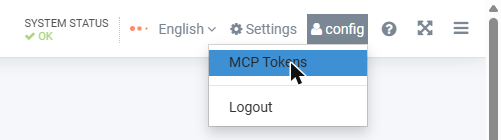
- Click your user name at the top right and select [MCP Tokens].
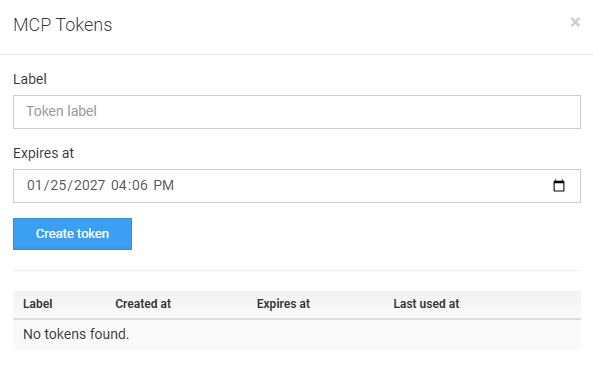
- Enter a label that tells you where the token is used, for example
laptop-claude(letters, digits, dot, underscore and hyphen). The label identifies the token in the token lists and in the MCP server's audit log. - Check the expiry date (the default is 90 days from today) and click [Create token].
- Copy the token right away and keep it in a safe place. It is shown only once: iDNA stores only a fingerprint (hash) of the token and cannot display it again.
| Note | ||
|---|---|---|
| ||
The MCP Tokens dialog right after [Create token]: the one-time token value with its copy hint, the value itself blurred or replaced. |
...