
Page History
...
- The plugin: the knowledge wiki, the "idna-wikilookup" skill and the Companion's operating instructions. The plugin also works on its own: without a connection to iDNA, it answers from the wiki only (restricted wiki mode) and tells you so.
It is installed from panagenda's plugin marketplace on GitHub: - The MCP connection: connects the AI client to your iDNA appliance for live data. It requires that your iDNA administrator has enabled the MCP server (see Setting up the MCP Server in iDNA Applications).
Supported Clients
| Client | Plugin installation | MCP connection |
|---|---|---|
| Claude Cowork (desktop app) | Customize → Plugins | configuration file, through the helper tool mcp-remote (requires Node.js) |
| Claude Code CLI | command line | command line |
| GitHub Copilot App | Customize → Manage marketplaces, Add plugin | Customize → Add → MCP Server |
| GitHub Copilot CLI | command line | configuration file |
| OpenAI ChatGPT/Codex | Customize → Plugins | Settings → Plugins → MCPs, token in an environment variable |
| OpenAI Codex CLI | command line | configuration file, token in an environment variable |
...
In the iDNA web interface, click your user name at the top right and select [MCP Tokens]. Enter a label that tells you where the token is used (for example laptop-claude), check the expiry date and click [Create token]. Copy the token right away: it is shown only once. Screenshots and details are in Setting up the MCP Server in iDNA Applications, Step 4.
Note: create one token per machine or client, so that each can be revoked on its own. The clients store the token in plain text, in their configuration or, for OpenAI ChatGPT/Codex, in an environment variable; treat it like a password and do not share it.
...
- Open the settings (gear icon at the bottom left), select [Model providers] and click [Add provider]. Select [Ollama (local)].
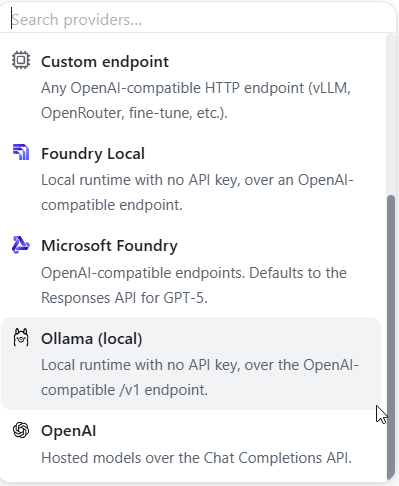
- Enter a display name and the Base URL of the Ollama server:
http://localhost:11434/v1if Ollama runs on the same machine, otherwisehttp://<Ollama host>:11434/v1. Save the provider. The models of the Ollama server are now listed under it.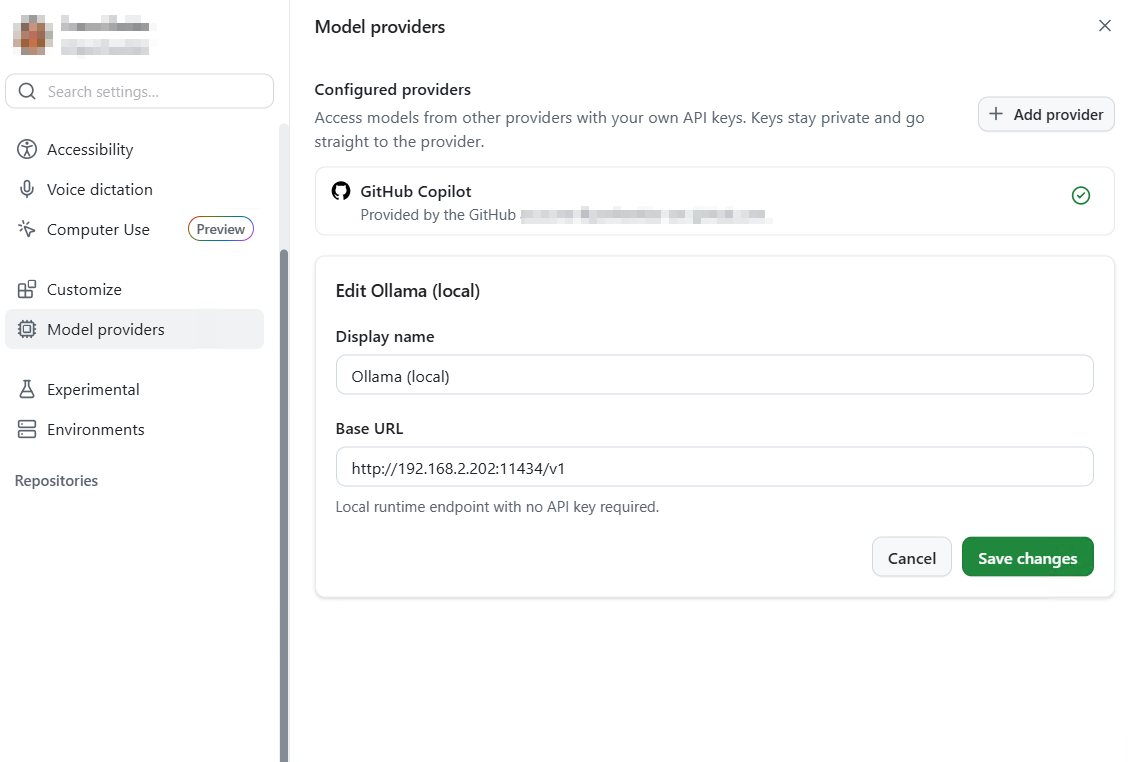
- Start a new session and select the local model in the model picker. If GitHub-hosted models are also available to you, check the selection in every session.
panagenda tested this setup as a proof of concept with small local models that support tool calling: the plugin and the MCP tools worked. The tests show that the setup works, not how good the answers are; for analysis work, use the most capable model that your hardware can run.
Note: with a local model, the iDNA data that the AI retrieves through MCP is processed by the model in your network, not by a cloud AI provider. The GitHub Copilot App still requires a GitHub sign-in and communicates with GitHub; check GitHub's documentation and your organization's policies on what it transmits. Models that run on a workstation or a small server are less capable than the large cloud models: expect answers of lower quality and less reliable restricted-mode guidance (see Choosing the AI Model). Access to the data is enforced by your iDNA appliance in either case.
...