
Page History
| Table of Contents | ||
|---|---|---|
|
What the Work List Is
The Modernization Session Work List is the worksheet of one work session (see Modernization Planning: Work Sessions): every code block the session deals with, what to do with it, where its fix is written, and where in which application the code sits. It answers the developer's question: what exactly do I fix in this session?
A code block is a piece of code that iDNA recognizes wherever it occurs: the same block in ten applications is one block with ten occurrences. That is why a fix only has to be written once and can then be reapplied wherever the block occurs.
Where to Find It
The Work List exists in Metabase only. Open it from [App Lifecycle] → [Modernization Planning], tab [Work Session Overview]: click a session title, then [Open Work List] in one of its steps. The Work List opens in a new browser tab with the session preselected. If you have access to Metabase, you can also open it from the collection [App Lifecycle] there and choose the session in the [Session Details] filter.
How to Read It
Work Items Tab
One row per code block of the session:

- Work Item: the finding and the design element it was found in.
- Work Action: the scope and the action, for example Cross-Session / Author.
- The scope says where the block occurs: only in this session (Session), in several sessions (Cross-Session), resolved by a template update (Inherited from Standard), or current HCL template code (HCL Owned).
- The action says what to do: Author (write the fix here, for the first time), Apply (the fix exists already, reapply it), Resolve Divergence (decide before the refresh which version stays), Scan Template First, Verify Update (check after the template update), Cleared by Update or Inherit (HCL Owned). The last two are information, not work.
- Work Authored In: the session in which the fix is written; This Session when it is written here.
- Severity and Reach: how serious the finding is, and how many kept applications carry the block.
- Is Surplus To Master: the master does not have this block, so the refresh does not fix it. Fix it in the application after the refresh.
- Has HCL Origin, HCL Origin and the other HCL columns: whether the code comes from an HCL template, from which template family and versions, and whether it is still in the current HCL version.
- Code Block Drill-Down: [Explore Hash ID ...] opens the Code Block Overview, see below.
Design/Code Elements Tab
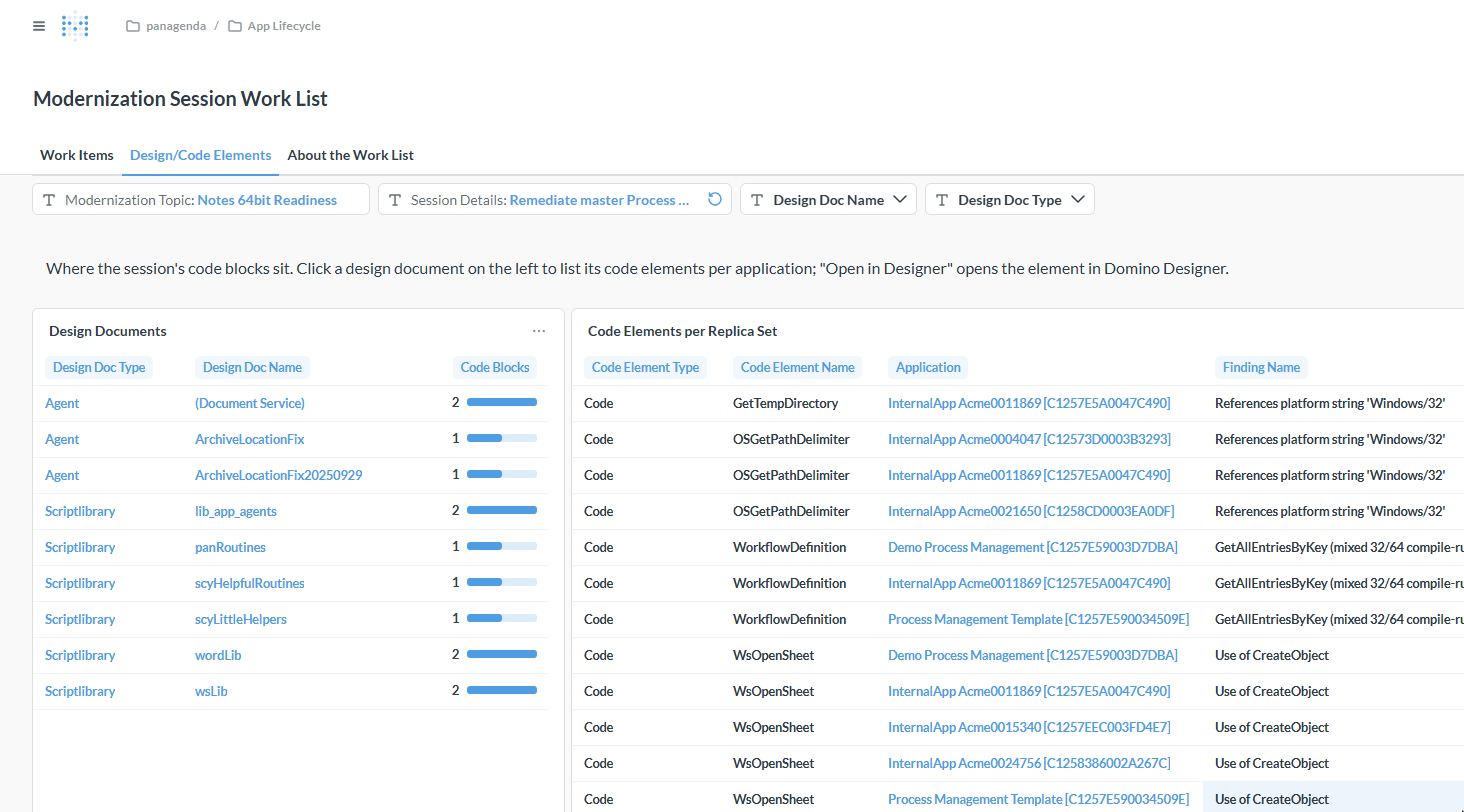
Where the session's code blocks sit. On the left, the design documents (agents, script libraries, forms, ...) with the number of blocks in each; click a name to list its code elements per application on the right. [Open in Designer] in the table on the right opens the element directly in Domino Designer.
Code Block Overview
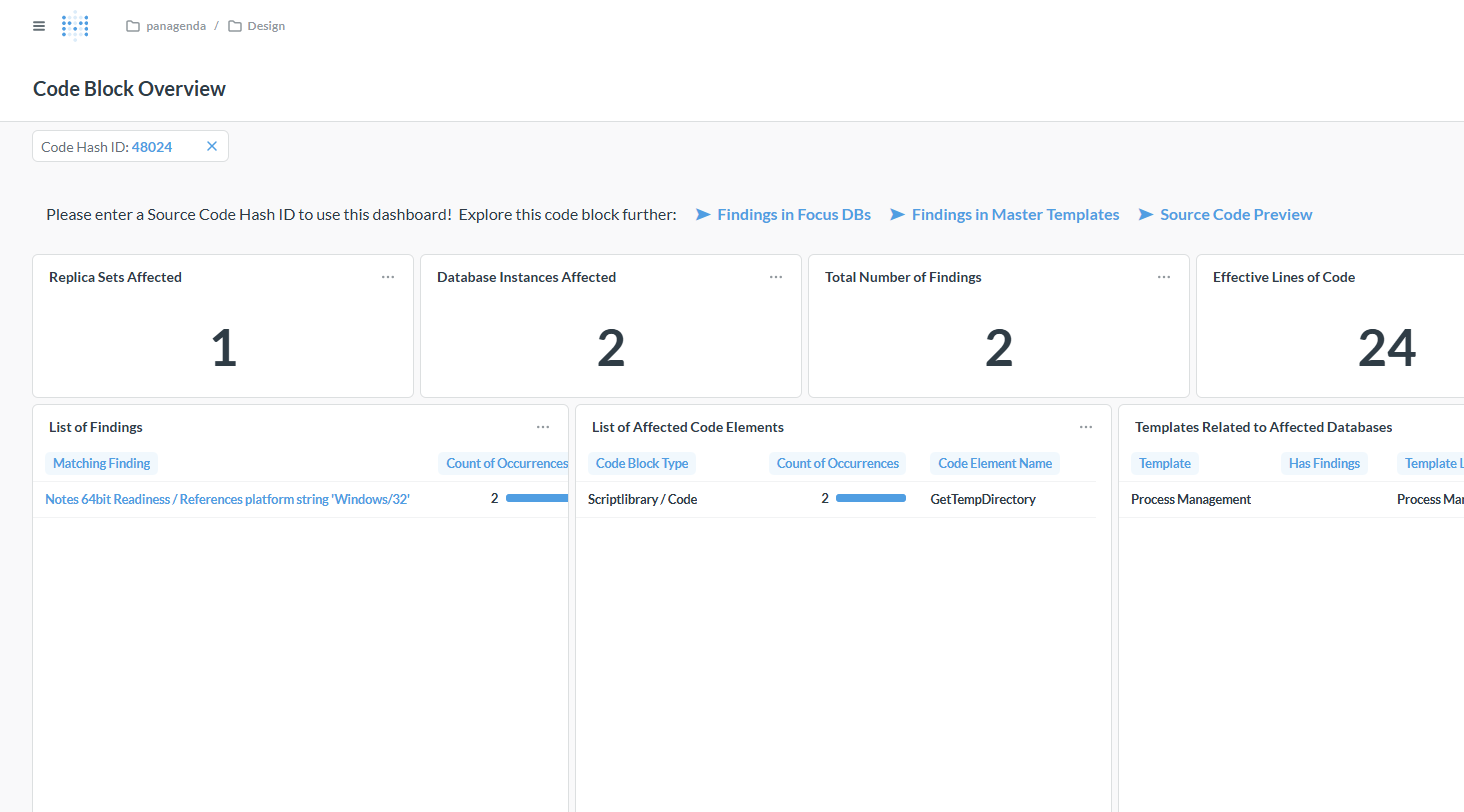
The drill-down from a work item shows one code block across your estate: how many applications and database instances carry it, the findings in it, the code elements it occurs in and the templates related to them. The link [Source Code Preview] shows the code itself.
About the Work List Tab
The product's own explanation of every scope, action and column.
| Tip | ||
|---|---|---|
| ||
You can ask the iDNA Applications Companion about the code behind a work item and drill into a solution: "Show me the code of the block 'References platform string Windows/32' in script library lib_app_agents. Why is it flagged for Notes 64-bit, and how would we fix it?" The Companion reads the code from iDNA, explains the finding, suggests a fix and tells you where else the same block occurs, so you know where the fix has to be reapplied. You can keep asking follow-up questions about the code and the suggested change. See Setting up the iDNA Applications Companion. |
What to Do Next
- Work the blocks in the order of the session steps in Modernization Planning: master-side work before the refresh, application-side work after it.
- Resolve every Resolve Divergence item before the refresh; a refresh overwrites the application's own version.
- The fixing happens in Domino Designer, outside iDNA. After the changed designs have been scanned again, the next nightly run updates the work list.
Related Topics
- Template Lineage: for rebase and upgrade sessions, which blocks survive the template update.
- [Design] → [Insights]: all findings by ruleset.
- [Design] → [Source Code]: code volume and duplication across the estate.