
Page History
...
This new version is a significant milestone release, as it introduces a ton wide range of new features in the application itself and opens a new chapter when it comes to setting up iDNA Applications. In addition, this release packs a significant number of updates in underlying components along with lots of new features, improvements and bug fixes.
...
| Note | ||
|---|---|---|
| ||
As of version 3.5.0, panagenda no longer supplies virtual appliance images for VMware or Hyper-V. iDNA Applications now runs on a Linux host that you provide, installed with the panagenda installer. This gives you more flexibility in choosing your virtualization platform and makes it easier to keep the operating system iDNA runs on up to date. Existing appliances keep running and are upgraded with the same installer. See Running iDNA on your own Linux for the details. |
| Table of Contents |
|---|
New Features
Application Lifecycle
The new [App Lifecycle] menu answers four questions about every application in your Notes/Domino estate, in this order: keep it or sunset it? Which route leads to ready? How ready is the estate? What is the plan?
iDNA classifies each assigns every application with a lifecycle vector (for example Keep/Modernize, Sunset/Archive or Sunset/Delete) and, for each of the two modernization topics Notes 64-bit and Nomad, a modernization vector, . It shows how ready the whole estate is , and turns the remaining work into a ranked modernization plan of work sessions, down to the individual code blocks. Template lineage shows which standard template a customized design comes from is based on and what was changed in it. The modernization topics are Notes 64-bit and Nomad.
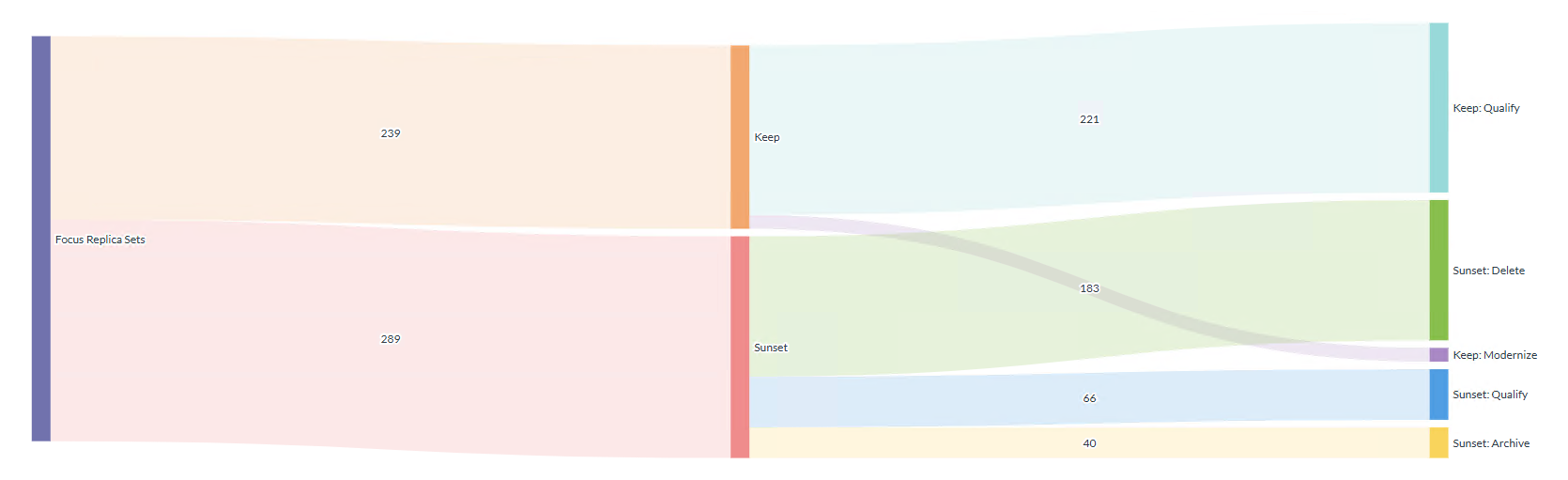
Read more in Application Lifecycle in iDNA Applications and its pages on the Lifecycle Vector, the Modernization Vector, Modernization Readiness and Modernization Planning.
...
iDNA Applications now includes an MCP server. MCP (Model Context Protocol) is the open standard through which AI assistants access external data. With the MCP server enabled, AI clients such as Claude, GitHub Copilot or OpenAI Codex answer questions about your Notes/Domino estate from your live iDNA data.
The MCP server is read-only and disabled by default. It runs on your iDNA host and is reached through the existing HTTPS port. Every user authenticates with their own token, and administrators see and revoke all tokens in one place. Your license sets the mode, restricted or permissive, and iDNA enforces it regardless of the AI client or model.
...
iDNA’s admin interface has been rebuilt. It opens at https://<your iDNA host>/idna/config and has pages for the [License], the [User ID] iDNA uses for collection, the [Server List] and the content packages under [Core Config] and [Optional Config] that define what iDNA collects. The previous address /idna/cfgc redirects to it.
The new [Config Manager] wizard sets up the collection for a Domino domain in four steps:
...
Read more in Running iDNA on your own Linux (requirements, recommended distributions, sizing and partitioning), Installing iDNA Applications on Linux and Upgrading iDNA Applications. iDNA runs most smoothly when the host resolves your Domino servers’ common names in DNS (see Domino Name Resolution / DNS).
Improvements
Activity History: Weekly activity per application, by department and by location, is now available in
cqx_data.Code Element Details: Findings name the code element more precisely, for example Script Library → Code (function) instead of Script Library → Script Library, Java code by its file name, and formulas such as hide-when formulas by their position and event (for example
pardef[4] > hidewhen).Code Insights Detection Patterns: 22 detection patterns of the shipped rule sets were corrected. Counts rise for Definite and Possible dependencies on other databases, External C Calls, Addressbook related code, change as follows:
- Detected for the first time: Calendar related code, What’s new in Notes 10.0.1
- Higher counts: Definite and
- Possible dependencies on other databases, Addressbook related code, Paper Printing
- Slightly higher counts: Mail Send, Working with files
- , Working with other programs
- Slightly lower counts: Hardcoded IP Addresses (version strings no longer match)
- , Pro: Javascript and HTML tags
- Higher or lower, depending on the estate: External C Calls
- (forward declarations no longer match)
Insights scores and ranks of the affected databases change with the first nightly run after the update.
Content Age per Replica Set: The replica set data now include a content age summary: scan status, retention configuration, cutoff date and the number of documents within the retention period.
Domino 12.0.2 FP8: iDNA’s backend utilizes a greatly reduced subset of a Domino server’s data and binary directories for Notes-native communication. This server never starts and cannot start, but when iDNA communicates with Domino servers for collection, it appears like a Notes Client for those Domino servers, carrying the version this stub Domino server inside iDNA is set up with. Since the previously used Domino 9 server was long outdated, this change was made with security and stability in mind.
Insights per Replica Set: New views in
cqx_datasummarize Code Insights per replica set, overall and for Notes 64-bit and Nomad, which makes them easier to query in Metabase or SQL.Installer: The installer shows the installed and the target version and waits 10 seconds before it starts, so you can still cancel. It asks for the server address, the name users type in their browser, suggests names and checks each one in DNS;
ifa hostnamechanges the address later. If an upgrade fails after the installer has taken its rollback snapshot, it prints the exact rollback commands, and it recovers from an interrupted container teardown. The offline package loads its images without unpacking a second copy, which needs less free disk space. New commands:ifa recreate,ifa diagnose-network,ifa hostnameandifa uninstall(see The ifa Command).Log Download: Administrators download the system logs as a zip file directly in iDNA ([Download Logs],
https://<your iDNA host>/idna/sys/logs). The separate PAC container that offered the log download before has been removed; the old address/pac/logsredirects to the new page.Metabase 62: The embedded dashboarding and reporting solution Metabase has been upgraded to one of the latest versions. Read more about the new capabilities of Metabase 62 in their official announcement blog post. The embedded dashboards have been restyled to match, and clicking through from an embedded dashboard now opens the full Metabase dashboard or question in a new browser tab, with the current filters kept.
Metabase Site URL and AI Features: Metabase’s site URL is now set from the iDNA host name. If users reach iDNA through an alias, a reverse proxy or another port, set
PANAGENDA_METABASE_SITE_URLin the configuration file. Metabase’s own AI features are disabled by default and can be enabled only through the configuration file (PANAGENDA_METABASE_AI_FEATURES_ENABLED).Notes 64-bit and Nomad Insights: New insights detect Windows/32 platform literals, LS2J, Java EE and CORBA classes removed from current Java, NotesHTTPRequest web methods and GetAllEntriesByKey, and several existing detections are more precise. Findings now show their severity, and findings in code that HCL itself ships in its current standard templates count remain visible as notes rather than , not as work for you.
Pseudonymization: With user-name pseudonymization enabled, each person now has one pseudonym across all user-related data.
Security: Request-forgery protection has been improved across all administration pages, role permissions are enforced on the server, query handling has been hardened. Disabled accounts can no longer sign in, error pages no longer echo request details and session IDs no longer appear in URLs. Numerous third-party libraries were updated, and unused ones removed.
Standard Templates: The catalog of HCL standard templates used for template comparison now covers releases up to Notes/Domino 14.5 as well as older Notes 5–7 templates.
Unique Titles: Unique replica set titles now carry the replica ID instead of a hash, which makes them readable and searchable.
User Names: User names at login are no longer case-sensitive, and leading or trailing spaces are ignored; users are signed in under their stored name. A login through the LDAP fallback updates the existing account instead of creating a second one.
View Usage: The new
cqx_dataviewdbviews_usedlists the views of each database that have a built index, that is, views that have actually been used.
...
Bug Fixes
Complexity Overview: Templates Added the templates of the new server versions were added, and fixed an issue with the navigation drop-down was fixed.
Configuration File: The installer no longer corrupts Fixed an issue where the installer corrupted a hand-edited configuration file that lacks lacked a final line break.
Container Health: A : Fixed containers that stayed unhealthy: a hung DDA container now restarts on its own instead of staying unhealthy, and the cron container restarts when its scheduler stops.
Content Age: After Fixed an issue where, after a failed content age scan, the results and the scan time of an earlier scan were still shown.
Fresh Installation: A Fixed a timing issue that could leave the iDNA database partly partially initialized after a fresh installation.
Insights Overview Exclude:
A database whoseFixed the custom property [Insights Overview Exclude]: a database where it is set to Exclude is now left out of every insights result (scores, ranks and summaries), not only out of the overview.
Insights Scores: Insights Fixed insights with several topics were being counted three times and weighted nine times in scores and summaries; this affected the old mail insights. Scores and ranks of the affected databases change with the first nightly run after the update.
Last Write Access: The Fixed the last write access of a replica set, which showed the last access instead. Replica sets without write activity now show no write date.
Missing V14 Java Classes: Fixed a false finding: The the insight no longer reports
com.sun.net.httpserver, which still exists in Java 17.Usage Dashboards: Filtering Fixed filtering from one usage dashboard to another, which failed for some applications because their titles were formatted inconsistently.
...
Virtually all Docker images/containers have undergone significant updates in outward-facing components and underlying libraries. This provides a significant improvement in performance, stability and security.
| Component | 3.3.x | 3.5.0 |
|---|---|---|
| Data Miner | 2.1.0 | 2.5.0 |
| Embedded Domino | 9 | 12.0.2 FP8 |
| MCP server container | – | New (disabled by default) |
| Metabase | 0.50.36 | 0.62.19.5 |
| PAC container | Included | Removed |
| PostgreSQL | 15.16 | 15.19 |
| Tomcat | 9.0.115 | 9.0.123 |
What Changes for Administrators
Admin interface address: The admin interface moved from
/idna/cfgcto/idna/config. The old address redirects; update your bookmarks. See Admin Interface and Config Manager.Log download: Logs are downloaded in iDNA under [Download Logs] (administrator login required). The PAC container and its Tomcat manager are gone.
User names: User names are no longer case-sensitive. If two accounts differ only in upper and lower case, only one of them can sign in; merge such accounts.
Disabled accounts are now refused at login, including through the LDAP fallback and the external API.
Role permissions: Role permissions are now enforced on the server. The log download, the ETL refresh and the notification settings require the Administrator role; changes to Custom Insights require the Administrator or Editor role. Give users who need these functions the matching role.
Metabase content: The upgrade replaces the dashboards and questions panagenda ships. Make your own changes in copies, not in the originals.
Metabase site URL: Set
PANAGENDA_METABASE_SITE_URLin the configuration file if users reach iDNA through an alias, a reverse proxy or another port.Docker: Docker Compose v2 (
docker compose) is required.ifa customizeno longer changes Docker’s storage location and now does the same asifa recreate; the configuration keysPANAGENDA_DOCKER_BRIDGEandPANAGENDA_DOCKER_GRAPHare deprecated.Custom queries on
cqx_data: Code element names in findings have changed (see Code Element Details above), [Insights Overview Exclude] removes a database from every insights result, and with user-name pseudonymization enabled the pseudonyms change once with the first nightly run. Check saved questions and filters that rely on them.
...