New Feature
GreenLight Frontend (UI)
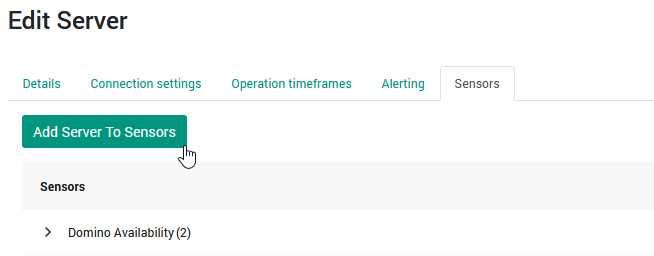
Server Config: Duplicate Sensor Assignments for New Servers
A new feature has been added to server configuration that allows importing sensor assignments from an existing server.
The goal of this new functionality is quicker setup of new servers without the hassle of having to visit multiple sensor configurations to add a single server.
New Feature
GreenLight Frontend (UI)
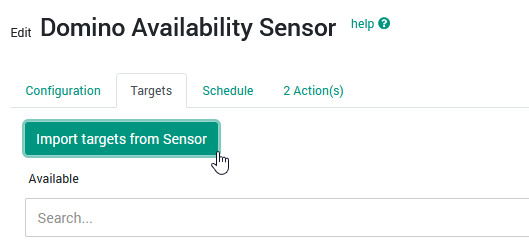
Sensor Targets: Import Target Servers from Existing Sensor
It is now possible to import target servers from another sensor with the options to merge with existing targets or overwrite entirely with the imported selection.
This will make it much easier to ensure consistent target server assignments where a group of sensors targets the same group of servers.
New Feature
GreenLight Frontend (UI)
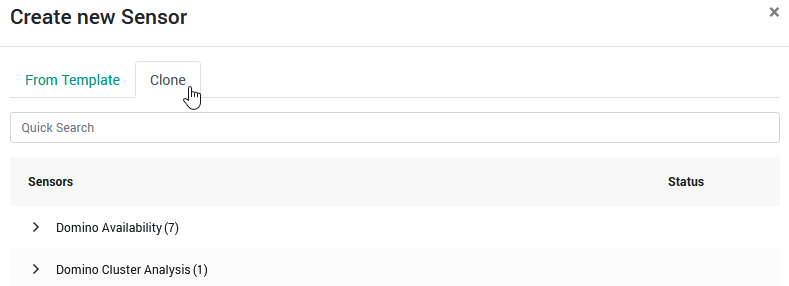
Sensor Creation: Import Settings from Existing Sensor
When Creating a new sensor, it is now possible to clone and existing one. Thereby inheriting settings and actions from the original sensor.
Improvement
GreenLight Backend (Foundation)
Upgrade to Domino Version 12.0.2
GreenLight's backend utilizes a greatly reduced subset of a Domino server's data and binary directories for Notes-native communication.
This server never starts and cannot start, but when GreenLight communicates with Domino servers for collection, it appears like a Notes Client for those Domino servers, carrying the version this stub Domino server inside GreenLight is set up with.
Since the previously used Domino 9 server was long outdated, this change was made with security and stability in mind.
Improvement
GreenLight Messaging
More Details in "System-Generated Message Footer"
Wording of this footer has been improved and the originating GreenLight server added as one of the items being displayed.
Improvement
GreenLight Frontend (UI)
Improved Usability for Opening Sensor Definitions
It is now possible to open a Sensor Definition and Measurement right from the "Sensors" tab when editing a server by right-clicking the sensor and selecting the desired action.
Bug
GreenLight Frontend (UI)
Restored checkbox "Append System-Generated Message Footer"
An issue has been resolved that would lead to this checkbox not being visible.
Bug
GreenLight Frontend (UI)
Resolved Display Issue with Action Condition "${true}"
Setting this on an action that does not have the "Run Always" option would lead to no run condition option being displayed.
Bug
GreenLight Frontend (UI)
Resolved Display Issue with Sensor Schedule
In certain situation, the sensor schedule would not properly reflect the previously configured schedule after re-opening a sensor.
Bug
GreenLight Frontend (UI)
Resolved Display Issue with Action Condition "${true}"
Setting this on an action that does not have the "Run Always" option would lead to no run condition option being displayed.
Bug
GreenLight Frontend (UI)
Resolved Display Issue with Action Condition "${true}"
Setting this on an action that does not have the "Run Always" option would lead to no run condition option being displayed.
Bug
GreenLight Frontend (UI)
Resolved Display Issue with Action Condition "${true}"
Setting this on an action that does not have the "Run Always" option would lead to no run condition option being displayed.
Bug
GreenLight Frontend (UI)
Resolved Display Issue with Action Condition "${true}"
Setting this on an action that does not have the "Run Always" option would lead to no run condition option being displayed.