Windows Platform Requirements
- Suuported Platform
Windows 10, version 1709, and later - Device Join
User Device must be either:- Entra ID joined
- Hybrid Entra ID joined
- Entra ID registered
- Accessable Domains:
The Client need to be able to connect via TCP 443 (SSL) to- *.truedem.com
- *.truedem.app
- *.epmapi.com
*.servicebus.windows.net
Ensure that proxy authentication is not required and SSL inspection is disabled for these domains. Large enterprises should implement split tunneling for communications to the mentioned endpoints.
AppLocker Rules
When using AppLocker (Windows Defender), ensure that TrueDEM is listed as a Trusted Application. AppLocker - Allow Rule
Powershell transcription
Ensure that PowerShell transcription is turned off. Check your GPO settings:Computer Configuration\ Administrative Templates\Windows Components\Windows PowerShell - Turn on PowerShell Transcription
User Configuration\ Administrative Templates\ Windows Components\Windows PowerShell - Turn on PowerShell Transcription
Windows 11 Privacy & Security Location Settings
Starting with Windows 11 26100, new Privacy & Security Location settings allow further restriction of location, wifi, and cellular data. TrueDEM requires access to location information. Grant permission to avoid regular prompts from TrueDEM requesting access. Enable the following Regkeys on devices:
Device management administrators can control this setting in several ways. First, ensure that the main Location service is turned on.
Here are three options.
- GPO
- Intune Policy
- ConsentStore Regkeys (usuall approach but less reliable)
GPO
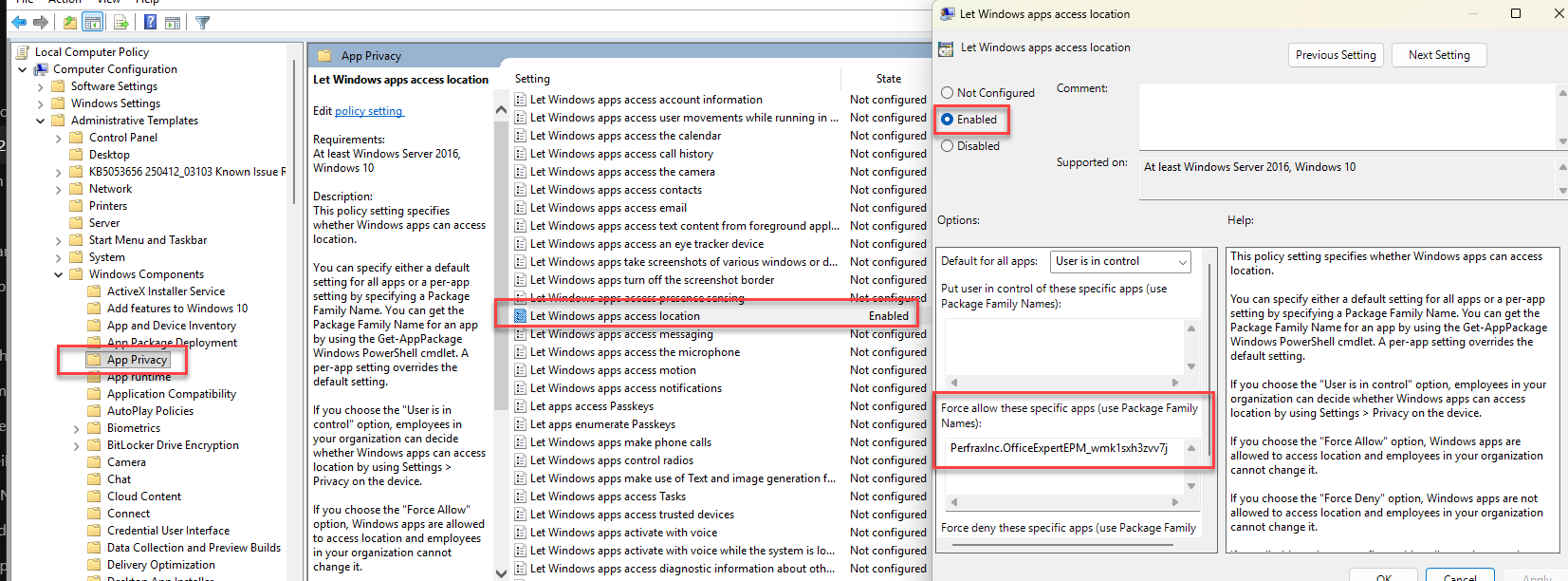
Computer Configuration / Administrative Templates / Windows Components / App Privacy / Let Windows apps access location
- Force allow these specific apps: PerfraxInc.OfficeExpertEPM_wmk1sxh3zvv7j
Intune Policy
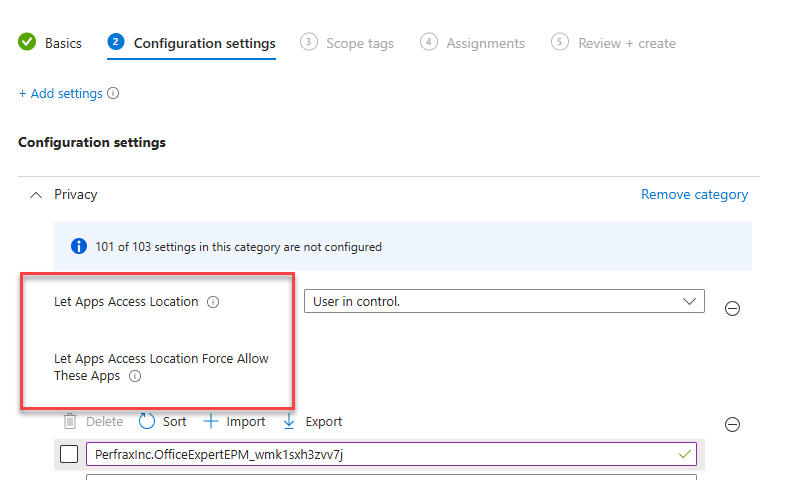
Add Settings from the Intune Settings Catalog:
- Privacy / Let Apps Access Location = User in control
- Let Apps Access Location Force Allow These Apps = PerfraxInc.OfficeExpertEPM_wmk1sxh3zvv7j
OLD - ConsentStore - HKCU RegKeys
Old previous way via ConsentStore Regkeys: (less reliable if the user changes the settings in UI)
[HKEY_LOCAL_MACHINE\SOFTWARE\Microsoft\Windows\CurrentVersion\CapabilityAccessManager\ConsentStore\location]
"Value"="Allow"
[HKEY_CURRENT_USER\Software\Microsoft\Windows\CurrentVersion\CapabilityAccessManager\ConsentStore\location]
"Value"="Allow"
[HKEY_CURRENT_USER\Software\Microsoft\Windows\CurrentVersion\CapabilityAccessManager\ConsentStore\location\PerfraxInc.OfficeExpertEPM_wmk1sxh3zvv7j]
"Value"="Allow"
[HKEY_CURRENT_USER\Software\Microsoft\Windows\CurrentVersion\CapabilityAccessManager\ConsentStore\wifiData]
"Value"="Allow"
[HKEY_CURRENT_USER\Software\Microsoft\Windows\CurrentVersion\CapabilityAccessManager\ConsentStore\wifiData\PerfraxInc.OfficeExpertEPM_wmk1sxh3zvv7j]
"Value"="Allow"
[HKEY_CURRENT_USER\Software\Microsoft\Windows\CurrentVersion\CapabilityAccessManager\ConsentStore\cellularData]
"Value"="Allow"
[HKEY_CURRENT_USER\Software\Microsoft\Windows\CurrentVersion\CapabilityAccessManager\ConsentStore\cellularData\PerfraxInc.OfficeExpertEPM_wmk1sxh3zvv7j]
"Value"="Allow"
macOS Platform Requirements
- Supported Platform
macOS Version 13+ (Ventura or above)
macOS ARM64 - Accessable Domains
Make sure the same domains (see above) can be accessed from the device. Hostname
Ensure that the hostname is configured correctly.scutil --set HostName <new host name>
- Privacy Preference Policy
Link to macOS Privacy Preference Policy
.
Antivirus related info
Generally, whitelisting items at the AntiVirus level should not be necessary. However, instances may arise where the AV Vendor flags TrueDEM. In such cases, you might need to whitelist the following two processes:
- PerfraxAgent.Exec.Net.exe
- tracert.exe
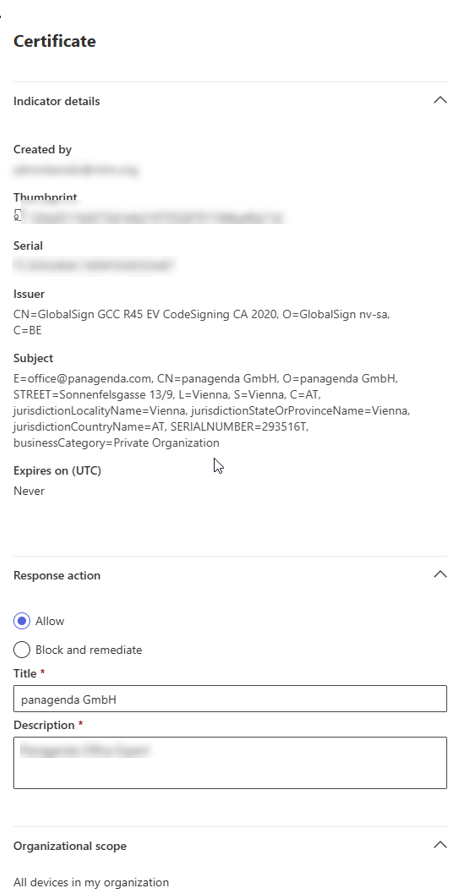
In case Microsoft Defender is being used, the simplest way would be to trust "panagenda" as the issuer in your environment based on the certificate signature. A possible config could look like the following. (> Agent Version 1.25.*)
Changes to This Document
We may update this document from time to time by posting the updated document to our website. You acknowledge that it is your responsibility to review this document periodically.
If we make changes that materially reduce your rights or protections, we will send you an update notice via the contact information you have provided to us.