Overview
Every iDNA Applications appliance runs with one license file. panagenda issues it, and the iDNA administrator uploads it on the appliance. The license sets:
- the license type: trial, engagement or subscription
- how long iDNA collects data and how long the data stay accessible afterwards
- which HCL Domino servers can be analyzed (by certifier)
- which content packages are available
- two options that matter in a security or privacy review:
- whether user and small department names are pseudonymized
- whether and how AI clients may access iDNA's data through the MCP server
This page is for IT and security reviewers who evaluate iDNA Applications before or during a trial. What iDNA reads from your Notes/Domino environment and which access it needs is the same for every license type; see What iDNA Applications Reads from Your Notes Environment.
License Types
Trial
A trial license lets you evaluate iDNA Applications on your own Notes/Domino environment. It usually runs for 14 days and may be extended in special circumstances.
- What it reads: the same as a subscription, from the same servers and content packages.
- What it analyzes per server: Notes client and web sessions, the Domino Directory, server configuration and the database catalog; with the optional content packages also the Domino event log, mail routing, HCL DLAU and MarvelClient data.
- What it analyzes per application: the design and source code of every focus database. Document profiles and content age are analyzed for a sample of about 50 databases, which iDNA selects itself from the middle of the pack in usage and complexity.
- What you see: the sample in full. All other applications are counted in every total but shown with masked names.
- User names and small department names are always pseudonymized.
- Upgrade: the data collected during the trial stay available when the installation is upgraded to a subscription.
Everything a reviewer needs to approve and run a trial is on iDNA Applications Trial License.
Engagement
An engagement license runs for three months and includes all features, without a sample and without masked names. It is meant for organizations that do not want to commit to a long-term subscription right away, but need a collection period long enough for meaningful results.
When the three months are over, iDNA stops collecting data. The data stays visible for up to six months after collection has ended. You can then continue with a full subscription, or with a usage-only subscription: the design and source code collected during the engagement stay available but are no longer updated.
Subscription
A subscription license runs until its expiry date. A full subscription includes the usage, design and source code analysis; a usage-only subscription includes the usage analysis.
At Expiry
When any license expires, iDNA stops collecting and processing data. The data collected so far stay on the appliance. How long they remain accessible after expiry is set in the license.
Pseudonymized User Names
Pseudonymization is the default. iDNA pseudonymizes user names in the per-user usage analyses: who used which application and when, per-user summaries, the license analysis and the editor statistics of the content analysis.
- Each name is replaced by a pseudonym derived from it. A person keeps the same pseudonym, so trends over time still work. The organization part of the Notes name stays readable (example: edf224d918d55f0da97e/ACME)
- Departments and locations with fewer than 15 assigned user names are shown as a placeholder; their usage still counts in every total. The license can set another threshold.
- Some data are shown with real names on purpose, whatever the setting: access-control entries, agent signers and group memberships, who last accessed and last wrote to each application, and person documents from the Domino Directory.
- The collected data are stored with real names on the appliance in your network. Pseudonymization is applied when iDNA prepares the data for the analyses.
License without pseudonymization: the usage analyses show real names, and small departments and locations are named. panagenda issues such a license only after your organization has confirmed in writing that it has taken the necessary internal steps, including with the works council, and is responsible for the processing. The setting changes with a new license, in either direction. A trial license always pseudonymizes.
The note on user name pseudonymization is written for works councils, data-protection officers and compliance functions. It explains which user names iDNA pseudonymizes, which data it shows with real names on purpose, and what a license without pseudonymization requires. It describes iDNA Applications 3.5.0. Share it with the people who approve the evaluation.
English | German |
Who sees which data, and how pseudonymized data move through iDNA: iDNA Applications Data Flow in Detail.
MCP Server and AI Clients
With the MCP server, AI clients such as Claude, GitHub Copilot or OpenAI Codex can answer questions about your Notes/Domino estate from your iDNA data. The MCP server is off by default and free of charge. It needs a double opt-in: your organization requests an MCP license from panagenda, and the iDNA administrator then enables the MCP service on the appliance.
- License without MCP (the default): the MCP server has no access to iDNA's data.
- Restricted mode: the AI works with an allowlist of iDNA's data; the detailed user-activity tables are excluded.
- Permissive mode: the AI can access all of iDNA's analysis data, including detailed user activity.
The MCP server reads the same prepared data as the dashboards: the pseudonymization setting applies to it, and on a trial it sees the same sample and masked names. MCP is available on every license type, including a trial. Data that the AI retrieves become part of the AI conversation and are processed by the AI platform your organization uses.
Setup, modes and tokens: Setting up the MCP Server.
Requesting and Uploading a License
To request a trial, an engagement or a subscription, or to change a license option, contact panagenda through the iDNA Applications contact form. On a trial or engagement license, the menu item [Upgrade your Experience] in iDNA opens the same form.
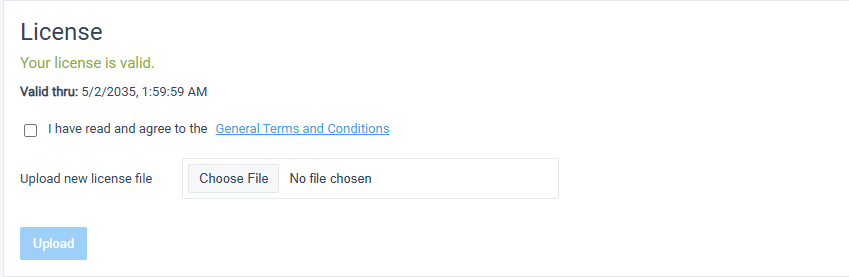
The iDNA administrator uploads the license file in [Settings] → [System configuration ...] → [License]: accept the General Terms and Conditions, choose the license file and click [Upload]. A new license replaces the previous one; the data collected so far stay on the appliance.