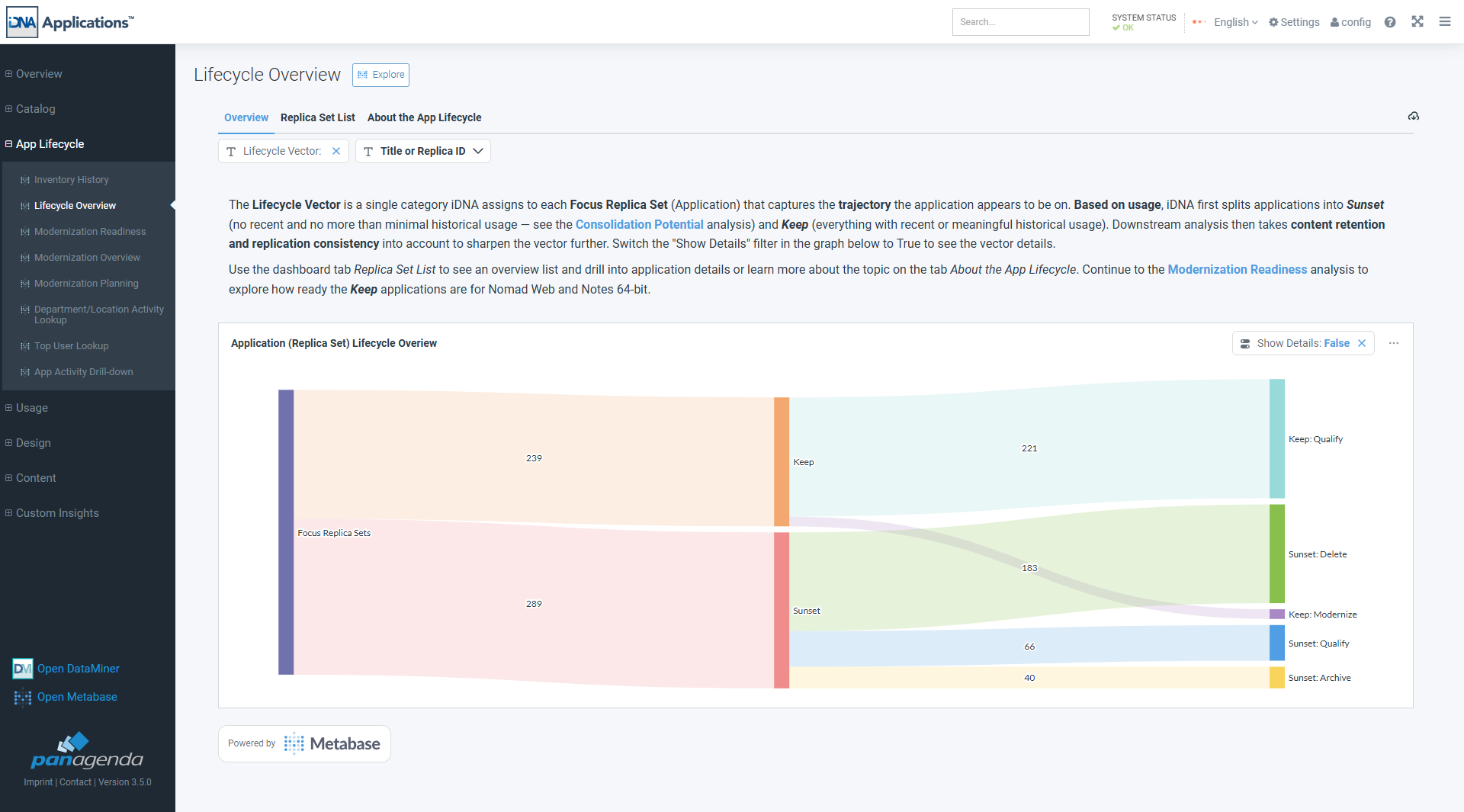
The lifecycle vector is a label iDNA assigns to every focus application. It describes the trajectory the application is on: should you keep it, or can you retire it, and what has to happen first? It is the first step of the Application Lifecycle (see Application Lifecycle in iDNA Applications).
The label is built in two steps.
1. Direction, based on usage. An application goes to Sunset only if nobody used it in the last 90 days and its usage across all recorded history is very low at most. This is the same rule as iDNA's Consolidation Potential analysis. Every other application goes to Keep: any recent activity, or meaningful usage in the past, keeps an application.
2. Disposition, what to do with it. Within each direction, iDNA adds what the application needs:
| Label | Meaning | What to do |
|---|---|---|
| Keep/Modernize | Kept, and in considerable use: at least medium usage in the last 90 days. | Make it ready for the target platform. These applications come first in modernization. |
| Keep/Qualify | Kept, but used little in the last 90 days. | Look at the application before investing in it: is it worth modernizing, or on its way to sunset? |
| Sunset/Archive | Ready to retire, but some replica still holds documents within your retention period. | Consider putting the application on a read-only archive server. |
| Sunset/Delete | Ready to retire, and no replica holds documents within your retention period. | Application can be deleted if reducing the number of databases is relevant. |
| Sunset/Qualify | Would be retired, but something prevents a safe decision, for example no retention configured, or replicas that disagree. | Resolve the named issue first. Until then, iDNA recommends neither archiving nor deleting. |
Both Keep dispositions continue to modernization: every kept application gets a modernization vector (see Modernization Vector: The Route to Ready). Sunset applications get none, because an application you retire needs no modernization.
Some labels carry a third part that names a reason, for example Sunset/Qualify: Conflict - Replication Inconsistency or Keep/Qualify: Warning - Check Status. The rule behind them is simple: a conflict blocks the destructive path and only flags the safe one. On the Sunset path, archiving or deleting cannot be undone, so any doubt about the content (a missing retention configuration, replicas with different retention settings or document counts, a failed content scan) moves the application to Sunset/Qualify. On the Keep path nothing is removed, so the same issue is simply a flag next to the disposition.
What each reason means and how it is detected is explained on the dashboard's [About the App Lifecycle] tab.
In the iDNA Portal: [App Lifecycle] → [Lifecycle Overview].
The Sankey chart reads from left to right: all focus applications (Focus Replica Sets), split into Keep and Sunset, then into the dispositions. The numbers are applications. Set the [Show Details] filter on the chart to True to add the reasons as a fourth column:
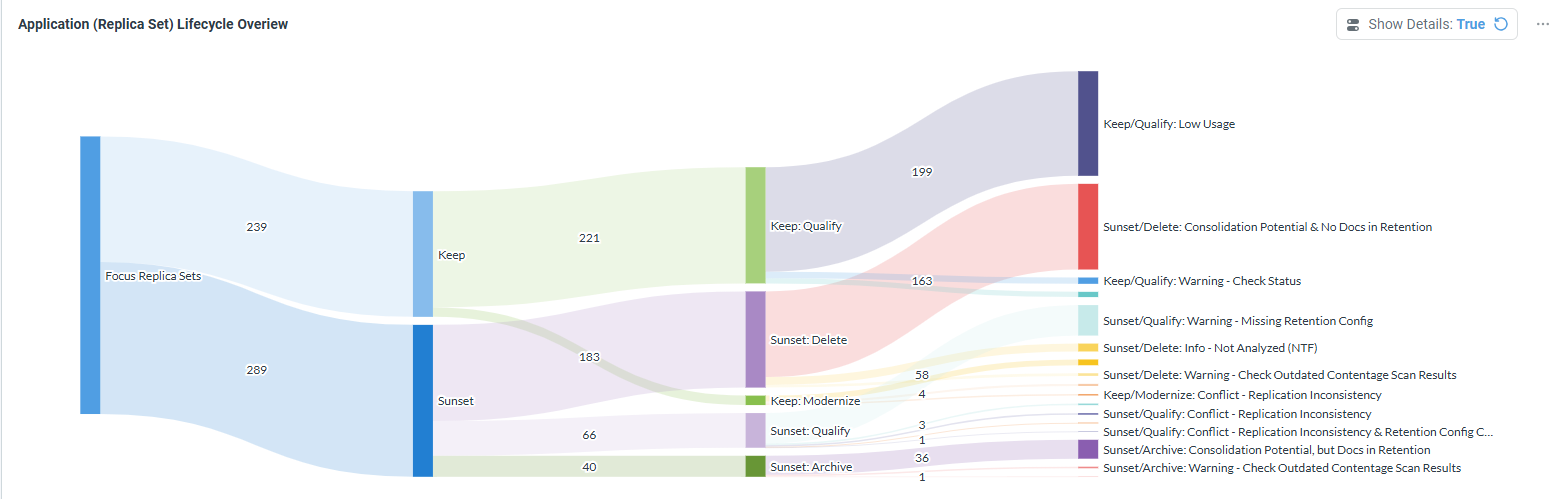
Hover over a band to see its count; click a node to narrow the dashboard to it.
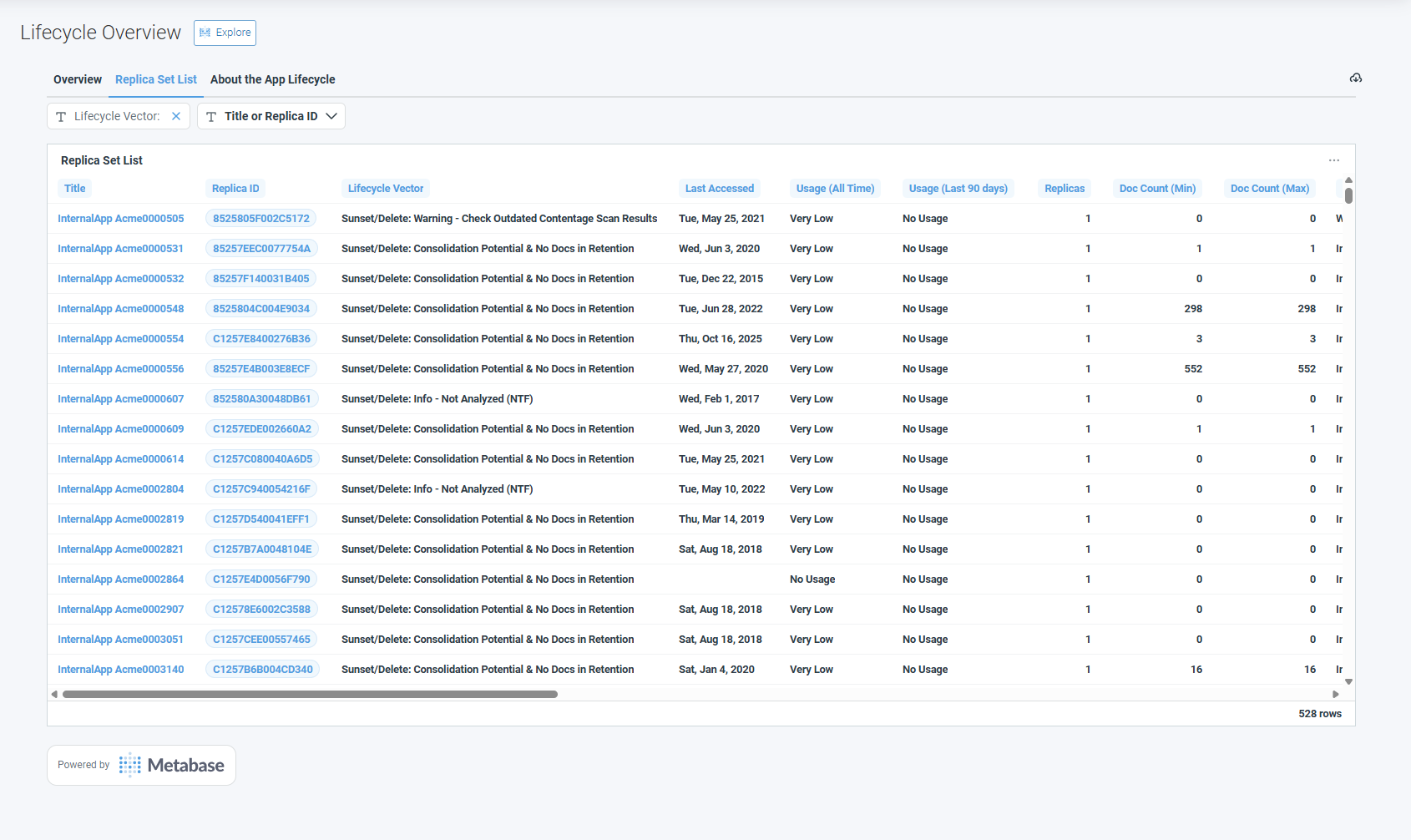
One row per application with its lifecycle vector and the facts behind it: when it was last accessed, its usage across all recorded history and in the last 90 days, the number of replicas, the document counts across the replicas and the retention analysis results. Click a title or replica ID to open the application in Application Insights.
iDNA's built-in explanation: what the vector is, how it is calculated, what every label on the dashboard means and where the vector is used in iDNA.
|
You can copy a screenshot of this dashboard, paste it into your AI client and ask the iDNA Applications Companion what it means for your estate: "Here is our Lifecycle Overview. What stands out, and where should we start?" With the Companion connected to iDNA's MCP server, it can then go beyond the picture, for example list the Sunset/Qualify applications with the issue that blocks each of them. See Setting up iDNA Applications Companion. |
|
The iDNA Applications Companion can prepare a retirement for you. Ask, for example, "Which departments still work with this application?" before you retire it, or, for a Sunset/Archive application with several replicas, "Which replica should we archive?" The Companion answers from iDNA's usage and content data and explains why it picks that replica. |