
What It Is
Modernization Overview by Work Session is a plain list of all work sessions of the modernization plan, with their key numbers side by side. Where Modernization Planning: Work Sessions takes you through the plan one session at a time, this list lets you compare sessions, for example all sessions of one route.
A work session usually covers several applications, so the number of sessions and the number of applications do not match one to one. It is not the same as the Modernization Session Work List, which lists the code work inside one session.
Where to Find It
This dashboard exists in Metabase only and is not linked from the Portal. If you have access to Metabase, open it from the collection [App Lifecycle] there.
How to Read It
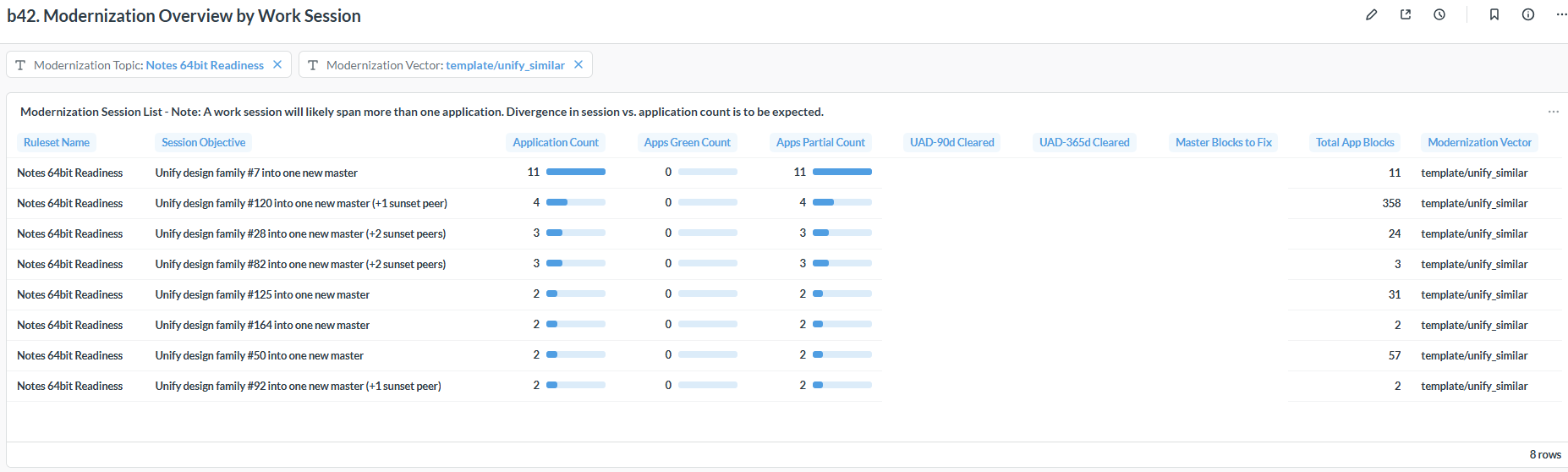
Narrow the list with the [Modernization Topic] and [Modernization Vector] filters; the example shows the sessions that unify design families. The columns:
- Session Objective: the session title, the same sentence as in Modernization Planning.
- Application Count: the applications the session works on.
- Apps Green Count and Apps Partial Count: the applications the session makes fully ready, and those it helps without making them fully ready because they carry more work elsewhere. Unify Similar Apps and Investigate Inheritance sessions show no green applications: they need a decision before they can make anything ready.
- UAD-90d Cleared and UAD-365d Cleared: the user access days in the last 90 and 365 days of the applications that only this session makes ready, a measure of how much daily work the session unblocks.
- Master Blocks to Fix and Total App Blocks: the code blocks to fix in the master, and in the applications.
- Modernization Vector: the route the session belongs to.
Did you know?
The iDNA Applications Companion can compare sessions for you: "Which of our Unify Similar Apps sessions for Notes 64-bit would be worth doing first, and what decision does each of them need?" See Setting up iDNA Applications Companion.