
What Modernization Planning Is
A list of findings per application does not tell you where to start. What you need is a plan: "Fix this template first, it makes a third of the applications ready. These ten similar applications should become one template. What remains are a few one-off fixes." Modernization Planning turns the modernization vectors (see Modernization Vector: The Route to Ready) into exactly that: a ranked queue of work sessions for one modernization topic.
Why the Unit of Work Is a Session
Notes designs cannot be rewritten reliably by a program: every fix means a developer in Domino Designer with one design open. A work session is therefore one design fixed completely in one sitting: a master template, a family of similar applications, or a single application. While the design is open, everything in it is fixed, so nobody has to open it twice.
The sessions are ranked by what they achieve: first by the number of applications the session alone makes ready, then by the number of applications it affects, then by their usage. A session that makes 20 applications ready comes before one that makes a single application ready.
Session Kinds
Each session kind follows from a route of the modernization vector:
| Session | Works on | The work |
|---|---|---|
| Fix Master Template | a master template | Fix the master once; the applications inheriting from it are fixed with a design refresh. |
| Rebase Master Template | a master derived from an HCL standard template | Replace its design with the current version of the standard template, then re-apply your customizations. |
| Upgrade Standard Template | an HCL standard template | Upgrade the master to the current HCL version instead of editing it. |
| Unify Similar Apps | a design family | Investigate building one shared master for a family of similar, unlinked applications. |
| Investigate Inheritance | the template the applications resemble | Verify or restore the template relationship, then bring the applications onto the fixed master. |
| Individual Code Fixes | one application | Fix a standalone application in place. |
Unify Similar Apps and Investigate Inheritance sessions need a human decision first: can the applications really share one template? Until that is decided, the applications they would make ready are a potential, not a certainty. "Not reconcilable" is a legitimate outcome.
Work Items
Inside a session, every code block with findings is a work item, and every work item says what it needs:
- Author Fix: write the fix here; this session is where it is first written.
- Apply Authored Fix: the same code also occurs elsewhere, and its fix is written in another session; reapply it here.
- Resolve Divergence: an application's own copy of code that differs from the master. Decide before the refresh whether to keep the variant (move it into the master) or accept the master's version.
- Scan Template First: the master has not been scanned, so its work is not known yet.
- Verify after Template Update: a check after the template update.
- Cleared by Template Update and HCL Owned: no code fix. The update removes the code, or the code is current HCL template code, so there is no fix for you to write.
Session Steps
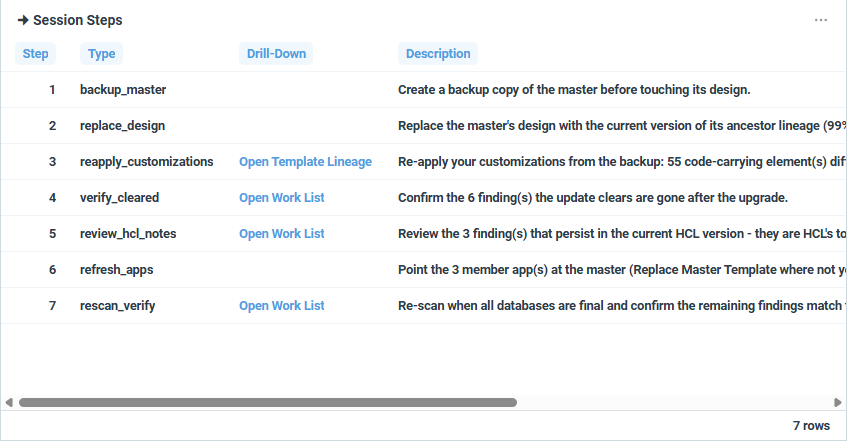
Every session comes with its procedure, in order. For a rebase, for example: back up the master, replace its design, re-apply your customizations, verify that the cleared findings are gone, review the HCL notes, point the member applications at the master and refresh them, re-scan. Two rules apply to every session:
- Master first, then the refresh, then the applications. Fix the master before you refresh the applications that inherit from it.
- A refresh overwrites diverging application code. Decide about every Resolve Divergence item before the refresh; fix the remaining application code after it.
iDNA locates and quantifies the work, and the work itself happens outside iDNA: your developers or administrators carry it out in Domino Designer and Domino administration. iDNA does not track the progress of a session. Once the changed designs have been scanned again, the next nightly run updates the vectors and the plan.
Where to Find It
In the iDNA Portal: [App Lifecycle] → [Modernization Planning].
How to Read It
Filters
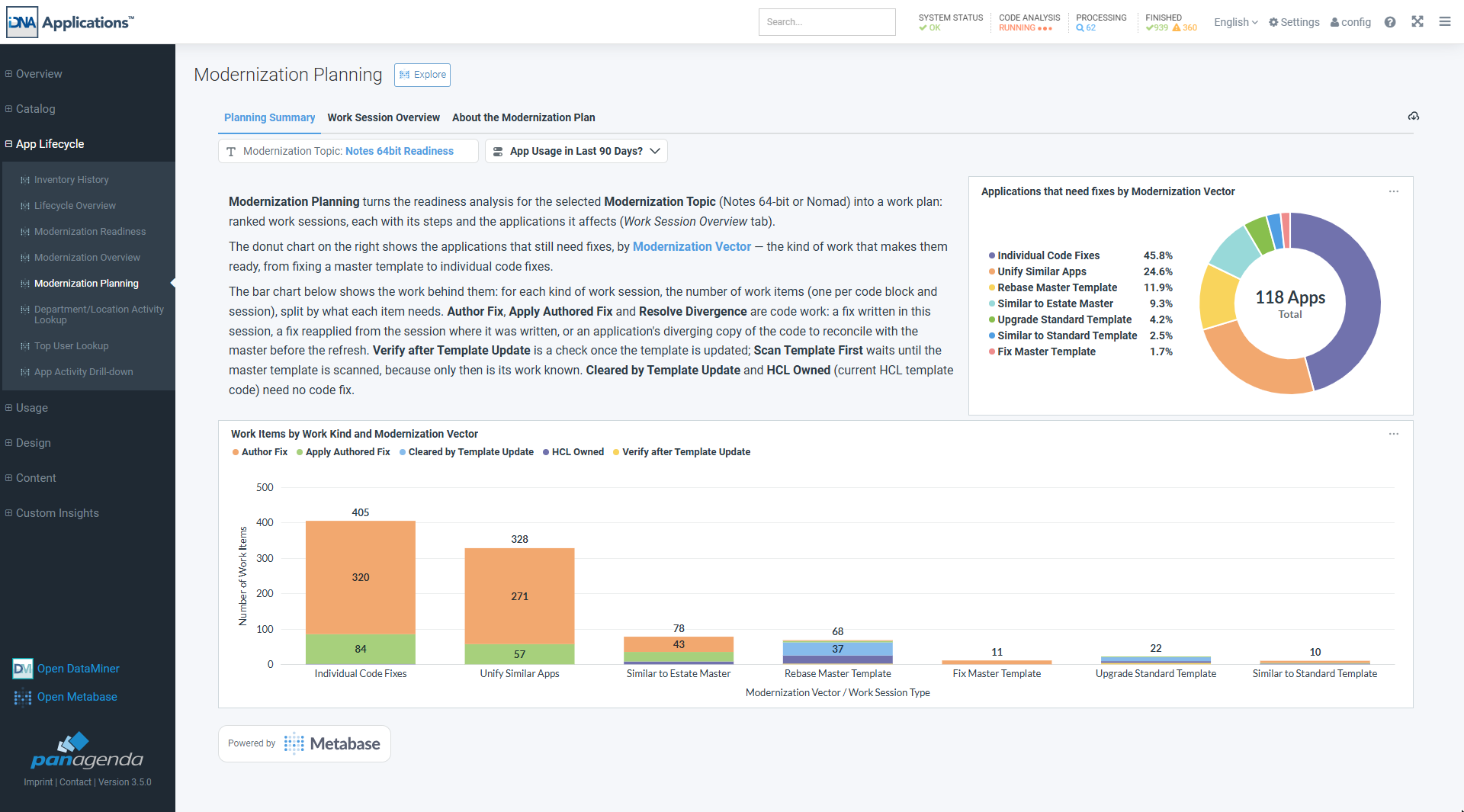
- [Modernization Topic]: the target platform; the dashboard opens with Notes 64-bit.
- [App Usage in Last 90 Days?]: on the Planning Summary tab, limits the charts to applications used in the last 90 days (Yes) or not used (No). The bar chart applies it per session: Yes keeps every session with at least one recently used application.
- [Session Details]: the selected session on the Work Session Overview tab. You set it by clicking a session title.
Planning Summary Tab
- Applications that need fixes by Modernization Vector: the donut chart shows how the applications that still need fixes divide between the routes.
- Work Items by Work Kind and Modernization Vector: for each kind of session, the number of work items, split by work kind. Author Fix, Apply Authored Fix and Resolve Divergence are code work; Cleared by Template Update and HCL Owned need no code fix.
Work Session Overview Tab
The sessions in order of their rank. The session title is a sentence that names the work, for example Rebase master acme_StdR9Mail onto StdR9Mail lineage (99% similar) or Remediate 'InternalApp Acme0024649' in place. Scroll the table to the right for the key numbers: the number of applications, the usage the session clears (user access days in the last 90 days of the applications only this session makes ready) and the blocks to fix.
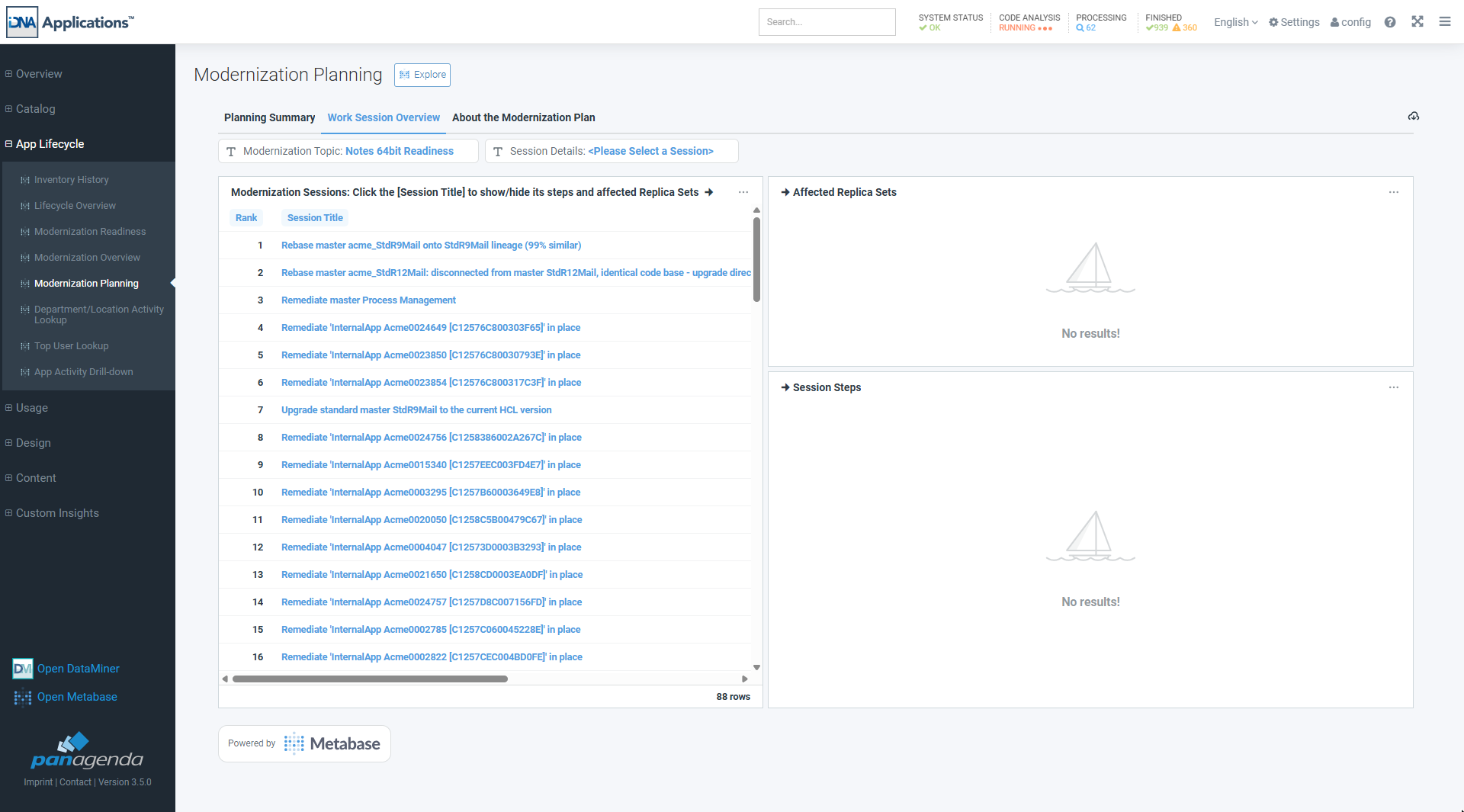
Click a session title to show its details on the right:
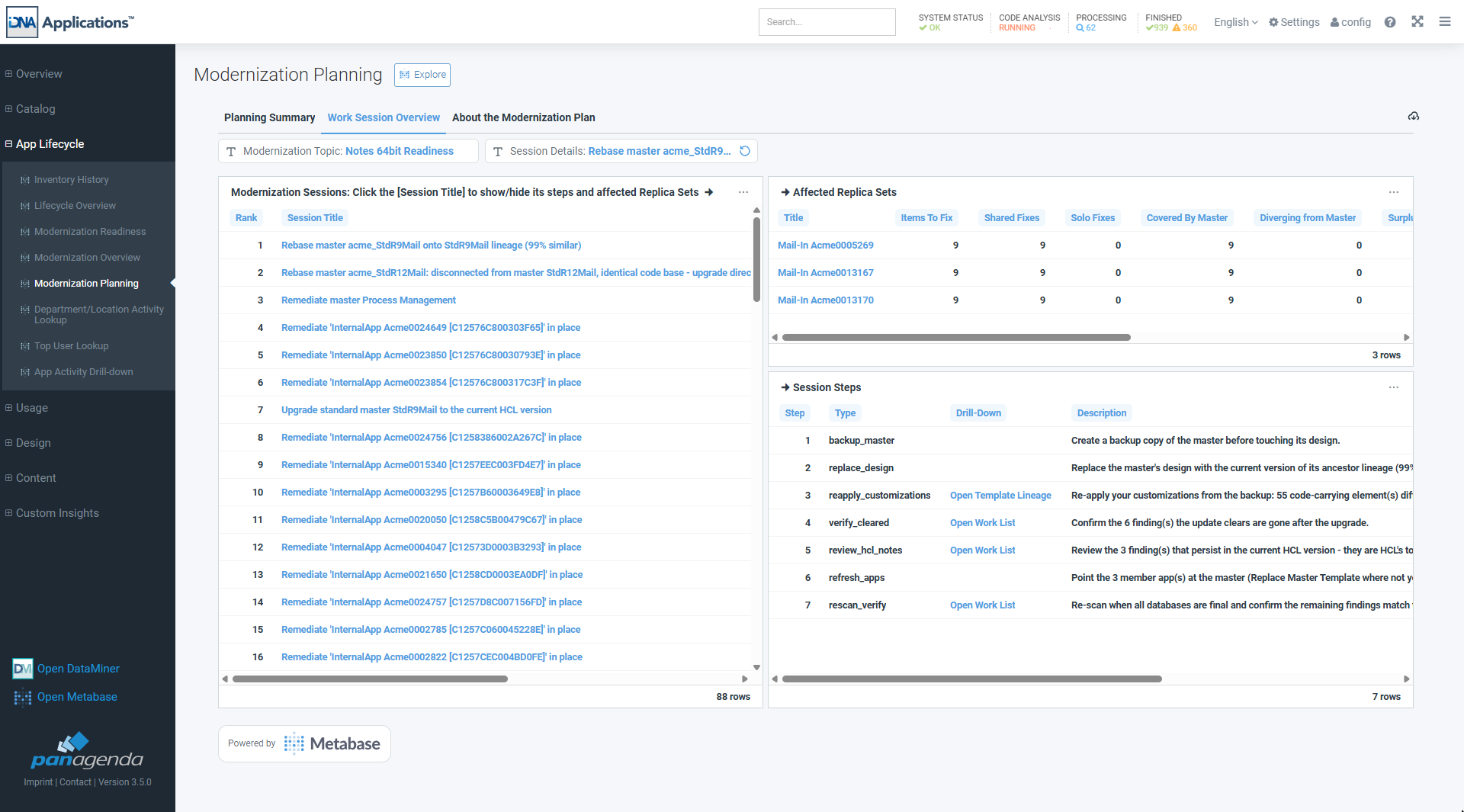
- Affected Replica Sets: the applications the session works on, with their blocks to fix, how many the master covers, how many diverge from it or are surplus to it, the template names they declare and, for a rebase, the ancestor. A title opens the application in Application Insights.
- Session Steps: the procedure of the session, in order. [Open Work List] opens the code blocks of a step in the Modernization Session Work List; for the re-apply step of a rebase, [Open Template Lineage] opens the master's changes in Template Lineage.
Click the session title again to clear the selection.
About the Modernization Plan Tab
The product's own explanation: the session kinds, how the plan is calculated, and what each key number means.
Did you know?
The iDNA Applications Companion can walk you through a session. Ask, for example, "Walk me through the session 'Rebase master acme_StdR9Mail onto StdR9Mail lineage': what do we do, step by step?" The Companion lists the steps in order and puts the code blocks under the step they belong to, tells you which blocks are real work and which are only notes, and warns you where a refresh would overwrite code. You can also ask "Which sessions should we do first for Notes 64-bit, and why?" See Setting up the iDNA Applications Companion.
What to Do Next
- Work the sessions from the top. A code block you meet further down is either written there or was already fixed in an earlier session (Apply Authored Fix).
- For the code work of a session: Modernization Session Work List.
- Before you rebase a master: Template Lineage shows what was customized and what survives the update.
- For all sessions of one route in a single list: Modernization Overview by Work Session.
Related Topics
- Modernization Readiness: The Estate at a Glance: how ready the estate is before and after the work.
- [Design] → [Insights]: the code findings behind the work items.