
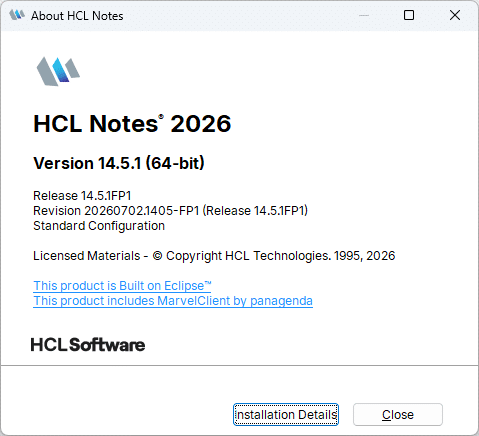
HCL Notes/Domino 14.5.1 shipped on March 19, 2026, and as is tradition the first Fix Pack arrived a few months later to tidy up the things that only reveal themselves once thousands of real users start clicking on real workspaces. HCL Notes/Domino 14.5.1 Fix Pack 1 (FP1) was released on July 16, 2026, and it is a genuinely useful one: a large share of the fixes are regressions introduced in 14.5.1 itself. Blurry action bars, a Preferences dialog that forgot how big it was, printers that suddenly developed opinions about fonts FP1 puts all of that back in its place.
In this post we break down what’s inside Fix Pack 1, group the fixes by area, and help you decide whether to roll it out.
What about fixes in Fix Pack 1
HCL’s release notice states that Notes/Domino 14.5.1 FP1 contains fixes for approximately 46 known issues. The public Notes/Domino Fix List currently shows 49 entries for the release — a small discrepancy that is entirely normal, since the fix list is maintained continuously and entries can be added after the release notice is written. Either way: a solid, focused Fix Pack.
Fix Packs are always cumulative and language independent, so FP1 can be applied on top of any language version of a 14.5.1.x installation. The selection criteria are unchanged: low-risk, high-impact fixes addressing defects that affect the broadest set of customers, plus proven hot fixes, security patches, and JVM updates. Translation fixes are explicitly not included.
Here is the breakdown by area.
Administration
- MSKADT6SJ4: Server – DominoIQ – Fixed an issue where, when running in Remote mode, the statistic
DominoIQ.Config.ModelFileNamewas not being set.
API
- WDCABHFPYM: Programmability – Rest API – Fixed an issue where the REST API was showing incorrect version information.
Calendar
- SBOEDR7H8M: Client – Calendar – Mac – Fixed an issue on the Mac client where sending a DOMI meeting invite was not working as expected for roaming users.
Client Accessibility
- PMIADJCEQX: Client – Editor – Fixed an issue in the Notes editor where the cursor and punctuation marks behaved incorrectly when typing in a right-to-left Arabic language.
Client UI
This is the biggest block in FP1 with eleven fixes — and it is where most 14.5.1 users will feel the difference immediately.
- UTOODRG8WS: Client – Workspace – Fixed an issue where dragging and dropping workspace pages could result in misplaced database icons on the page.
- SBOECSZFPA: Client – Workspace – Fixed an issue where, intermittently, a Workspace page would be renamed after multiple drag-and-drop operations.
- HNAKDSEMW8: Client – UI – Fixed an issue where parts of the UI were blurry, in particular the action bar of the mail template and Search in View.
- JPAIDR8JEC: Client – UI – Fixed an issue where action bar button backgrounds were not painting properly when using a gradient.
- HYZGDSR4NC: Client – Preferences – Fixed an issue where the font size was too small in the File – Preferences UI. This is a regression.
- HNAKDSYC4F: Client – Client UI – Fixed an issue where selecting multiple databases in the Open Application dialog using Ctrl or Shift was not working.
- WSHHDSY7Q3: Client – UI – Fixed an issue where the Application dialog was not remembering its size. This regression was introduced in 14.5.1.
- SUPNCBBJEF: Client – Workspace – Fixed an issue where the Workspace icon was not created when clicking an application link or document link.
- SANECF99U3: Client – Outlines – Fixed an issue where outline entries in some databases were not visible when the Operating System theme was selected.
- JJARDQ2HUC: Client – Outlines – Fixed an issue where some application outline navigators were intermittently missing from custom databases.
- HNAKDUUKLB: Client – UI – Fixed an issue with the setting Open each document in its own window where closing a document window caused a random document to open.
Content Scan
- NFRODT85Q3: Server – MailScan – Fixed an issue where the
tell mailscan statuscommand could crash Domino. This regression was introduced in 14.0.
Database
- SRKMDABFZ8: Programmability – LotusScript – Fixed an issue when removing documents from one category using the LotusScript
CreateViewNavFromCategoryresults. - NGRTDQGD7A: Server – Database – Fixed a crash that could occur with particular color profile fields.
- JPAIDSTFSW: Server – Database – Fixed an issue where running DBMT resulted in the error “Database compactor error: 34:76” when using a black list indirect file.
- JPAIDK8EV9: Server – Database – Fixed an issue where
n*.ndxfiles were being orphaned on NIFNSF servers. - GRHEDUHLLM: Server – Performance – Fixed a performance issue that could occur when copying local databases. This regression was introduced in 14.5.1.
- JPAIDHQF79: Server – Database – Fixed a panic about corrupted memory during
NSFCloseOpenContainershandling.
Editor
- JADGDRUW5M: Client – Editor – Fixed a crash that could occur when certain sized attachments were previewed or opened.
- HNAKDS56SB: Client – Install – Fixed an issue where the Notes client failed to start when launched using a
mailtoURL containing URL-encoded Spanish characters. - RKHADS8EJH: Client – Embedded Browser – Fixed an issue where the Notes client could crash or fail to load a message when processing MIME emails.
- RSSNDP9TAV: Client – Mac – Editor – Fixed an issue on macOS where bolded text was not properly aligned with regular text. This is a regression.
- RKHADUFEZ6: Client – Attachments – Fixed an issue where some MIME emails containing inline images displayed those images incorrectly.
- NNAIDUE3ZD: Client – Editor – Tabbed Tables – Added a new notes.ini setting for tabbed tables that restores the pre-14.5.1 tab color behavior (all tabs displaying their color).
- MMNDDTYNP8: Client – Printing – Fixed an issue where certain printers would no longer print in Notes 14.5.1 due to the OTF Inter fonts. The previous workaround was to delete those fonts.
HTTP Server
- CSAODQYBQU: Server – Web Browser – Views – Fixed an issue with embedded views on a form where a single category view failed with “No documents found” via the web.
- STAADTJ9AS: Server – HTTP Server – Fixed an issue where calling a Java agent from HTTP and connecting to HTTPS resulted in a TLS error. This is a regression.
LotusScript
- ASHEDR7CMB: Designer – LotusScript – Fixed an issue where a LotusScript agent compiled on a 64-bit Designer client failed when run on a 32-bit Notes client.
- KSAUDSJAAH: Programmability – LotusScript – Fixed an issue with LotusScript and the Nomad client that occurred when assigning using an array in a type.
- RBARDRV8Q8: iNotes – Mail – Fixed an issue where some images embedded in CID format within an email were not displayed correctly in iNotes.
- KMOADR9C3J: iNotes – Verse – Fixed an issue where iNotes returned a generic error message and error code from an iNotes API when the mail database exceeded a limit.
- HHIEDRM936: iNotes – Mail – Fixed an issue where emails containing
x-amp-htmlwere not rendered correctly. - ASIADP9HZ4: Client – Mail – MIME – Fixed a crash that could occur when opening MIME emails. The fix switches the default from IE to Edge as the embedded browser, controlled by a new notes.ini setting.
- SGHHDUBDVB: Server – Mail – Fixed a problem where an S/MIME encrypted message could not be read and its attachment was lost if the recipient’s mail database had exceeded quota.
Messaging / MIME
- BRISDT4J43: Server – Mail – Fixed an issue where Delivery Status Notifications (DSNs) generated by Domino were not RFC 3464 compliant with regard to the To field.
Preferences
- KNARDSNGNR: Client – Preferences – Fixed a crash that could occur when clicking More – Preferences in the mail database. This is a regression.
Programming IDE
- SRPADSNAVZ: Designer – JavaScript – Fixed an issue where the JavaScript editor intermittently became unresponsive for roughly 2–4 seconds.
Search
- YPOLDQ97F8: Client – Search – Fixed an issue in Search Center where text entered in the Search Center was not displayed in the search bar once Search This View was used.
Security
- CTOEDUGLBD: Server – Security – Fixed an issue where HTTP tell commands broke a chained OIDC Identity Provider configuration, which in turn broke Domino OIDC.
- DDUTDTKR76: Server – Security – Added a new notes.ini setting for OIDC login,
OIDC_LOGIN_COOKIE_UNLIMITED_DURATION. When set to 1, it removes the 15-minute cookie duration limit.
Tools
- JJARD55HCB: Designer – Export – Fixed an issue where the YAML OnDisk Sync feature would sometimes miss elements when syncing. This is a regression.
Web Server
- JJARDQYHE2: Server – Web Server – Fixed an issue in web agents where an unauthorized user error encountered during execution was not handled correctly.
- ATHNDR8GHR: Client – Mac – Fixed an issue where
NotesHTTPRequestcalls failed for roaming users on macOS. This regression was introduced in 14.5.
XPages
- ASHEDQPNA4: Programmability – XPages – Fixed an issue where enabling Content Security Policy (CSP) on an XPages application broke the XPage.
- JJARDSPDK8: Programmability – XPages – Fixed an issue where an XPages tooltip with the property
dynamicContent=truewas not working. This is a regression.
If you want the full, always-current list of included fixes and SPR numbers, you can find it here in the HCL Fix List.
Embedded Sametime fixes
FP1 also carries six Embedded Sametime fixes. These are tracked separately from the Notes/Domino Fix List, so they are easy to miss but if your users live in the chat window, this is the part of the release notice worth reading twice.
- SAME-74413: Fixed an issue where the chat window took cursor focus on an incoming message in Integrated webchat mode.
- SAME-73252: Fixed an issue where the web integrated chat window auto-refreshed.
- SAME-74115: Fixed an issue where a random group chat was created with only one participant.
- SAME-71826: Fixed an issue setting a user’s presence status based on keyboard and mouse activity.
- SAME-74076: Fixed an issue with auto login when clicking a chat in a supported locale.
- SAME-76325: Fixed an issue where double-clicking a user took about three minutes to open a chat window on a VM.
That last one deserves a moment of silence. Three minutes to open a chat window is enough time to walk over to your colleague’s desk and ask them in person.
Things to Note
- The JVM was upgraded to Semeru jdk-21.0.11+10 with timezone version 2026b.
- Starting with 14.0 FP1, AUT files are no longer attached to Knowledge Base articles they now live on MHS.
- Installing Domino on SUSE Linux Enterprise 15 SP6 is supported. You will see a warning during installation, but the configuration is supported.
- Installing 14.5.1 is a prerequisite FP1 is applied on top of an existing 14.5.1 installation.
- Fix Packs are cumulative and language independent, so FP1 can go on any language version of 14.5.1.x.
System Requirements
Nothing dramatic changed here, but a few points are worth confirming before you roll out:
- Windows: Windows 10, 11, Server 2019, 2022, and 2025 all 64-bit, x86-64 only.
- macOS: Sonoma (14.x), Sequoia (15.x), and Tahoe (26.x) are supported. Tahoe adds M4 and M5 to the supported Apple silicon list.
- Virtualized: Citrix Virtual Apps & Desktops 7.1912+, Citrix XenApp 7.15, VMware VDI 7, VMware Horizon 7.13 and 8, and Microsoft RDS 2019/2022. Note that these platforms are not supported for the Designer and Administrator clients.
- Disk: 2.8 GB to install the Windows Standard client, 900 MB to run it (excluding local mail files). 2 GB or more recommended on macOS.
- Memory: 1 GB minimum, or whatever the OS demands if that is higher. In 2026, treat this number as a legal minimum rather than a design goal.
- Display: 1024 × 768 minimum; OpenGL hardware support on Windows, 32 MB video RAM or more on macOS.
Full details are in HCL Notes 14.5.1 and 14.5.1 FP1 System Requirements (KB0128971).
Download Resources
You can download HCL Notes and Domino 14.5.1 Fix Pack 1 from the HCLSoftware download portal.
Further Information
- Notes/Domino 14.5.1 Fix Pack 1 Release Notice (KB0132257)
- HCL Notes and Domino 14.5.1 Release Notes (KB0129261)
- HCL Notes 14.5.1 and 14.5.1 FP1 System Requirements (KB0128971)
- HCL Domino 14.5.1 and 14.5.1 FP1 System Requirements (KB0128491)
- HCL Domino 14.5.1 and 14.5.1 FP1 for IBM i Software Requirements (KB0128972)
- HCL Notes/Domino Fix List
- HCL Customer Support Portal
- Ideas portal
Should I update?
Yes and with less hesitation than usual.
The shape of this Fix Pack is a large portion of the fixes which are regressions introduced in 14.5.1 itself. The blurry action bars, the shrunken Preferences font, the Application dialog that forgot its size, the local database copy performance hit, the printers that stopped printing because of the new OTF Inter fonts. None of these will take down your environment, but every one of them generates help desk tickets, and collectively they make 14.5.1 feel less polished than it actually is.
On the server side there is real substance too: the NIFNSF .ndx orphaning fix, the NSFCloseOpenContainers memory panic, the DBMT compactor error, and two OIDC fixes one repairing chained Identity Provider configurations broken by HTTP tell commands, the other adding OIDC_LOGIN_COOKIE_UNLIMITED_DURATION for anyone who has been fighting the 15-minute cookie limit. Add the S/MIME-over-quota fix, the RFC 3464 DSN compliance correction, and the updated Semeru JVM with 2026b timezone data, and the case is straightforward.
My advice: schedule it. Test it against your own application landscape first as always but there is no template change to worry about in this one, and the risk profile is exactly what a Fix Pack should be. If you are still on 14.5.1 GA, you are running a version with a known list of annoyances that already has a fix.
For a MarvelClient Upgrade customer, integrating Fix Pack 1 into your Notes 14.5.1 client setup is very easy. If you would like assistance, or are interested to learn more about MarvelClient Upgrade, reach out and let’s connect.