Microsoft and many others provide handy checklists to test your Copilot readiness. Helpful, but all the ones I’ve read so far focus on the same thing, data requirements for controlling input to M365 Copilot:
- Sensitivity labels
- Oversharing remediation
- SharePoint permission cleanup
- Retention policies
- etc.
All of that is necessary. But they all have one glaring omission.
The silent work horse
Think about the following: in many tenants, the most visible AI output is not a Copilot chat prompt at all, it’s the meeting recap that appears automatically after every meeting: The Intelligent Teams meeting recap. Depending on licensing and usage, it may well be the most used Copilot feature you have, responsible for:
- Recording with chapters and topics
- Summarizing and transcribing
- AI recommended tasks
- etc.
Basically, all of this rests on a single item: the quality of the audio capture.
Now, the transcript is not a document that anybody curated. It is a computer generated transcript in real-time, captured through whatever microphone, room and network path each participant happened to be using during that meeting. So, the quality of the capture determines the quality of all that is derived from it.
So who is actually governing that?
Two pillars of Copilot readiness — and the one that’s missing
I am not a Copilot readiness person. But from my understanding, the readiness conversation rests mostly on two pillars, and both of them are about data that already exists.
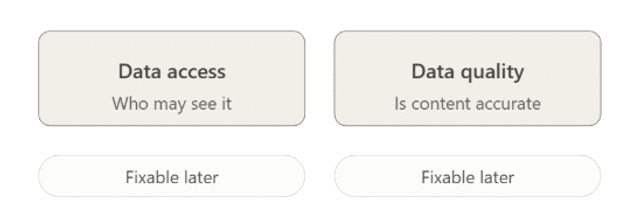
Data access asks who may see what Copilot produces. Data quality asks whether the stored content is accurate and current. The owners of these two pillars are usually different people and often in different departments.
What is missing in my eyes is a third one: Capture quality.
Was what we recorded and transcribed actually faithful to what happened in the meeting?
Now you could argue that capture quality is just part of data quality. Conceptually you would be right. However, I would still keep it separate, because of one property it does not share with the other two: it cannot be remediated afterwards.
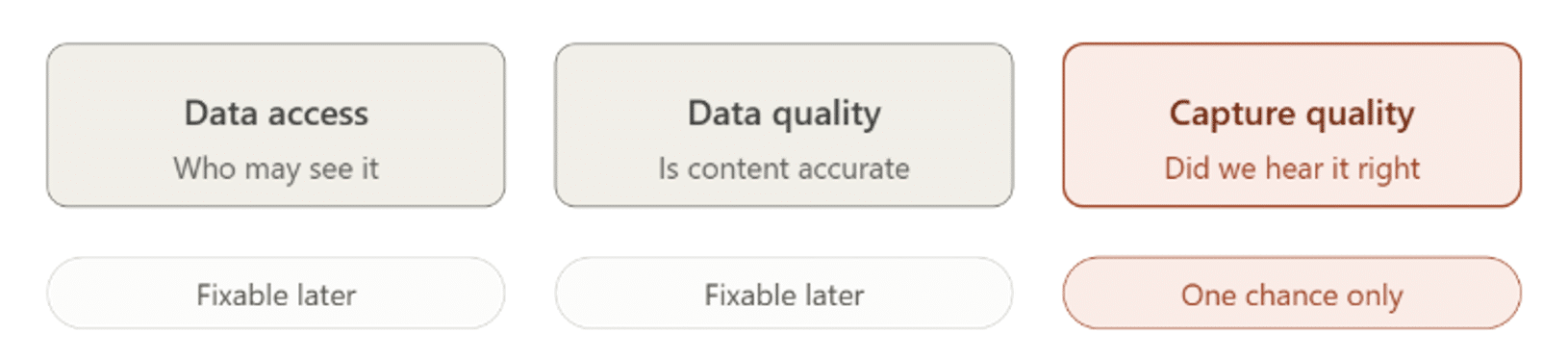
An error in a document can be updated or deleted next week. A wrongly assigned permission can be corrected. Both of those workstreams are retrospective and repeatable.
A meeting that was captured badly cannot be re-captured. There is no easy second pass and no cleanup and no “we will fix it in phase two” as the recording and transcription are already unreliable. The Meeting organizer can, in theory, run through the transcription and adjust it, but what you cannot do is re-capture the audio. And that is where the loss has already happened.
That asymmetry is worth discussing. Two of the three inputs to Copilot are fixable later. The third one you get exactly one attempt at, it happens live, thousands of times a week, and usually nobody is watching.
How a Teams meeting transcript is actually created
A Teams meeting produces a single transcript. It is generated in the cloud, from the audio as the cloud service receives it. There is no per-attendee version. Everybody reads the same text.
That single fact splits network impairment into two categories:
Incoming impairments: Your inbound audio stream degrades. Bad home Wi-Fi, everybody sounds like a robot, you miss half of the discussion. Your experience is ruined, but the transcript, though, is unaffected and the service already had everyone’s audio cleanly.
Outgoing impairments: Your outbound audio stream degrades. Packet loss on your send path or simply using a faulty microphone. Your audio arrives at the transcription service degraded, and that degradation is written into the shared transcript. Permanently. For all thirty attendees and for every AI agent that consumes it afterwards.
So Poor Call Rate and transcript integrity are actually pointing in different directions. You can drive the first one down and still learn almost nothing about the second one. The only way you can is if you know what the AI agent’s experience is.
Why Poor Call Rate tells you nothing about transcript quality
The picture below indicates that the recording bot service in the cloud had issues in receiving a good audio media stream in a specific meeting. Exactly the thing you want to capture but that most tools won’t. Nor will Copilot tell you it struggled. It will simply interpret what it ‘gets’, good or bad without ever raising an alarm. Producing a transcript that might not be what you expected….

What causes the call quality for a participant or AI agent to fail is a topic of its own, and not the focus for this article.
The uncomfortable irony
And here is what I think should be brought up. Governance actually makes defective transcripts more dangerous, not less. A retention policy commits you to keeping it. A sensitivity label dignifies it as an official record. eDiscovery guarantees that somebody will find it in three years. And unlike a wrong number in a spreadsheet, you cannot spot a bad transcript by reading it. A confidently mis-transcribed sentence reads perfectly. So, we end up applying enterprise strictness to something whose accuracy nobody ever validated.
How to measure Teams capture quality
You don’t necessarily need a new program. You mainly need to add one pillar to the existing two, and measure the distribution. Which users, sites, networks, rooms or even recurring meetings are systematically producing audio that the AI Copilot layer shouldn’t really be trusted on?
That is a cohort question, and whereas the original bad capture can’t be fixed, cohort findings allow you to remediate the causes and prevent future capture issues. For example by replacing old headsets or fixing Wi-Fi coverage, etc.
Key elements to improve capture quality:
- Look at send-side metrics per participant and per meeting, not just aggregate Poor Call Rate to identify potential issues.
- Drive voice profile enrolment in the meeting rooms where the decisions actually get made so individual speakers can be better recognized and captured by the AI.
Summary
Data access asks who may see it. Data quality asks whether it is accurate. Capture quality asks whether we heard it correctly in the first place and it is the only one of the three that you cannot go back and fix.
Bad audio used to be a user experience complaint. Meanwhile it has quietly become a AI data quality problem where more and more crucial Copilot functionality depends on, and I think it belongs on the governance checklist. Capture quality is the one pillar where the only available action is measurement, not remediation. So, perhaps it’s time to start adding that to your Copilot readiness program .
Disclosure: I work at panagenda. Our TrueDEM product measures inbound and outbound media stream quality per call and per participant, including the recording and transcription agent. Feel free to reach out if you want to know more.