Why this matters
A Teams meeting can have multiple files and artifacts associated with it. From recordings and transcripts to collaborative and Facilitator notes. How these are stored is a complex story of mixed ownership and potential loss of information when people leave. Starting mid-November Microsoft is rolling out changes to how collaborative & Facilitator notes are stored. However, the changes will only affect future storage, not existing files. Understanding how meeting artifacts and notes were stored until now as well as in the future is important so you can understand what the risks are and determine if you need to take mitigating actions.
What happened to the meeting notes?
Picture a weekly status meeting that runs smoothly for two years. The facilitator agent takes the notes, everybody is happy. Then a colleague leaves the company, after a month the leaver process cleans up his OneDrive, and poof!: A good part of the meeting’s AI notes is gone with it.
Nobody did anything wrong. So what happened? The answer is a confusing ownership system in Microsoft Teams. So, let’s dive into the topic.
How meeting storage works
Before arguing anything, let’s look at how and where Teams actually stores things when it comes to meetings.
For channel meetings, it is simple. Everything is stored in the SharePoint associated with the Team and stays there regardless of participant changes. For non-channel meetings though, the situation was (until now) a bit more complex. For those, each meeting artifact (recording, transcript, notes, etc.) could have a different owner and therefore its own storage location:
| Meeting item | Stored in | Triggered by |
| Recording | Organizer’s OneDrive | Organizer, then co-organizer, and as fallback the initiator (MC1085569) |
| Transcript | Organizer’s OneDrive, next to the recording | Organizer (MC726122) |
| Facilitator AI notes (.loop) | Until mid-November 2026: Meetings folder of the Initiator’s OneDrive After Nov 2026: Organizer’s OneDrive | Until mid-November 2026: Whoever turned Facilitator on or was first to the meeting in which Facilitator was configured to start automatically* After Nov. 2026: The organizer |
| Collaborative meeting notes (.loop) | Until mid-November 2026: Organizer’s or first creator’s OneDrive After: Organizer’s OneDrive | Until mid-November 2026: Whoever created the notes After: The organizer |
*As long as it is a Copilot licensed internal participant
Recordings and transcripts mostly follow the organizer. Facilitator notes followed the person who switched Facilitator on. Something that, depending on the meeting settings, any Copilot licensed (internal) participant in the meeting can do. Worse yet, if the Facilitator was activated by default by the organizer in the meeting settings, the initiator was simply the first participant (internal / with a Copilot license) joining the meeting. Roadmap item #576194 now fixes that, storing all notes to the organizer’s OneDrive instead.
Why is this important?
As the table above already shows, Facilitator is built on Loop, so a .loop file is created every time it activated for a new meeting occurrence and previously each .loop file was stored individually in the OneDrive of the person initiating it or first to the meeting. This wasn’t very clear and most people wouldn’t even notice it as the meeting series notes in the Loop interface show all the meeting notes as a single series, independent of each .loop files location. Making it look like they are all in one place, even if they are clearly not. If one person’s OneDrive was cleaned up, this could result in individual notes simply disappearing.
Let’s look at an example of how this would look like in a real-life scenario up to now:
Example: One meeting, four OneDrive’s
User 1 schedules a recurring meeting (not in a channel) and invites 10 colleagues across the globe. Everyone is a presenter. Facilitator is on for every occurrence. Not really special.
User 1 started the first 10 facilitator sessions. After that, User 2, User 8 or User 10 started the other sessions, depending on who was online first.
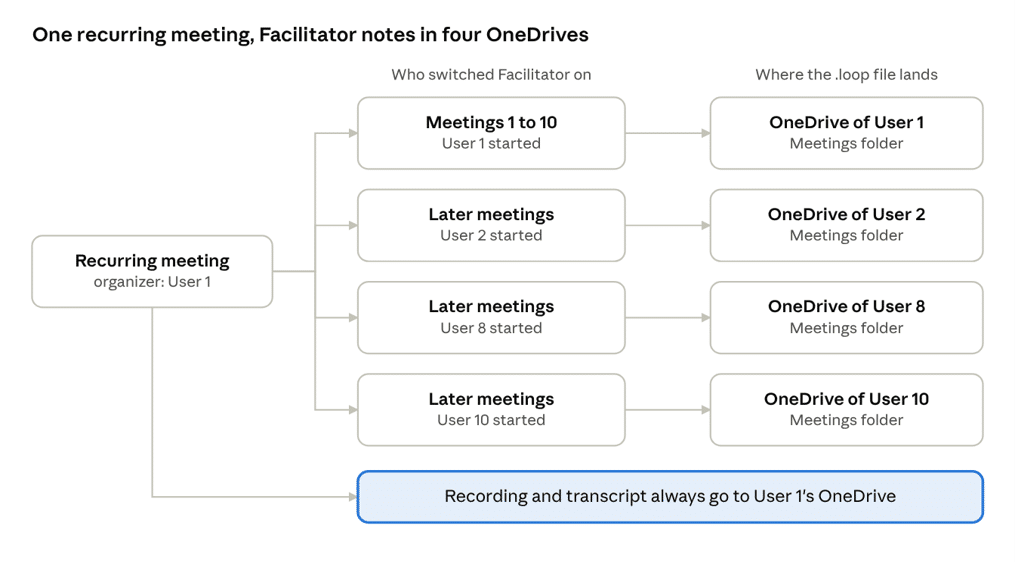
If each of them counts as the Facilitator initiator, one meeting series ends up with .loop files in four different OneDrive Locations. With Multi-Geo, possibly in four different geographies. The recording and transcript, meanwhile, stay with User 1. So, the records of one meeting are split across several owners.
Then User 2 leaves…
Now User 2 resigns. The standard leaver process deletes his account, and his OneDrive follows once the deleted-user retention window ends.
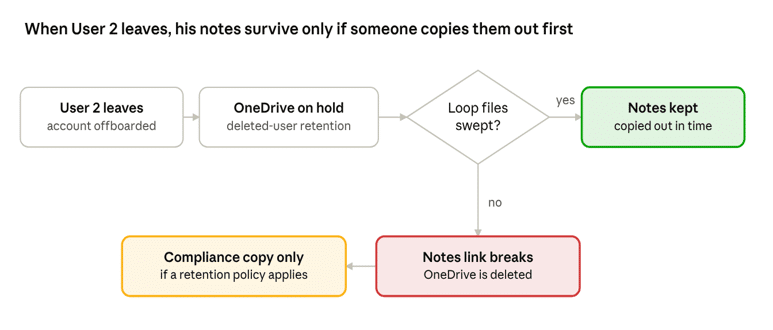
You would assume a retention policy would covers this, right? Partly. A Purview retention policy can hold a copy for eDiscovery. But the Notes tab of those meeting occurrences points to a file that no longer exists, and Teams offers no ownership transfer that keeps the link working so to the eye of the meeting participants, those notes are simply gone. Retention keeps a compliance copy. It does not keep the notes usable. The only solution being that you copy out any notes .loop files before the OneDrive is deleted and store it in another users OneDrive. However Teams can’t re-point to a new location so you need to provide the new location of the files inside the affected meeting chat. This is exactly why Microsoft likely implemented the change but it doesn’t solve it for existing notes as the change will only have effect for future notes, not for existing ones.
Where the tooling falls short
Microsoft documents most of this openly. Still, the gaps around ownership of meeting notes add up, and in my eyes they belong on the governance checklist:
- No sensitivity label inheritance. A meeting marked highly confidential does not pass its label to the Facilitator notes file
- No retention labels on the notes. Retention labels aren’t supported for cloud attachments in AI-generated notes (Microsoft Learn).
- Meeting protections don’t apply. Watermarks and Prevent copy and paste aren’t applied to Facilitator responses or notes.Data residency follows the OneDrive. With Multi-Geo, a non-EU initiator’s notes land in his geography (Multi-Geo in Teams).
Things are changing
Microsoft has clearly recognized the risks in this meeting notes ownership confusion and is rolling out changes to remedy at least some of it. From November 2026, new collaborative meeting notes and Facilitator notes in non-channel meetings go to the organizer’s OneDrive instead of who starts it (Roadmap item #576194). Great, problem solved! Well, yes and no. Be aware that Microsoft indicated that existing .loop files will not be moved. Making it a fix for files going forward, not for those already in existence. This means that the issue described above could still happen well in the future as long as the meeting notes were made before mid-November 2026.
So, if you or your organization are using Facilitator for crucial meeting notes, the coming weeks would be a good time to check your offboarding procedures (are .loop files included?) and retention policies and to see if there any meeting notes files you’d already like to preemptively consolidate. It’s better to be aware and take action now you know then to wait and run into this when it is too late.