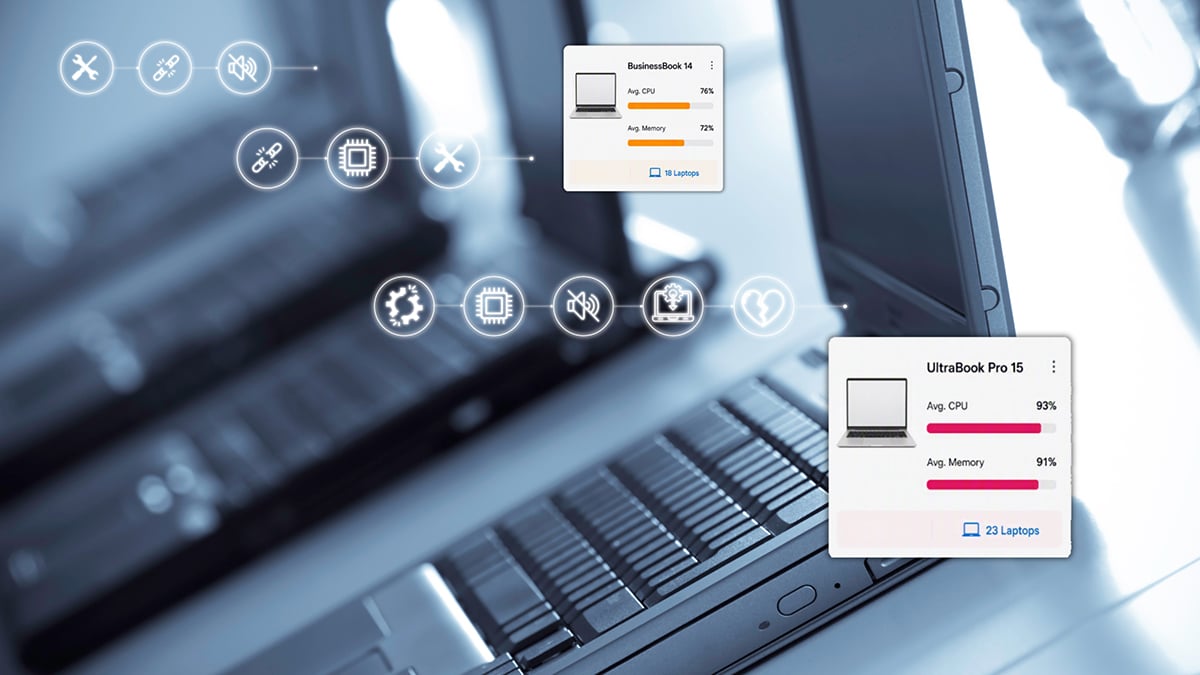
Spot device issues before they drag down your users

That laptop is four years old. The CPU spikes every time a Teams call starts. A background process is eating 40% of memory. Your user just says “it’s slow.” TrueDEM shows you exactly what’s going on with every device.

What is TrueDEM device intelligence?

TrueDEM’s device intelligence gives IT teams continuous visibility into how endpoint hardware and software affect the Microsoft 365 experience. The agent runs in user context on the device itself, capturing data on CPU utilization, memory usage, active processes, OS and Teams versions, audio devices, hardware characteristics, and more. No remote sessions needed, no matter where the user works. Built by panagenda as part of the TrueDEM platform.

The device problem nobody can prove

Devices are one of the most common root causes of poor M365 performance and one of the hardest to diagnose.

Users report symptoms, not causes

"My Teams calls keep breaking up." "Outlook is slow today." "My laptop feels sluggish." These descriptions don’t tell you whether the problem is the device, the network, or the service. Without endpoint data, you’re guessing.

Hardware refresh decisions are based on age, not performance

Most organizations replace devices on a fixed cycle: three years, four years, whatever the policy says. But a three-year-old device running light workloads may perform perfectly, while a newer device loaded with resource-heavy software struggles. Age is a crude proxy for actual performance.

You can’t see what’s happening without interrupting the user

Traditional troubleshooting means scheduling a remote session, asking the user to reproduce the problem, and hoping the issue shows up while you’re watching. For intermittent problems like a background process that only spikes during calls, this almost never works.

Software conflicts are invisible until they cause problems

An antivirus scan that runs during meeting hours. A VPN client that competes with Teams for CPU. A driver that causes audio device disconnections. These interactions don’t show up in any single tool’s logs, you need correlated device-level data to spot them.

TrueDEM gives you continuous device performance data for every endpoint. No remote sessions, no user interruption, no guesswork.

The device problem nobody can prove

Devices are one of the most common root causes of poor M365 performance and one of the hardest to diagnose.

Symptoms, not causes

Users report symptoms, not causes

"My Teams calls keep breaking up." "Outlook is slow today." "My laptop feels sluggish." These descriptions don’t tell you whether the problem is the device, the network, or the service. Without endpoint data, you’re guessing.

Age-based refresh

Hardware refresh decisions are based on age, not performance

Most organizations replace devices on a fixed cycle: three years, four years, whatever the policy says. But a three-year-old device running light workloads may perform perfectly, while a newer device loaded with resource-heavy software struggles. Age is a crude proxy for actual performance.

Can’t see without interrupting

You can’t see what’s happening without interrupting the user

Traditional troubleshooting means scheduling a remote session, asking the user to reproduce the problem, and hoping the issue shows up while you’re watching. For intermittent problems like a background process that only spikes during calls, this almost never works.

Invisible software conflicts

Software conflicts are invisible until they cause problems

An antivirus scan that runs during meeting hours. A VPN client that competes with Teams for CPU. A driver that causes audio device disconnections. These interactions don’t show up in any single tool’s logs, you need correlated device-level data to spot them.
TrueDEM gives you continuous device performance data for every endpoint. No remote sessions, no user interruption, no guesswork.

How TrueDEM spots device issues

Continuous monitoring without remote sessionsCPU, memory, processes, hardware, OS, audio devices. All in user context.
The TrueDEM agent captures device performance data continuously as part of its normal operation. CPU, memory, active processes, hardware specs, OS version, Teams version, audio devices, all collected in user context, without needing admin rights or a remote session.
Performance during calls, not just idle stateCPU and memory tracked specifically during Teams calls.
Most device data is captured at rest. TrueDEM specifically tracks CPU and memory usage during Teams calls, so you can see whether a device struggles under the load of real-time communication. Which is when device limitations matter most.
Top resource-consuming processesWhich specific processes spike during calls.
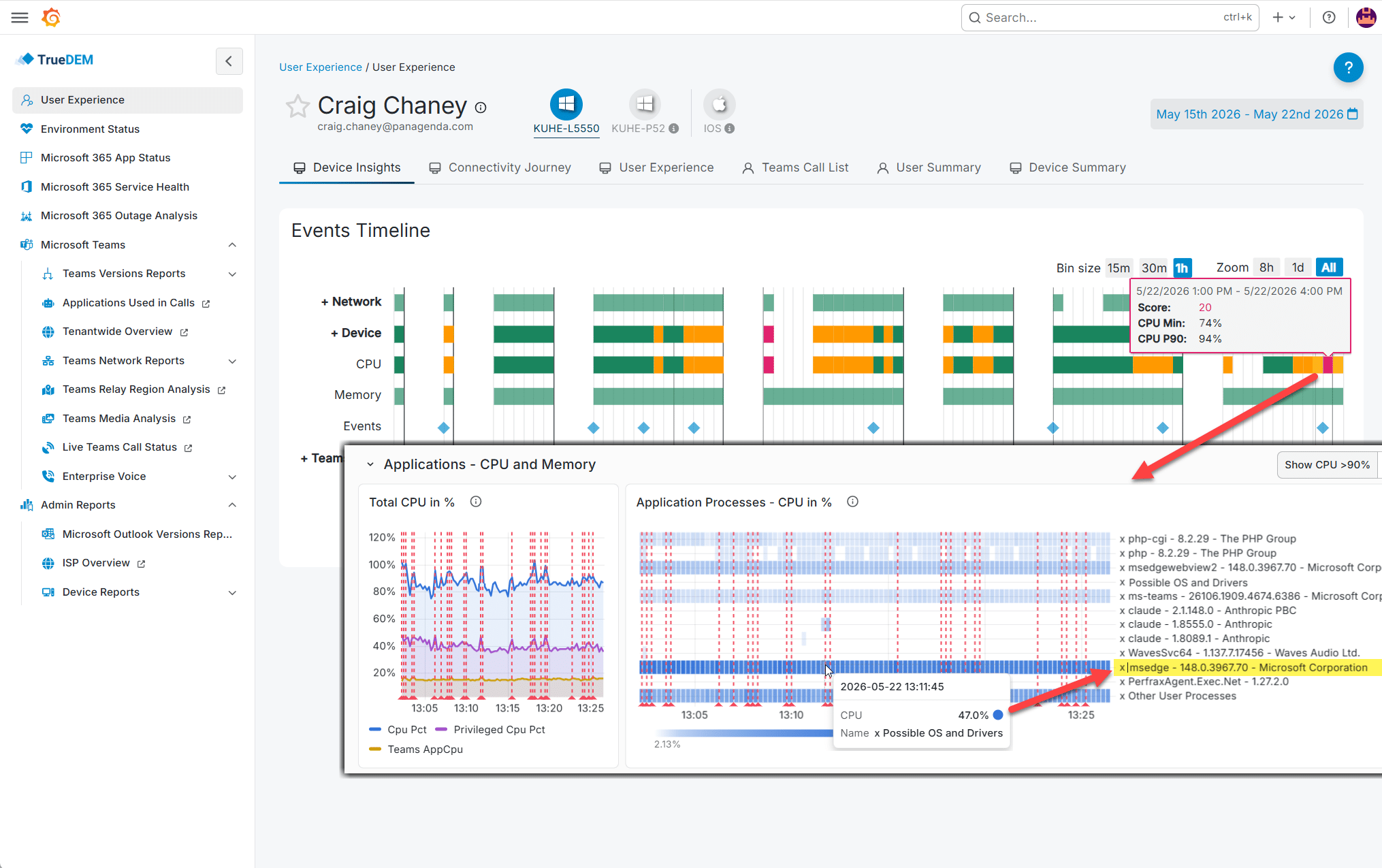
Not just total CPU or memory usage, but which specific processes are consuming resources. Identify the backup agent that spikes during calls, the security tool that runs full scans at 10 AM, or the browser with 40 tabs competing for memory.
Software change trackingInstalls, updates, removals logged on a timeline.
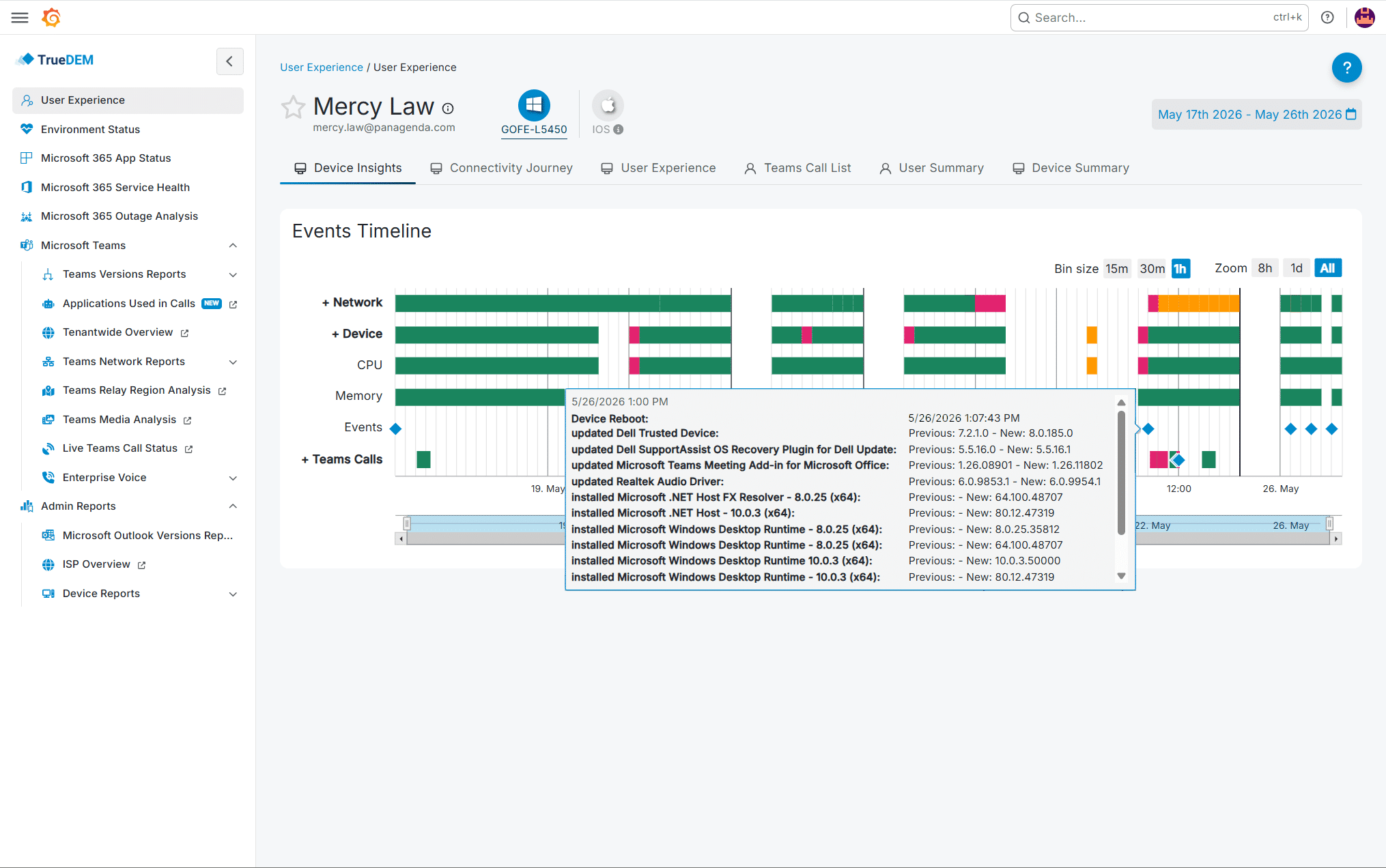
TrueDEM logs software installations, updates, and removals as events on a timeline. When a user’s experience suddenly degrades, you can correlate it with a recent software change without asking them what they installed.
Application version distributionTeams, OS, Outlook classic vs. new. Manage migrations with data.
See which Teams versions, operating systems, and Outlook clients (classic vs. new) are deployed across your organization. Know who’s on which version and whether a specific version is causing issues on certain device types.
Hardware and audio device IDLaptop model, headset, camera. Correlate with performance patterns.
Know exactly which laptop model, headset, camera, and audio device each user has. Correlate device models with performance patterns across your fleet to identify hardware that consistently underperforms.

What you actually see in TrueDEM

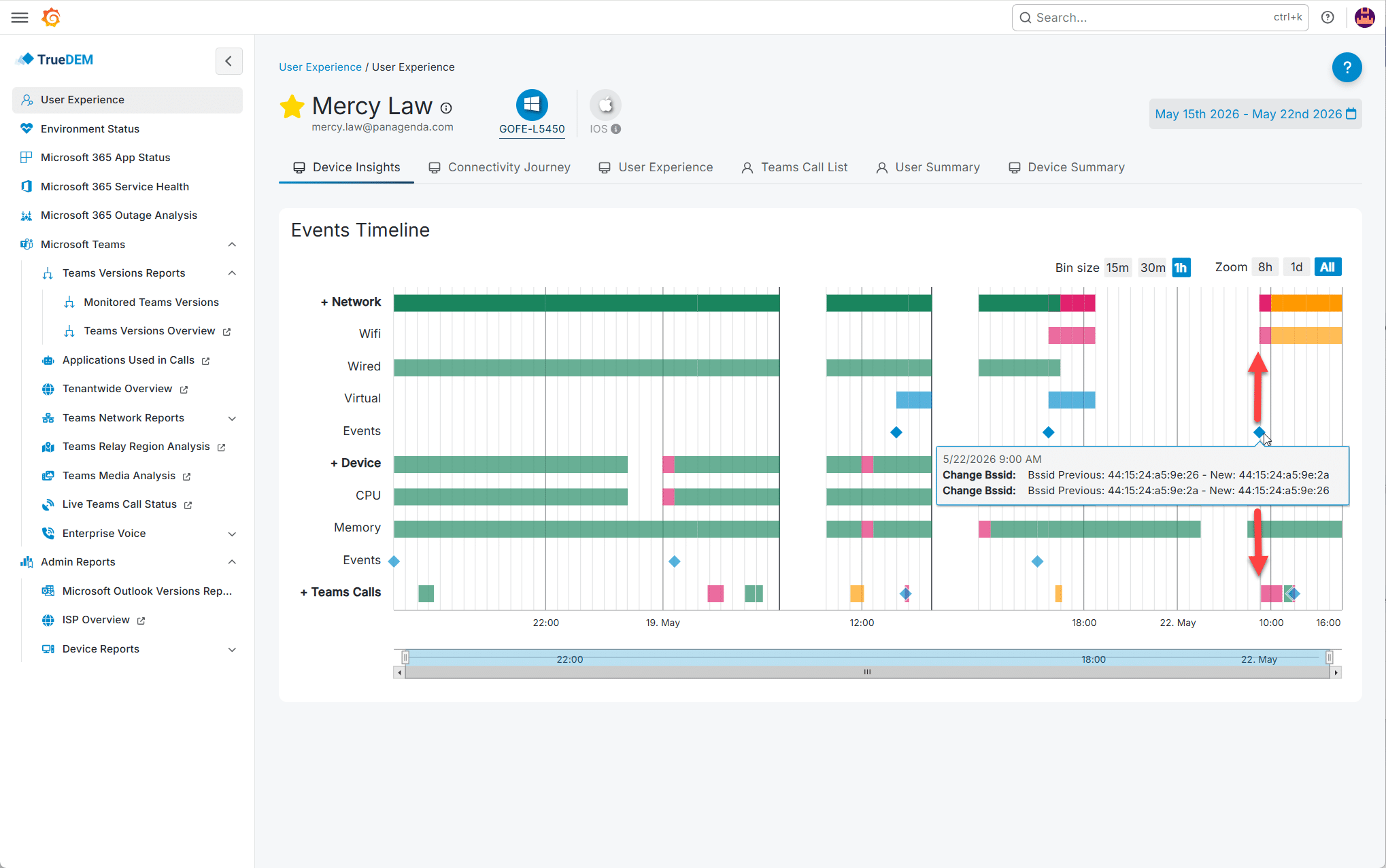
Device Insights timeline

A comprehensive timeline view showing network, device, and call quality events for any user’s device over the last 7 to x days. Three expandable categories with aggregated scores.

CPU and memory with smart thresholds

Device utilization shown as both minimum and 90th percentile (P90) values, so extreme outliers don’t cause false alarms. You see sustained resource pressure, not momentary spikes, which is what actually impacts the user experience.

Device Summary

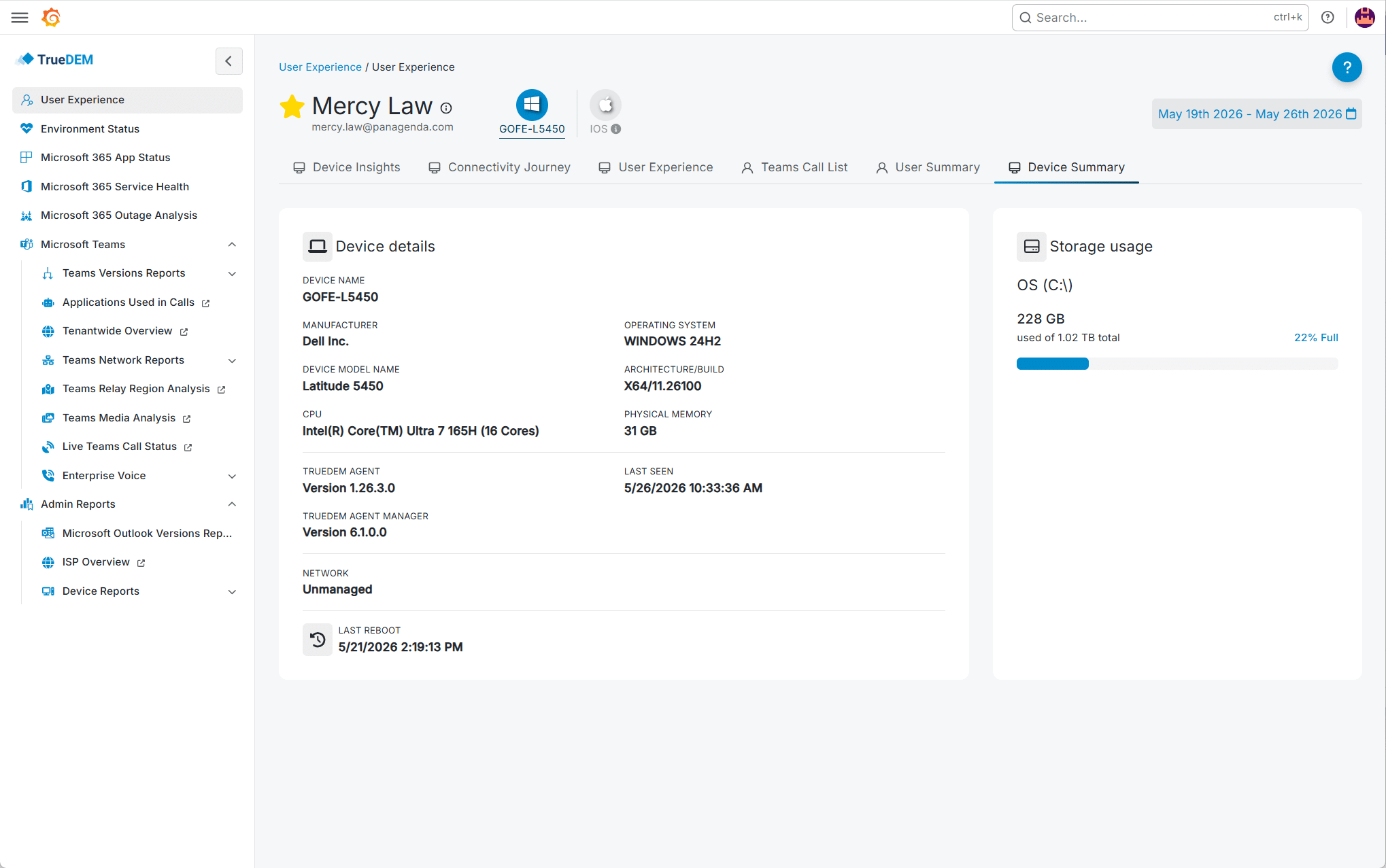
Basic device characteristics at a glance: hardware model, OS version, Teams version, agent status, and last-seen timestamp. Quickly verify data completeness before drawing conclusions.

Outlook version distribution

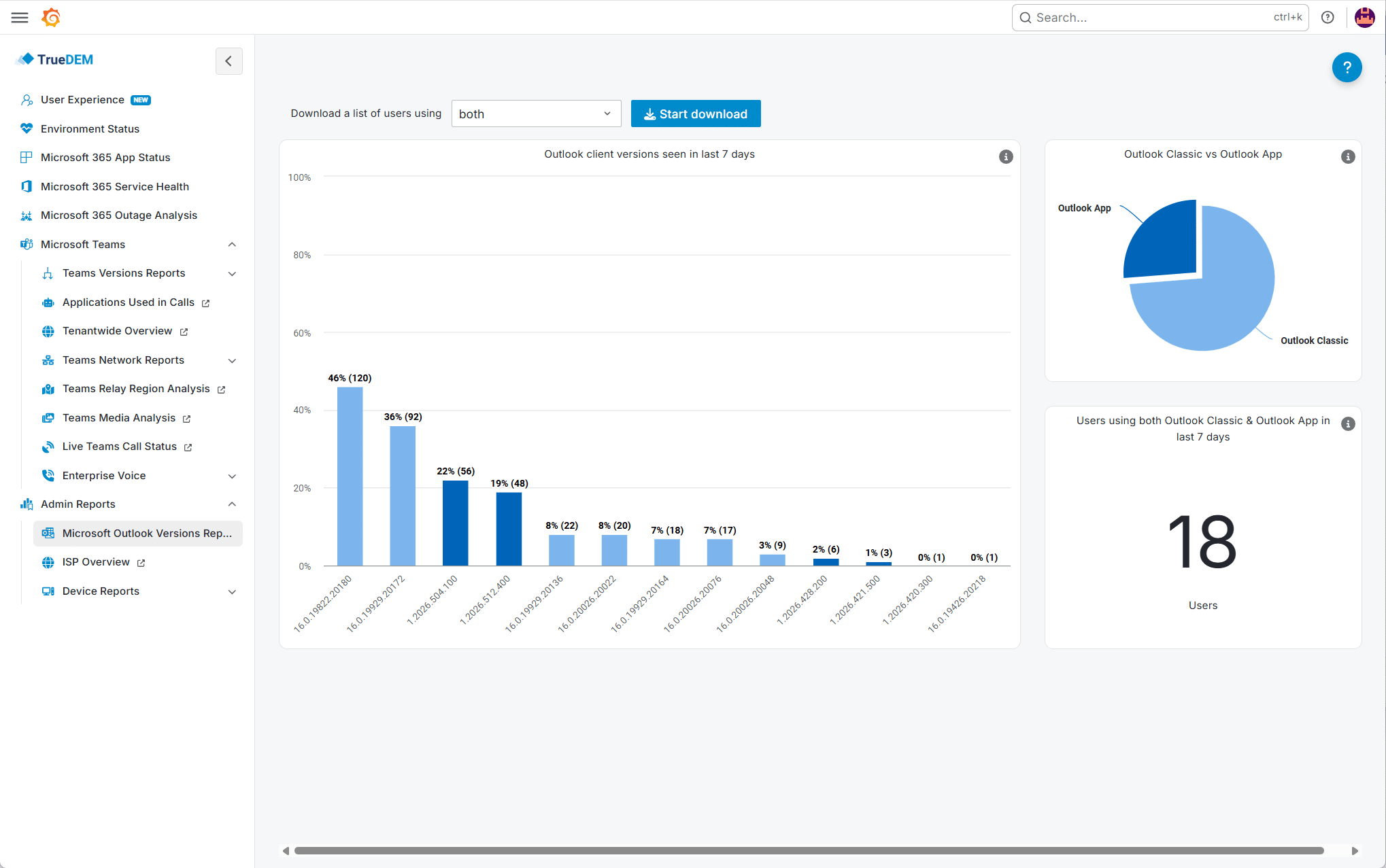
Dedicated report showing the distribution of Outlook classic vs. new Outlook across your organization with usage insights. Track migrations and identify whether specific versions correlate with performance issues on certain device types.

Software event timeline

Application installations, updates, and removals logged as events alongside performance data. When performance changes, you can visually correlate it with software changes on the same timeline.

What you actually see in TrueDEM

Device Insights timeline

A comprehensive timeline view showing network, device, and call quality events for any user’s device over the last 7 to x days. Three expandable categories with aggregated scores.

CPU and memory with smart thresholds

Device utilization shown as both minimum and 90th percentile (P90) values, so extreme outliers don’t cause false alarms. You see sustained resource pressure, not momentary spikes, which is what actually impacts the user experience.

Device Summary

Basic device characteristics at a glance: hardware model, OS version, Teams version, agent status, and last-seen timestamp. Quickly verify data completeness before drawing conclusions.

Outlook version distribution

Dedicated report showing the distribution of Outlook classic vs. new Outlook across your organization with usage insights. Track migrations and identify whether specific versions correlate with performance issues on certain device types.

Software event timeline

Application installations, updates, and removals logged as events alongside performance data. When performance changes, you can visually correlate it with software changes on the same timeline.

TrueDEM gives you continuous device performance data for every endpoint. No remote sessions, no user interruption, no guesswork.

Real-world: Making hardware decisions with data

Policy says replace anything older than four years: 1,200 devices at ~€800 each. TrueDEM shows 300 devices consistently have high CPU during calls and correlated quality degradation. 400 others are four years old but performing perfectly. Instead of replacing 1,200, you build a prioritized list of 300 that genuinely need it, with evidence for management.

Customer story

"[TrueDEM] suddenly provided us with full visibility of our current Microsoft Teams call quality problems and highlighted the specific issues that we needed to fix."

Chief Information Officer, Corporate IT Services | U.S. Fortune 100 Financial Services Company

Frequently asked questions

What device data does TrueDEM collect?

TrueDEM collects a broad range of device telemetry including (among other things) CPU and memory utilization, active processes and their resource consumption, hardware model and specifications, OS version, Teams client version, connected audio and video devices, and software installation/update/removal events. The data is collected in user context during Teams calls, when device load is typically at its peak. No admin rights or remote sessions required.

Does TrueDEM track device performance during Teams calls specifically?

Yes. TrueDEM captures CPU and memory usage specifically during active Teams calls, not just at idle. This is critical because devices that perform fine during normal work may struggle under the additional load of real-time audio and video processing and that’s exactly when device limitations impact the user most.

Can TrueDEM help with hardware refresh planning?

Yes. Instead of replacing devices based on age alone, TrueDEM provides actual performance data like CPU pressure, memory utilization, call quality correlation, so you can identify which devices genuinely need replacement and which are performing adequately despite their age. This enables data-driven hardware decisions and more targeted budget allocation.

Does the TrueDEM agent require admin rights on the device?

No. The TrueDEM agent runs in user context and does not require admin rights. It’s deployed via the TrueDEM Manager (which can be pushed through Intune, SCCM, GPO, or any software deployment tool) and installs as a lightweight MSIX Store App. It supports Windows 10+, macOS, and VDI environments.

Does TrueDEM provide device insights in VDI environments?

Yes. VDI environments add complexity because the device picture is split between the virtual machine (handling signaling and session control) and the local physical endpoint (handling media streams when optimization is active). TrueDEM monitors both the VDI host and the local device (Windows only), helping you determine whether a performance issue originates from the virtual machine’s resources or the physical endpoint. A distinction that is particularly difficult to make without dedicated monitoring.

Find out which devices are holding your users back

Roll out the TrueDEM agent. Device telemetry starts flowing immediately.