Optimize M365 know what every user actually experiences

Microsoft 365 is the backbone of your organization’s productivity. But in a hybrid world, do you really know how each user experiences it? TrueDEM breaks through the complexity with per-user, per-service, per-platform visibility across every work location.

What does TrueDEM monitor across Microsoft 365?

TrueDEM’s M365 experience monitoring capabilities give IT teams per-user, per-service visibility into how employees actually experience Microsoft 365 across Outlook, SharePoint, OneDrive, Teams, Copilot, and other services. In today’s hybrid work reality, where employees connect from corporate offices, home offices, and everywhere in between, this visibility is no longer optional. Built by panagenda as part of the TrueDEM platform.

The M365 visibility gap

Microsoft 365 is not one thing, it’s dozens of services, apps, and platforms. And in a hybrid work environment, the complexity multiplies.

You see Microsoft’s side, not your users’ side

Microsoft Service Health tells you whether services are up globally but not whether your specific users in a specific location can actually use them effectively. The gap between "Microsoft says it’s fine" and "my users say it’s slow" is where your real problems live.

One app, many experiences

Outlook on Windows might be fine while Outlook on the web is degraded. SharePoint might work for users of one ISP but crawl for users of another. Without per-service, per-platform, per-location visibility, you can’t tell what’s actually going on.

Your monitoring stops at the corporate edge

Traditional tools were built for a world where users, networks, and devices were all within IT’s direct control. They don’t extend into home offices, public networks, or personal ISP connections, and that’s where a growing portion of your workforce operates.

When an outage hits, you can’t tell who’s actually affected

Microsoft reports a service incident. Your support line lights up. But is every user impacted, or just a subset? And what about the users who haven’t called but are silently stuck? Without per-user as well as org-wide visibility, you can’t triage effectively.

TrueDEM gives you the full picture per user, per service, per location. So you can optimize the M365 experience proactively instead of guessing reactively.

The M365 visibility gap

Microsoft 365 is not one thing, it’s dozens of services, apps, and platforms. And in a hybrid work environment, the complexity multiplies.

Microsoft’s view, not yours

You see Microsoft’s side, not your users’ side

Microsoft Service Health tells you whether services are up globally but not whether your specific users in a specific location can actually use them effectively. The gap between "Microsoft says it’s fine" and "my users say it’s slow" is where your real problems live.

One app, many experiences

One app, many experiences

Outlook on Windows might be fine while Outlook on the web is degraded. SharePoint might work for users of one ISP but crawl for users of another. Without per-service, per-platform, per-location visibility, you can’t tell what’s actually going on.

Corporate edge blind spot

Your monitoring stops at the corporate edge

Traditional tools were built for a world where users, networks, and devices were all within IT’s direct control. They don’t extend into home offices, public networks, or personal ISP connections, and that’s where a growing portion of your workforce operates.

Outage impact unknown

When an outage hits, you can’t tell who’s actually affected

Microsoft reports a service incident. Your support line lights up. But is every user impacted, or just a subset? And what about the users who haven’t called but are silently stuck? Without per-user as well as org-wide visibility, you can’t triage effectively.
TrueDEM gives you the full picture per user, per service, per location. So you can optimize the M365 experience proactively instead of guessing reactively.

How TrueDEM optimizes the M365 experience

Monitoring from the user’s perspectiveAgent runs on the user’s device, office, home, or anywhere.
The endpoint agent runs on the user’s device and measures M365 performance from where they actually sit, office, home, or anywhere. No dependency on corporate infrastructure.
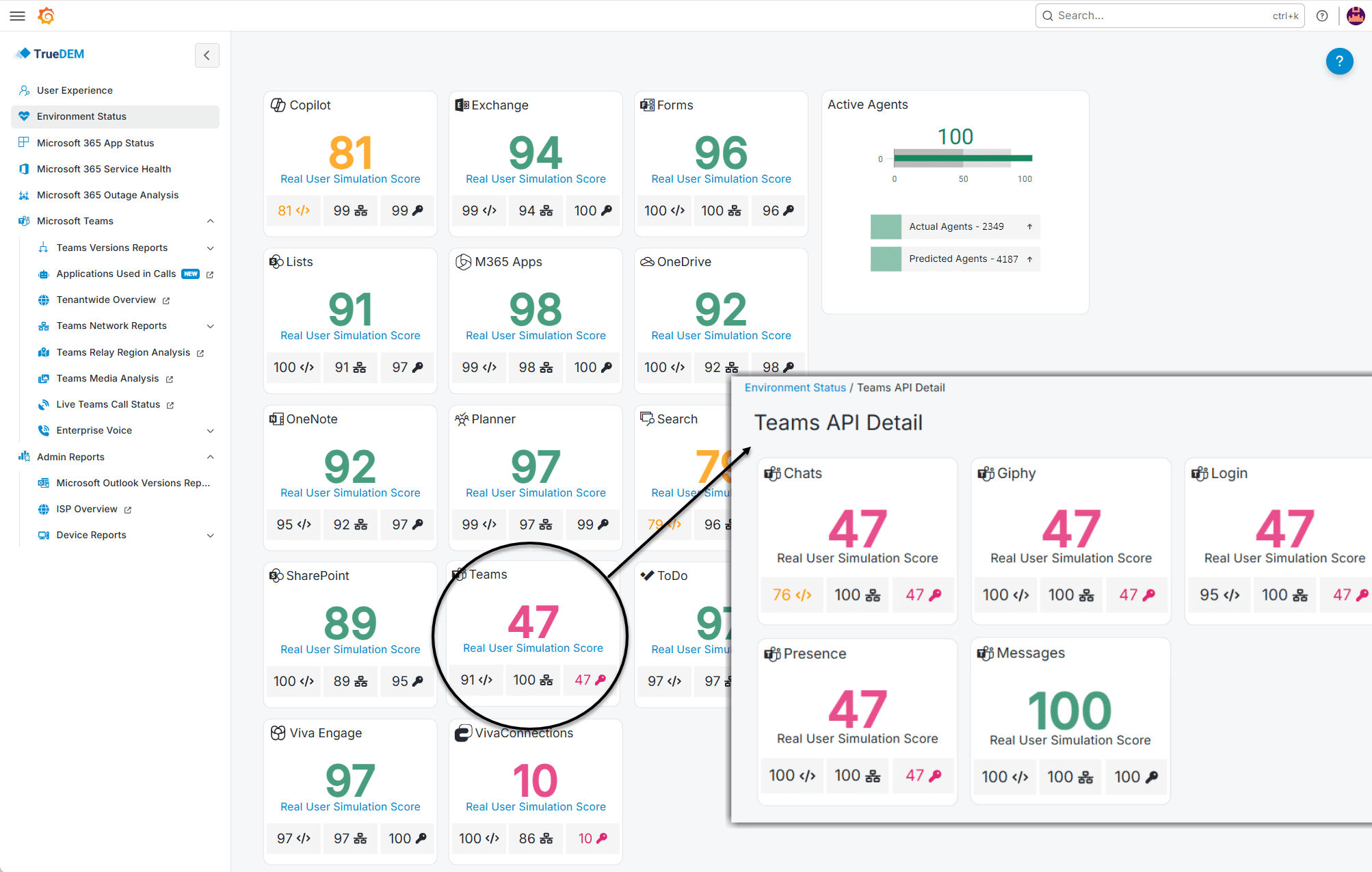
Per-service, per-platform breakdownWhich service, which functionality, on which platform.
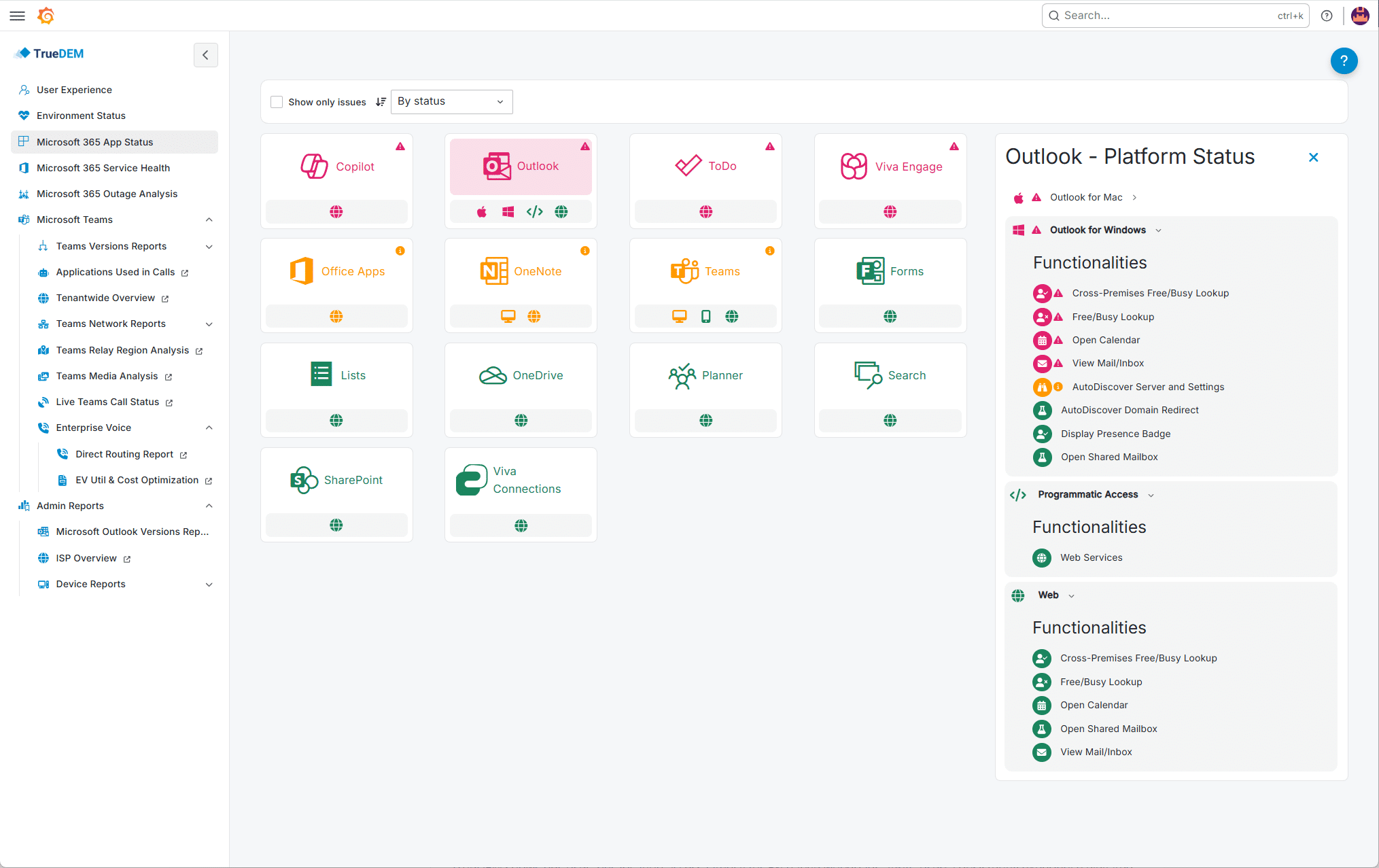
Not just "M365 is OK." TrueDEM shows you which service is impacted (Outlook, SharePoint, Teams, etc.), which functionality is affected (mail, calendaring, presence), and on which platform (desktop, web, mobile). You can guide users to working alternatives instantly.
Real User Experience scoringA Score per workload, based on each user’s own historical baseline.
Each workload gets a score based on each user’s own historical baseline. Because scores are derived from actual user activity rather than synthetic bot-based tests, they reflect real-world experience with far greater accuracy.
Outage impact analysisWhich of your users are actually affected, where, for how long.
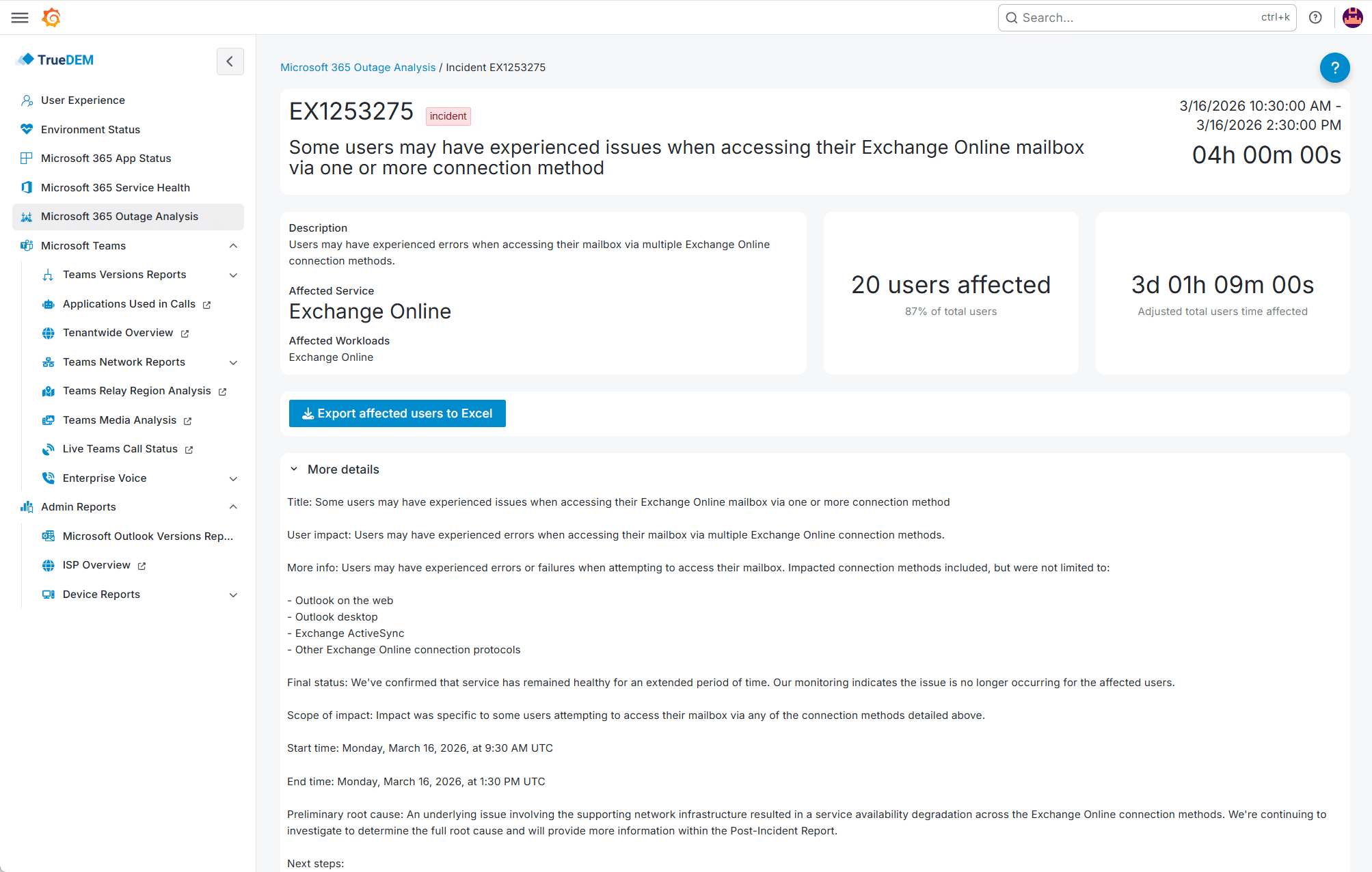
When Microsoft reports an incident, TrueDEM shows which of your users are actually affected, where, and for how long. Post-incident, TrueDEM provides outage impact reports for documentation and analysis.
Individual user contextCurrent experience vs. own history and the organization’s state.
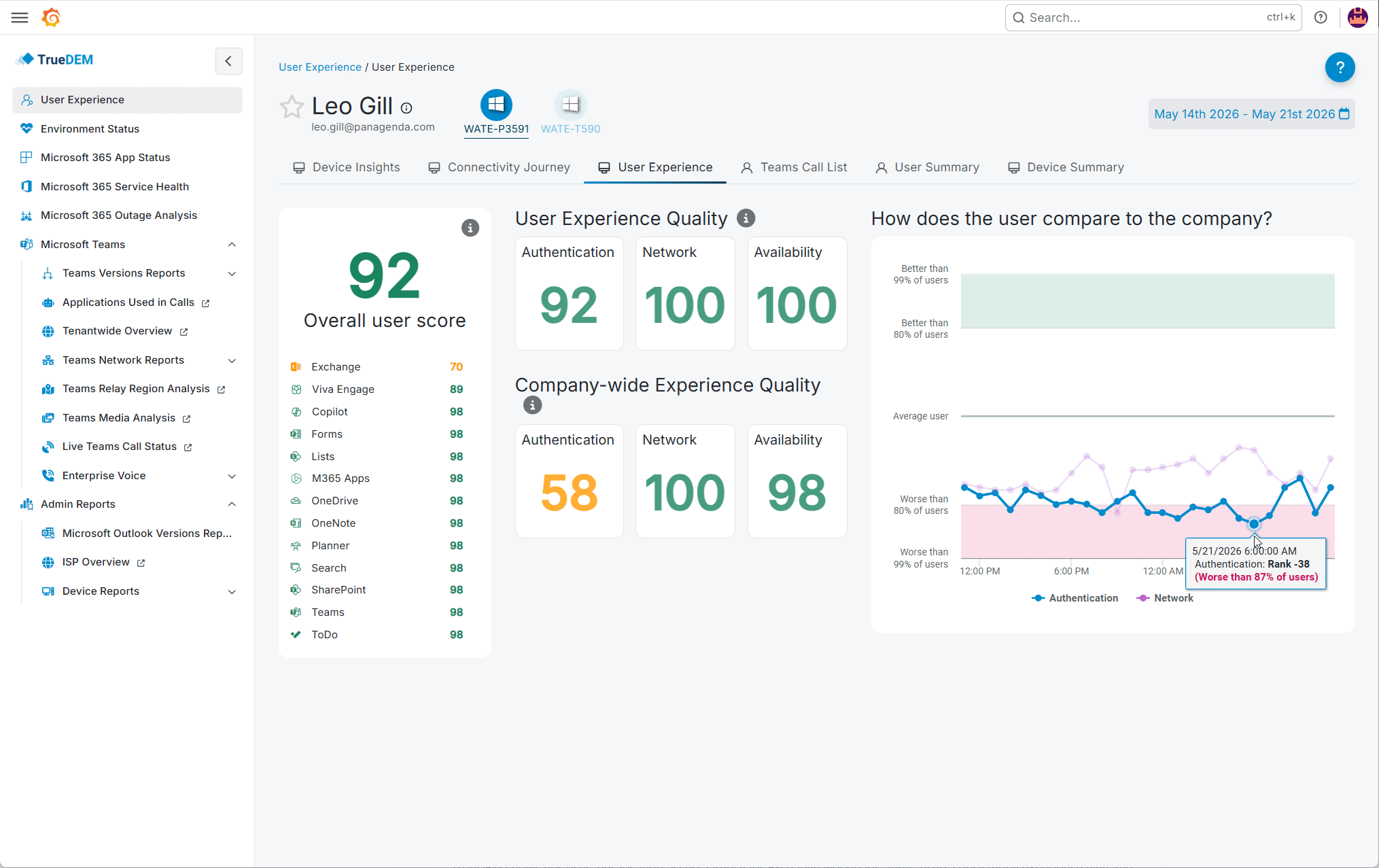
See any user’s current experience compared against their own history and the organization’s current state. Instantly distinguishing chronic issues from sudden changes.
ISP and location analyticsPerformance by ISP, managed network, and region.
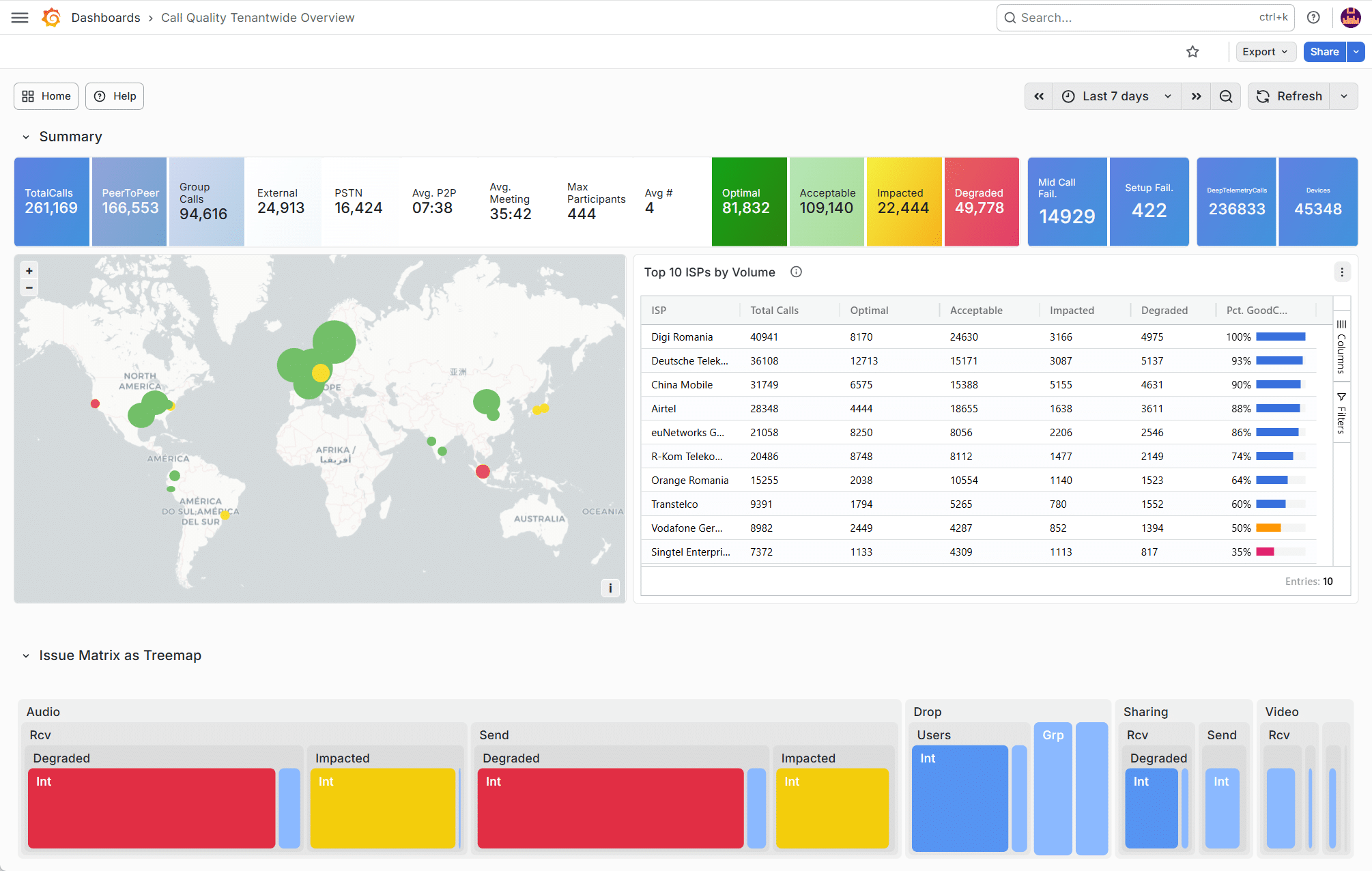
Performance data aggregated by ISP, managed network, and region. Identify which networks consistently underperform for M365.

What you actually see in TrueDEM

Environment Status overview

A single dashboard showing the health of every M365 workload in your organization, represented as scores with color-coded status (Normal, Impacted, Degraded) and sub scores for key areas.

M365 App Status

A detailed view per M365 app showing performance across platforms (Windows, macOS, web, mobile) and functionalities (mail, calendaring, presence, file access, and more). Filter to show only impacted services, sort by severity, and drill into specific tests.

Individual user experience

Search any user and see their complete M365 experience: which services are working well, which are degraded, device health, network quality, and connectivity journey from their device to Microsoft’s cloud. No remote session needed.

Top ISPs by performance

A ranked view of the ISPs and managed networks used across your organization, with per-ISP scoring against historical baselines. Click any ISP to see workload-specific performance for users on that network.

Outage analysis reports

Ready-to-use post-incident reports showing impacted users, impacted time per incident and per user, and affected locations. Useful for internal communication, SLA documentation, and identifying patterns in recurring incidents.

What you actually see in TrueDEM

Environment Status overview

A single dashboard showing the health of every M365 workload in your organization, represented as scores with color-coded status (Normal, Impacted, Degraded) and sub scores for key areas.

M365 App Status

A detailed view per M365 app showing performance across platforms (Windows, macOS, web, mobile) and functionalities (mail, calendaring, presence, file access, and more). Filter to show only impacted services, sort by severity, and drill into specific tests.

Individual user experience

Search any user and see their complete M365 experience: which services are working well, which are degraded, device health, network quality, and connectivity journey from their device to Microsoft’s cloud. No remote session needed.

Top ISPs by performance

A ranked view of the ISPs and managed networks used across your organization, with per-ISP scoring against historical baselines. Click any ISP to see workload-specific performance for users on that network.

Outage analysis reports

Ready-to-use post-incident reports showing impacted users, impacted time per incident and per user, and affected locations. Useful for internal communication, SLA documentation, and identifying patterns in recurring incidents.

TrueDEM gives you the full picture per user, per service, per location. So you can optimize the M365 experience proactively instead of guessing reactively.

Real-world: The shared mailbox nobody was monitoring

The support@[org].com mailbox handles hundreds of messages a day across three countries. The EMEA team mentions it feels sluggish between 8 and 10 AM. Nobody escalated because it always fixes itself.

TrueDEM shows per-user, per-location access latency for Exchange workloads. EMEA users consistently experience elevated latency during morning peak, while users in other regions are fine. The issue isn’t Exchange Online, it’s how traffic is routed between regions. A chronic, invisible problem surfaced in minutes.

Customer stories

Jicky Li | Senior Manager IT at IIC - INTERSPORT International Corporation GmbH

With TrueDEM, it enhanced our visibility so that we could see the data from a user computer all the way to the Microsoft Service, which helps us for faster troubleshooting and better understanding of the issue."

Jicky Li, Senior Manager IT | IIC - INTERSPORT International Corporation GmbH

Alan Woods | Infrastructure Service Manager at Pharmac

TrueDEM gives us granular visibility of those factors plus a wealth of relevant information on laptop performance in a single ‘pane of glass’. Our Service Desk team members are grateful for such a comprehensive and intuitive tool."

Alan Woods, Infrastructure Service Manager | Pharmac, New Zealand

Frequently asked questions

What Microsoft 365 services does TrueDEM monitor?

TrueDEM monitors all key M365 services, including Outlook, SharePoint, OneDrive, Teams, Copilot, and many others, at the service, application, platform, and functionality level. This means you can see whether mail, calendaring, or presence is impacted, and on which platform (Windows desktop, macOS, web, or mobile). Coverage is continuously expanding, and the monitoring works the same regardless of where the user works.

Does TrueDEM require a VPN connection to monitor remote workers?

No. The TrueDEM agent runs on the user’s device and communicates directly with the TrueDEM SaaS platform over standard HTTPS. It monitors M365 performance from whatever network the user is connected to, corporate, home, hotel, mobile hotspot, without requiring a VPN tunnel for the monitoring itself.

What is the Real User Experience Score?

Each M365 workload gets a score based on each user’s own historical baseline. Because scores are derived from actual user activity rather than synthetic bot-based tests, they reflect real-world experience with far greater accuracy. The score reflects how each service is performing right now compared to what’s normal for that user, not against an arbitrary industry benchmark.

Can TrueDEM help during a Microsoft outage?

Yes. TrueDEM correlates Microsoft Service Health incidents with your actual user impact data, showing exactly which users are affected and on which platforms. This lets you triage effectively, communicate precisely, and advise users on workarounds (for example, directing them to a platform that’s still performing normally). Post-incident, TrueDEM provides outage impact reports for documentation and analysis.

Does TrueDEM only monitor remote workers?

No. TrueDEM monitors the M365 digital experience across all work locations: corporate office, home office, and everywhere in between. Its strength is providing consistent, per-user visibility regardless of where people work, so you get a unified view across your entire workforce. Remote and hybrid visibility is where the biggest gap exists in most organizations, but TrueDEM covers all employees equally.

See what your users actually experience across M365

Roll out the TrueDEM agent. Visibility starts flowing immediately, from every location.