Fix Teams call quality before users lose patience

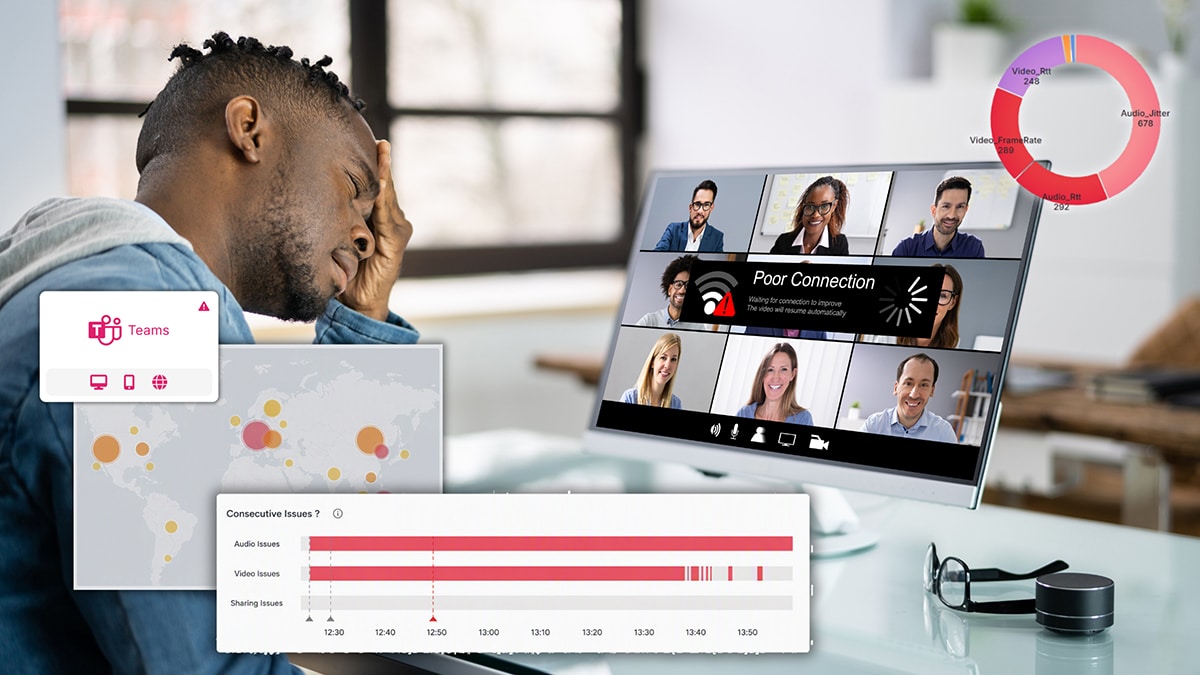
Poor audio. Dropped calls. Frustrated users. When Teams calls go wrong, IT gets blamed but rarely gets the data to find the cause. TrueDEM changes that with per-participant call quality data that pinpoints the root cause in minutes, during or after the call.

What is TrueDEM Teams call quality monitoring?

TrueDEM’s Teams call quality capabilities give IT teams per-participant visibility into every factor that affects Microsoft Teams voice and video calls, from the participant’s device, headset, and local Wi-Fi through VPN, corporate network, and ISP to Microsoft’s media relays and cloud services. Thanks to a deep integration with the Teams client, TrueDEM captures call quality data from within Teams as calls happen and retains it for full retrospective analysis. Built by panagenda as part of the TrueDEM platform.

You can’t fix what you can’t see

In today’s hybrid workplace, Microsoft Teams calls are the backbone of daily productivity. Yet ensuring high-quality calls is a constant challenge.

Work is happening everywhere

Employees join calls from offices, home offices, and public Wi-Fi networks, each with unique devices, networks, and connectivity. Traditional tools lack insight into what’s happening on remote devices and networks, making troubleshooting a guessing game.

So many potential points of failure

A Teams call traverses many stages: device, local network, VPN, corporate infrastructure, ISP, public internet, and Microsoft’s cloud. A hiccup at any point degrades quality, and without end-to-end visibility, pinpointing the cause is like finding a needle in a haystack.

Microsoft’s tools show averages, not answers

Microsoft call records presents aggregated data, making it nearly impossible to correlate a specific symptom to its actual cause for an individual user.

Users tolerate more than they report

According to Forrester’s State of the Service Desk report, 64% of employees avoid the service desk entirely when they experience performance issues. What you see in your tickets is just the tip of the iceberg. By the time users escalate, the problem has been festering for weeks.

Multiple teams, no shared data

Network, UC, and desktop teams each look at their own silo, and point fingers at each other. Without a shared view of what’s actually happening, troubleshooting drags on for days.

TrueDEM gives you the complete picture, per participant, per call, during and after, so you can stop guessing and start fixing.

You can’t fix what you can’t see

In today’s hybrid workplace, Microsoft Teams calls are the backbone of daily productivity. Yet ensuring high-quality calls is a constant challenge.

Blind spots

Work is happening everywhere

Employees join calls from offices, home offices, and public Wi-Fi networks, each with unique devices, networks, and connectivity. Traditional tools lack insight into what’s happening on remote devices and networks, making troubleshooting a guessing game.

Points of failure

So many potential points of failure

A Teams call traverses many stages: device, local network, VPN, corporate infrastructure, ISP, public internet, and Microsoft’s cloud. A hiccup at any point degrades quality, and without end-to-end visibility, pinpointing the cause is like finding a needle in a haystack.

Averages, not answers

Microsoft’s tools show averages, not answers

Microsoft call records presents aggregated data, making it nearly impossible to correlate a specific symptom to its actual cause for an individual user.

Silent sufferers

Users tolerate more than they report

According to Forrester’s State of the Service Desk report, 64% of employees avoid the service desk entirely when they experience performance issues. What you see in your tickets is just the tip of the iceberg. By the time users escalate, the problem has been festering for weeks.

Silo finger-pointing

Multiple teams, no shared data

Network, UC, and desktop teams each look at their own silo, and point fingers at each other. Without a shared view of what’s actually happening, troubleshooting drags on for days.
TrueDEM gives you the complete picture, per participant, per call, during and after, so you can stop guessing and start fixing.

How TrueDEM fixes Teams call quality troubleshooting

Deep integration with the Teams clientIntraCall Analytics: granular quality data captured in real time as calls happen.
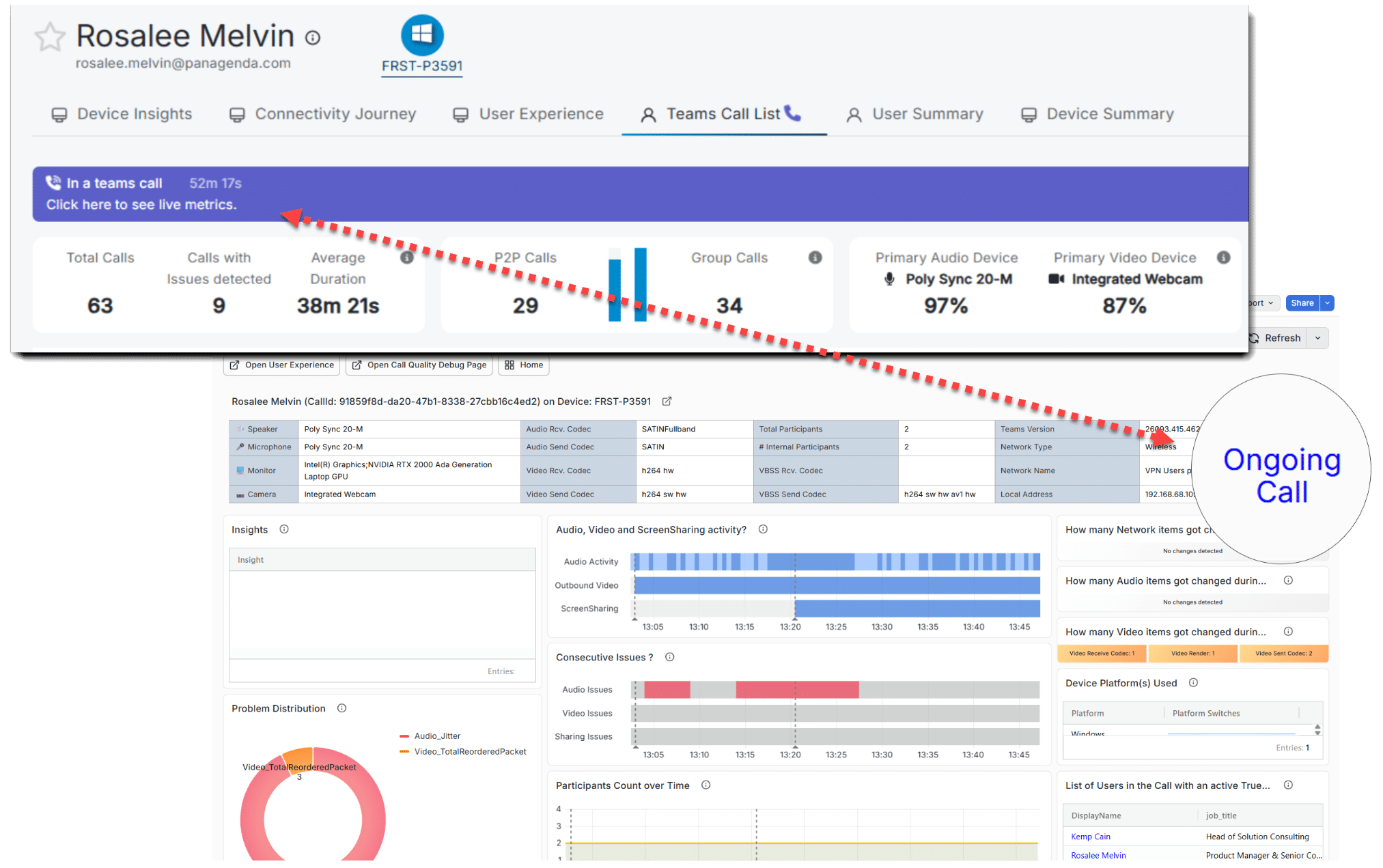
TrueDEM integrates directly into Microsoft Teams, providing IntraCall Analytics: granular, per-participant call quality data captured in real time as the call happens. This means you can see exactly what went wrong at the moment a user started screen sharing and audio degraded, a level of detail that CQD’s post-call aggregates can never provide.
End-to-end call data, not just cloud-side averagesTwo data sources in one view: endpoint and CQD.
TrueDEM brings together endpoint telemetry and real-time call metrics from the TrueDEM agent, with cloud-side data from Microsoft’s Call Quality Dashboard. This gives you the full path: device, local network, VPN, corporate network, ISP, and Microsoft’s cloud, for every participant in every call.
Per-participant, per-call granularityWhat each individual experienced during a specific call.
Where Microsoft’s CQD aggregates data across users and time periods, TrueDEM shows you what each individual participant experienced. Was it participant A’s Wi-Fi? Participant B’s overloaded CPU? An ISP routing issue? You can see each person’s perspective independently.
Data available during and after the callMonitor live or analyze days later. The picture is always complete.
TrueDEM captures comprehensive call metrics continuously. When a situation warrants closer attention, prior poor calls, VIP status, or trending issues, you can monitor live. But you don’t have to be watching: the same rich data is available for full retrospective analysis. Whether you look during the call or three days later, the complete picture is there.
Area-of-responsibility identificationWhich layer caused the problem? Each measured independently.
TrueDEM doesn’t just show you that a call was bad, it shows you which layer of the stack caused the problem. Device? Local network? Corporate infrastructure? ISP? Microsoft’s side? Each area is measured independently, so you can route the issue to the right team instantly instead of involving everyone.
Proactive pattern detectionReveal org-wide patterns before they become ticket floods.
Beyond individual troubleshooting, TrueDEM reveals patterns across your organization: which ISPs consistently cause problems, which device models struggle during calls, which office locations have network bottlenecks, which Wi-Fi networks degrade quality. This shifts your approach from reactive firefighting to proactive optimization.

What you actually see in TrueDEM

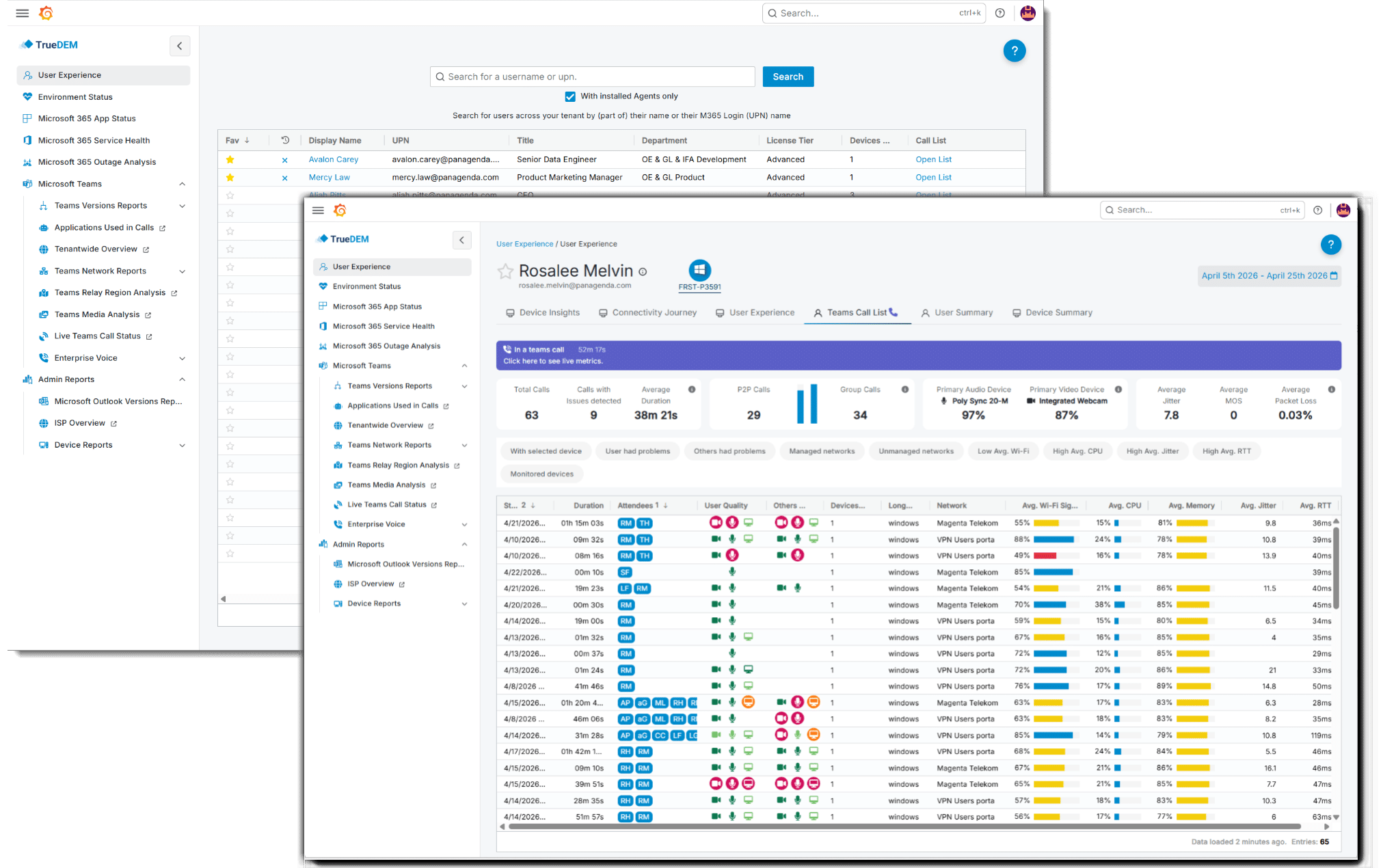
User search and call history

Search any user and see their complete Teams call history with individual quality ratings for each call. Quickly identify users with recurring issues or spot patterns across time periods.

Per-participant call analysis

Audio quality indicators (jitter, packet loss, round-trip time), video and screen sharing performance, device CPU and memory during the call, active processes, headset and audio device details, and the complete network path from device to cloud.

Live call view

For calls that warrant closer attention, TrueDEM provides a live view of ongoing call metrics as data flows in. Spot issues as they develop, without waiting for the call to end.

Network path analysis

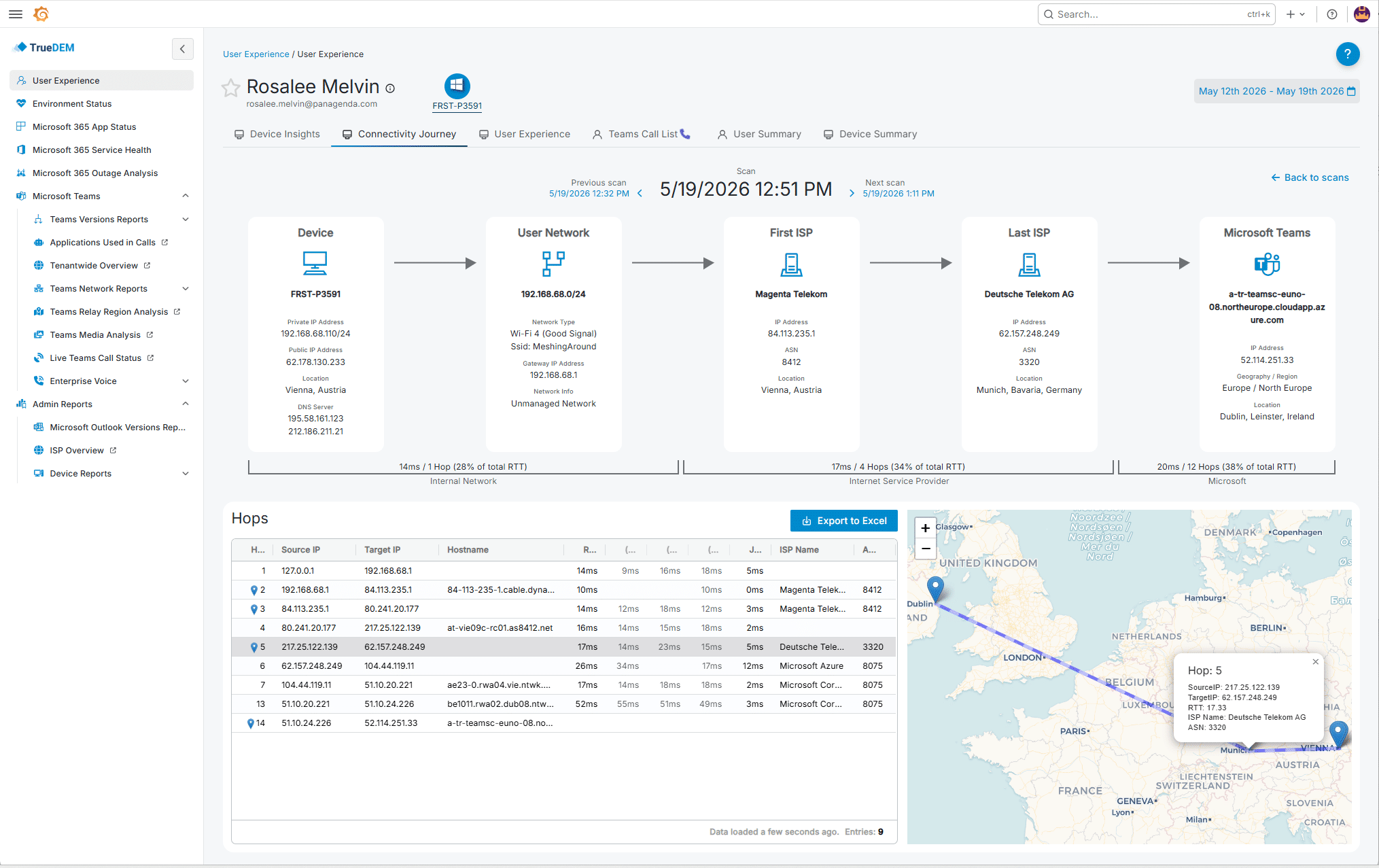
Trace the complete network path from the participant’s device to Microsoft’s media relay. Including local Wi-Fi signal strength, VPN routing impact, corporate network hops, ISP performance, and distance to the nearest Microsoft data center.

Managed network and Wi-Fi reports

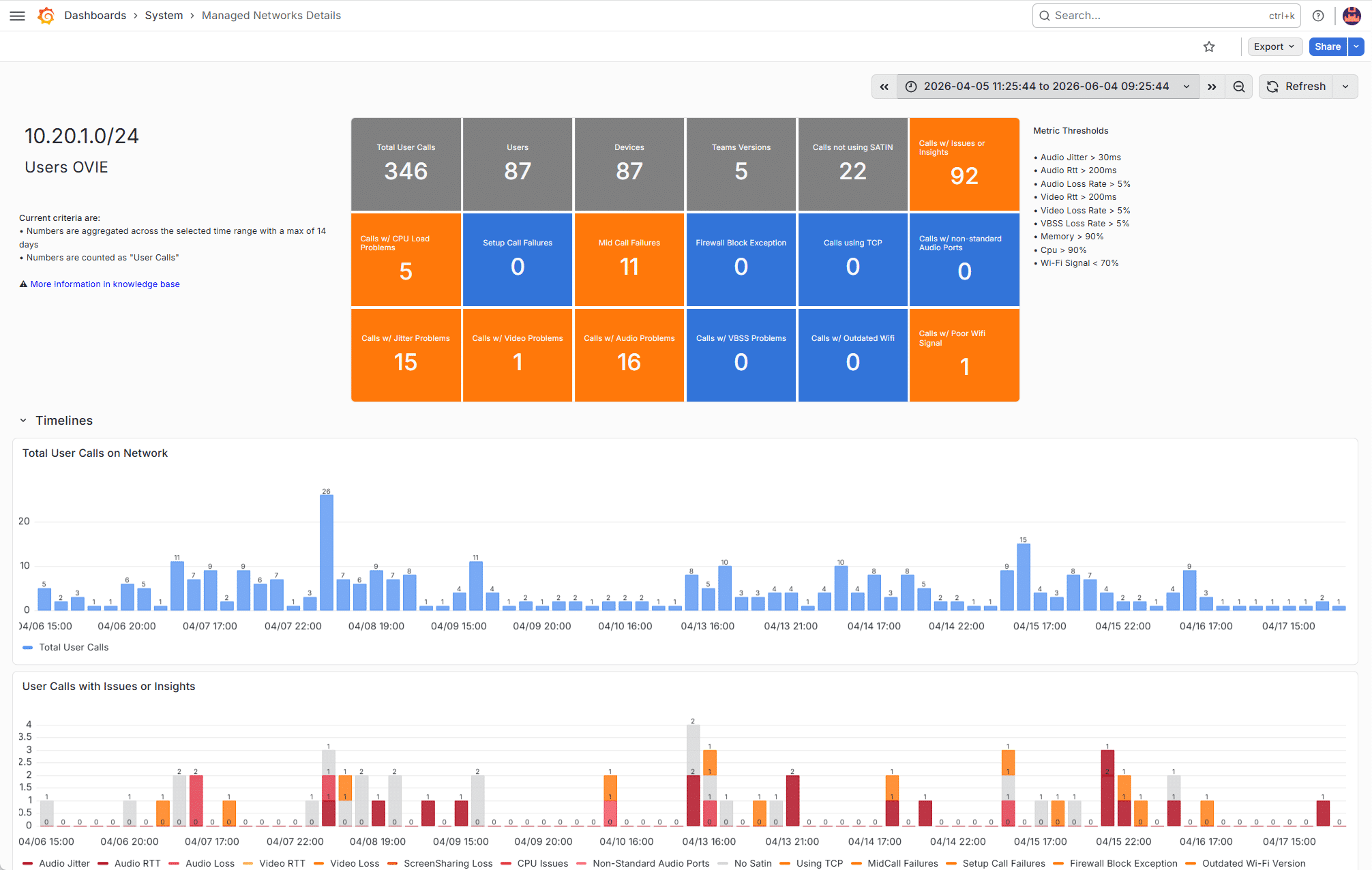
Aggregate call quality data by corporate network location, Wi-Fi network SSID, or ISP, so you can identify which networks consistently produce poor results and prioritize infrastructure improvements.

PSTN and direct routing dashboards

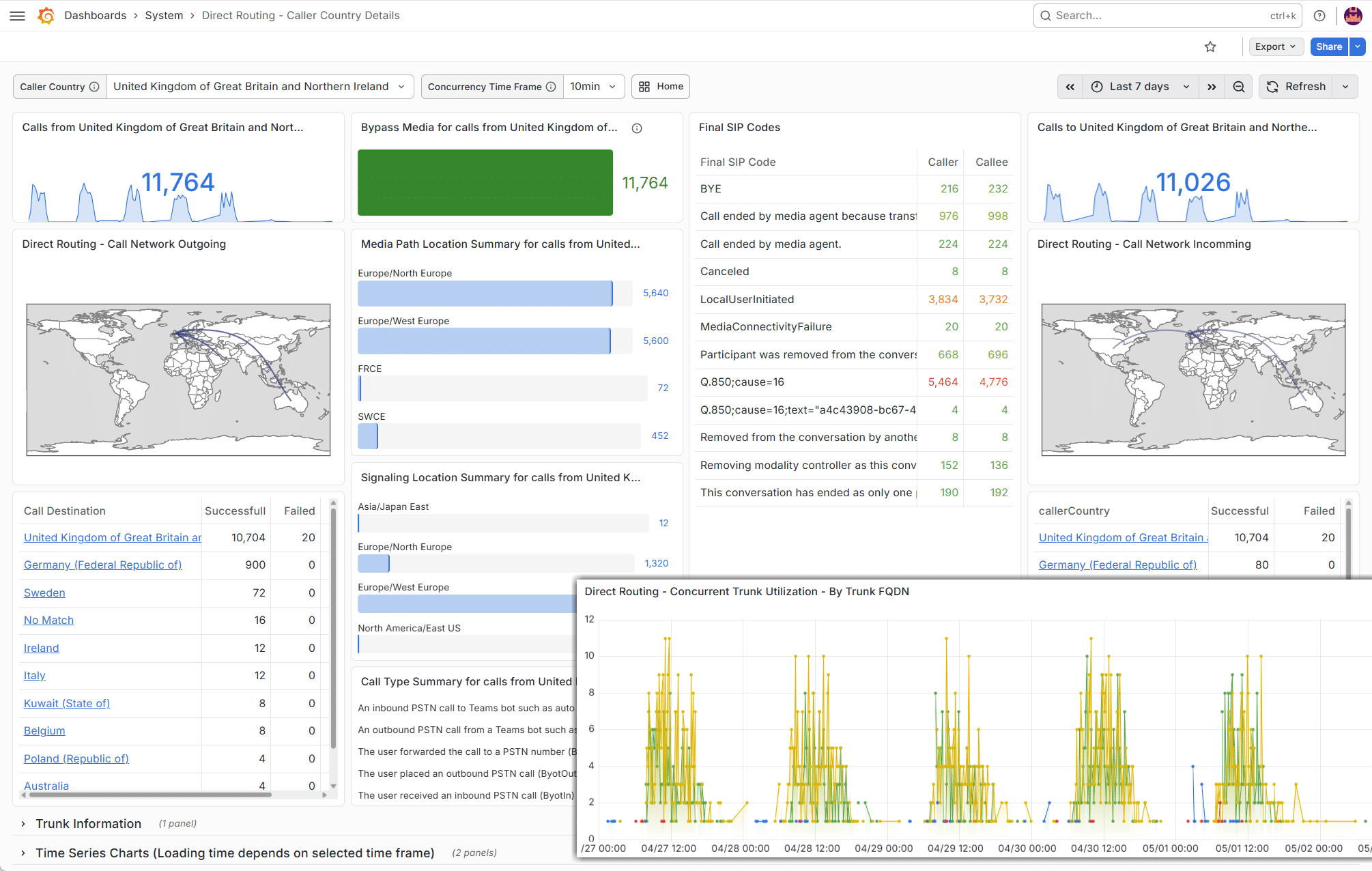
For organizations using Teams as their phone system, TrueDEM provides visibility into PSTN call quality including SBC performance, SIP codes, concurrent call traffic patterns, and direct routing path analysis, segmented by country, gateway, and time period.

What you actually see in TrueDEM

User search and call history

Search any user and see their complete Teams call history with individual quality ratings for each call. Quickly identify users with recurring issues or spot patterns across time periods.

Per-participant call analysis

Audio quality indicators (jitter, packet loss, round-trip time), video and screen sharing performance, device CPU and memory during the call, active processes, headset and audio device details, and the complete network path from device to cloud.

Live call view

For calls that warrant closer attention, TrueDEM provides a live view of ongoing call metrics as data flows in. Spot issues as they develop, without waiting for the call to end.

Network path analysis

Trace the complete network path from the participant’s device to Microsoft’s media relay. Including local Wi-Fi signal strength, VPN routing impact, corporate network hops, ISP performance, and distance to the nearest Microsoft data center.

Managed network and Wi-Fi reports

Aggregate call quality data by corporate network location, Wi-Fi network SSID, or ISP, so you can identify which networks consistently produce poor results and prioritize infrastructure improvements.

PSTN and direct routing dashboards

For organizations using Teams as their phone system, TrueDEM provides visibility into PSTN call quality including SBC performance, SIP codes, concurrent call traffic patterns, and direct routing path analysis, segmented by country, gateway, and time period.

TrueDEM gives you the complete picture, per participant, per call, during and after, so you can stop guessing and start fixing.

Real-world: How IT professionals use
TrueDEM for Teams calls

The home worker with chronic audio issues
A remote employee complains about garbled audio. Microsoft’s tools rate calls as “poor” but offer no why. In TrueDEM, you see the pattern: poor audio correlates with high Wi-Fi packet loss at specific times. Device is fine. Home Wi-Fi degrades when competing with household traffic. Specific finding shared, wired connection suggested, quality improves immediately. No remote session. No guessing.

Identifying a widespread issue before users escalate
You notice an uptick in poor calls at one office location. No tickets yet. TrueDEM’s managed network reports show a recent config change altered Teams media routing, adding latency. Device and ISP metrics are fine; the bottleneck is the corporate network layer. Concrete data to the network team, change rolled back, resolved before the first support ticket.

Customer stories

TrueDEM provides client telemetry information and combines it with Microsoft CQD and Call Analytics so that all relevant details for troubleshooting are in one place. Helpdesk efforts are very much reduced now and we are using the TrueDEM insights for a proactive infrastructure optimization."

Björn Bendix, IT Administrator | Deutsche MTM-Gesellschaft Industrie- u. Wirtschaftsberatung mbH

Without TrueDEM we had to involve three different IT department engineers to investigate a call quality problem. It would take an average of 12 hours, and they might never find a fix."

IT Engineering Manager, Corporate IT Services | U.S. Fortune 100 Financial Services Company

Frequently asked questions

What data does TrueDEM collect during a Teams call?

TrueDEM collects a comprehensive set of telemetry data during every call, this includes (but is not limited to) endpoint metrics like CPU, memory, and active processes; audio device details; network metrics such as Wi-Fi signal, bandwidth, jitter, packet loss, and round-trip time; and traceroute data across the full network path. Thanks to a deep integration with the Teams client, TrueDEM also captures call quality information directly from within Teams as the call is ongoing, providing per-participant quality scores and media stream details. All of this is combined with Microsoft’s cloud-side CQD data for a complete picture. The full range of collected metrics is extensive, contact us or start a trial to explore the complete dataset.

Can TrueDEM monitor calls in real-time?

Yes. TrueDEM captures comprehensive call data continuously. When there’s a reason for closer attention, prior poor calls, VIP user status, or trending issues, you can watch the call’s metrics live as it happens. But you don’t have to be watching: the same detailed data is available for full retrospective analysis at any time after the call ends. Whether you look during the call or days later, the complete picture is there.

Does TrueDEM replace Microsoft’s Call Quality Dashboard?

No, it complements it. TrueDEM integrates CQD data and adds what Microsoft’s tools lack: per-user endpoint telemetry, real-time call data from within the Teams client, local and corporate network path analysis, and individual-level granularity instead of aggregated averages.

Does TrueDEM support PSTN and direct routing calls?

Yes. TrueDEM provides visibility into PSTN call quality including SBC performance, SIP error codes, concurrent call traffic at gateways, and direct routing path analysis, segmented by country, gateway, and time period. This makes it particularly valuable for organizations using Microsoft Teams as their primary phone system.

How quickly can I start troubleshooting after deploying TrueDEM?

Once the TrueDEM agent is deployed to a user’s device, telemetry data starts flowing immediately. The very first call after deployment will already include full endpoint and call quality data. Organization-wide pattern analysis becomes meaningful once you have a few days of data across your user base.

Does TrueDEM work in VDI environments?

Yes. TrueDEM supports VDI environments including Citrix and Azure Virtual Desktop. VDI setups add complexity to Teams call monitoring because media streams, signaling, and session control are split between the virtual machine and the local device. TrueDEM is designed to provide visibility across this “monitoring triangle”, covering the VDI host, the local endpoint (Windows only), and the cloud connection.

Stop guessing why Teams calls fail

Roll out the TrueDEM agent and Teams plugin. Telemetry starts flowing from the very first call.